EQJW145:
Heating controller
Manual
mode
66 7010015003 A
© Fr. Sauter AG
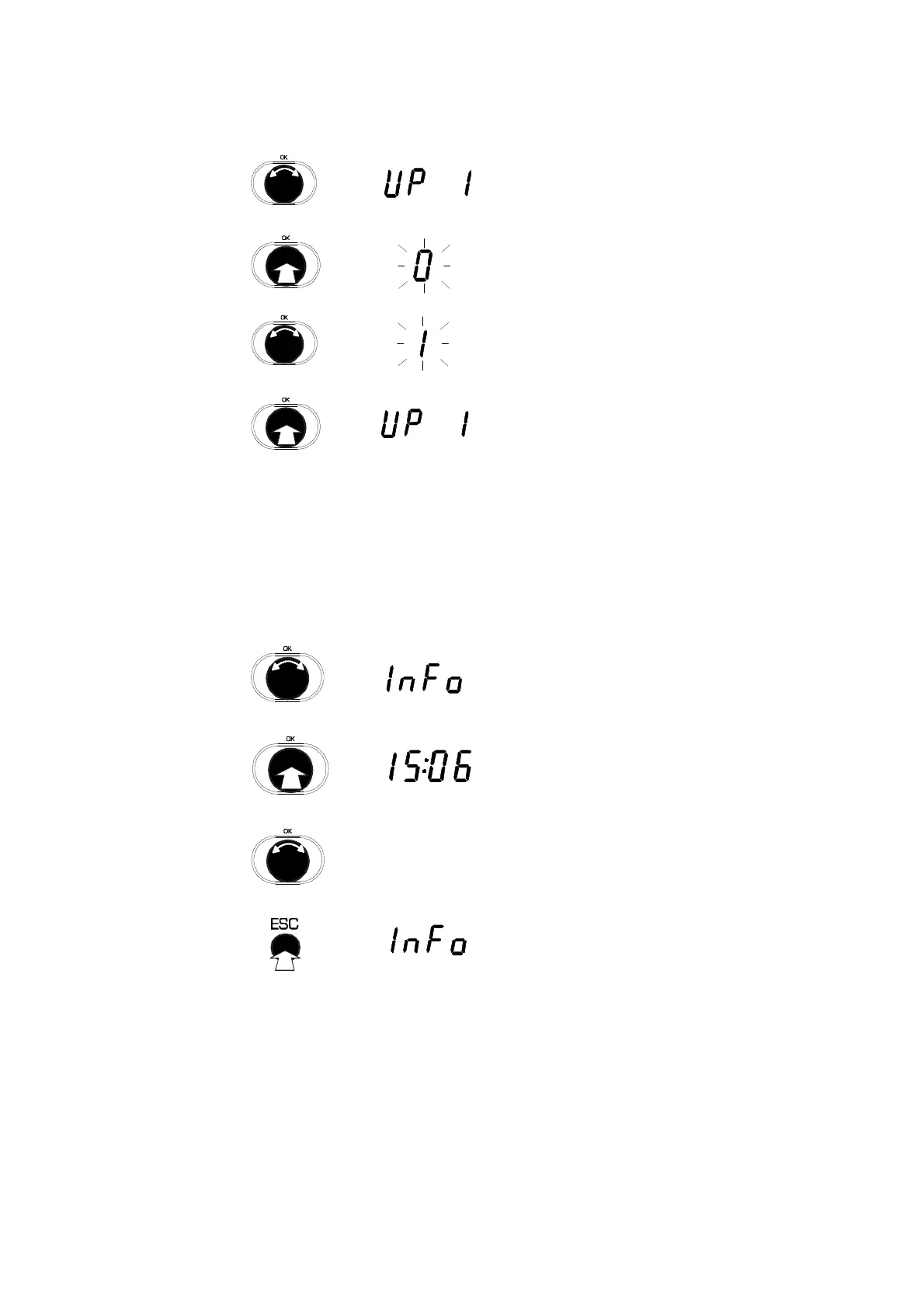
5.4 Set status of other outputs (pumps, configurable output) for manual mode
1. Turn the input knob.
2. Select the output you want. (UP 1 = heating
pump, LP = charge pump, rEL = configurable
output).
3. Press the input knob.
4. Select the menu sub-item.
5. Turn the input knob
6. Specify pump output (0= pump off, 1=pump
on)
7. Press the input knob.
•
The preset is accepted.
5.5 Exit manual mode
You exit manual mode as soon as you turn the rotary switch to another
position.
5.6 Check measured values in manual mode
1. Turn the input knob until the
•
"INFO" sub-item in the Display menu is
shown
2. Press the input knob
3. Select menu sub-item "INFO"
4. Turn the input knob
•
The individual values are shown.
•
The display loop corresponds to the
'automatic mode' switch setting.
5. Press the "ESC" key
6. Exit from menu sub-item "INFO".
...



 To Next Page