EQJW145:
Heating controller
Operation
50 7010015003 A
© Fr. Sauter AG
4.1.2 Displays when back-up mode, reduced mode and normal mode are set
To show the various displays described below, the bottom rotary switch must
be moved to one of the following positions (see 4.1).
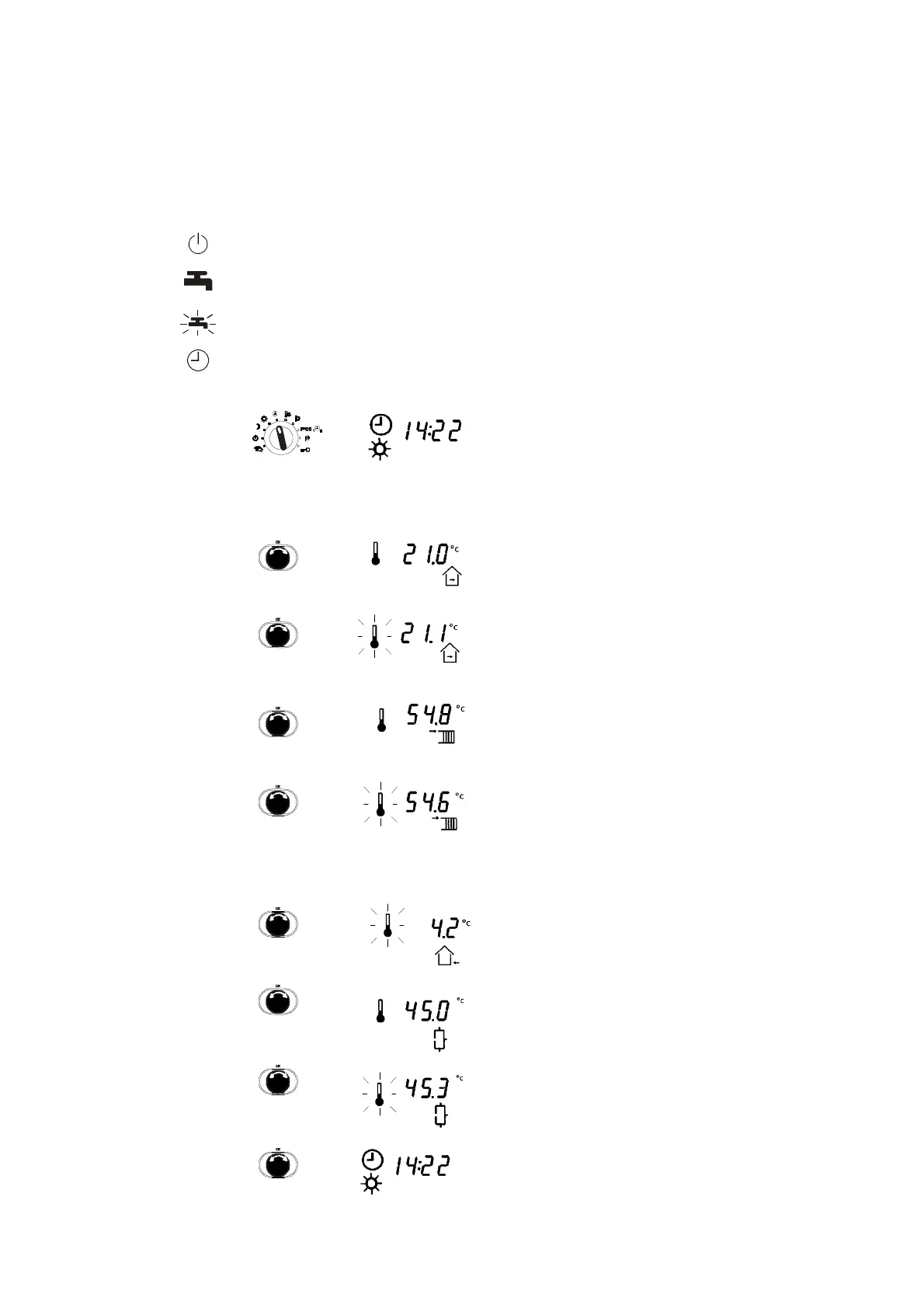
Off mode
Continuous heating to normal DHW temperature
Continuous heating to increased DHW temperature
Automatic mode
1. After you select the switch position for the top
rotary switch, the current time is shown. The
current operating status (here: sun for normal
mode = daytime operation) and the current
status of the outputs are shown on the lower
margin of the display (not illustrated here, see
2.5)
2. Turn the input knob further clockwise to show
the room setpoint temperature (only if a room
sensor is present)
•
Then the current actual value for the room
temperature (only if a room sensor is
present).
•
The flow setpoint (not available in OFF
mode or summer mode, for example).
•
The current actual value for the flow
temperature.
•
The outdoor temperature that is currently
measured.
3. Then you see the DHW setpoint
(if DHW preparation was configured).
•
The current measured DHW temperature
(if DHW preparation was configured).
4. Turn the knob further in a clockwise direction
to display the time again.



 To Next Page