01:03-02
©
Scania CV AB 2011, Sweden
133
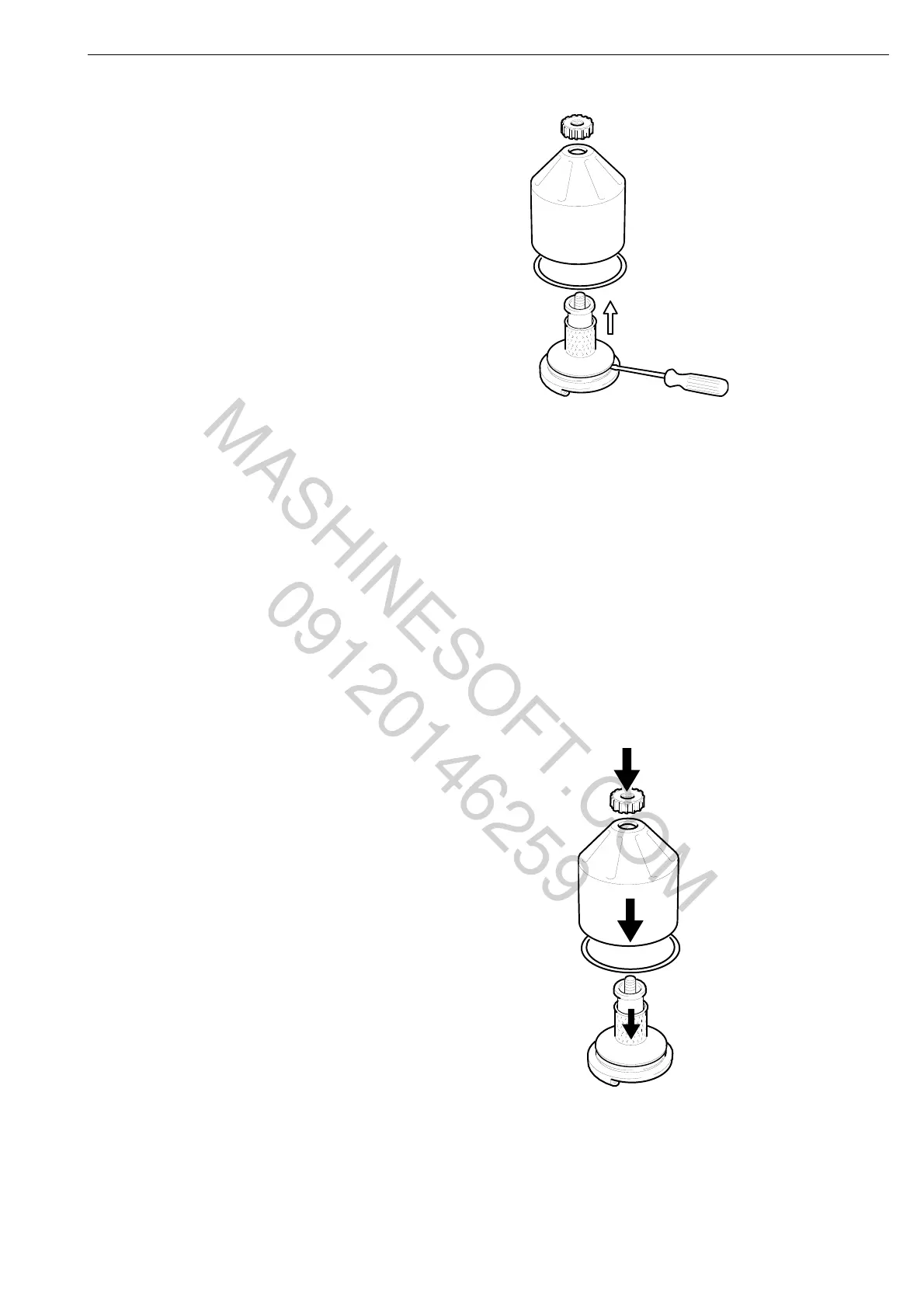
4 Grasp the rotor cover and tap the rotor nut
lightly with your hand or a plastic mallet so
that the rotor cover comes loose from the
rotor. Never strike the rotor directly as this
may damage its bearings.
5 Remove the rotor nut and cover from the
rotor.
6 Remove the strainer located on the rotor. If
the strainer has seized, prise carefully with
a screwdriver at the lower edge between
the rotor and the strainer.
7 Scrape away the deposits inside the cover
with a knife.
8 Wash the parts.
9 Inspect the two nozzles on the rotor.
Ensure that they are not blocked or
damaged. Renew any damaged nozzles.
10 Check that the bearings are undamaged.
11 Position the O-ring in the cover. Renew the
O-ring if it is at all damaged.
12 Assemble the parts and tighten the rotor
nut by hand.
Lubrication system
MASHINESOFT.COM
09120146259


 To Next Page