SIGLENT
10 SDS1000CML+/SDS1000DL+ User Manual
2.1 Menu and Control Button
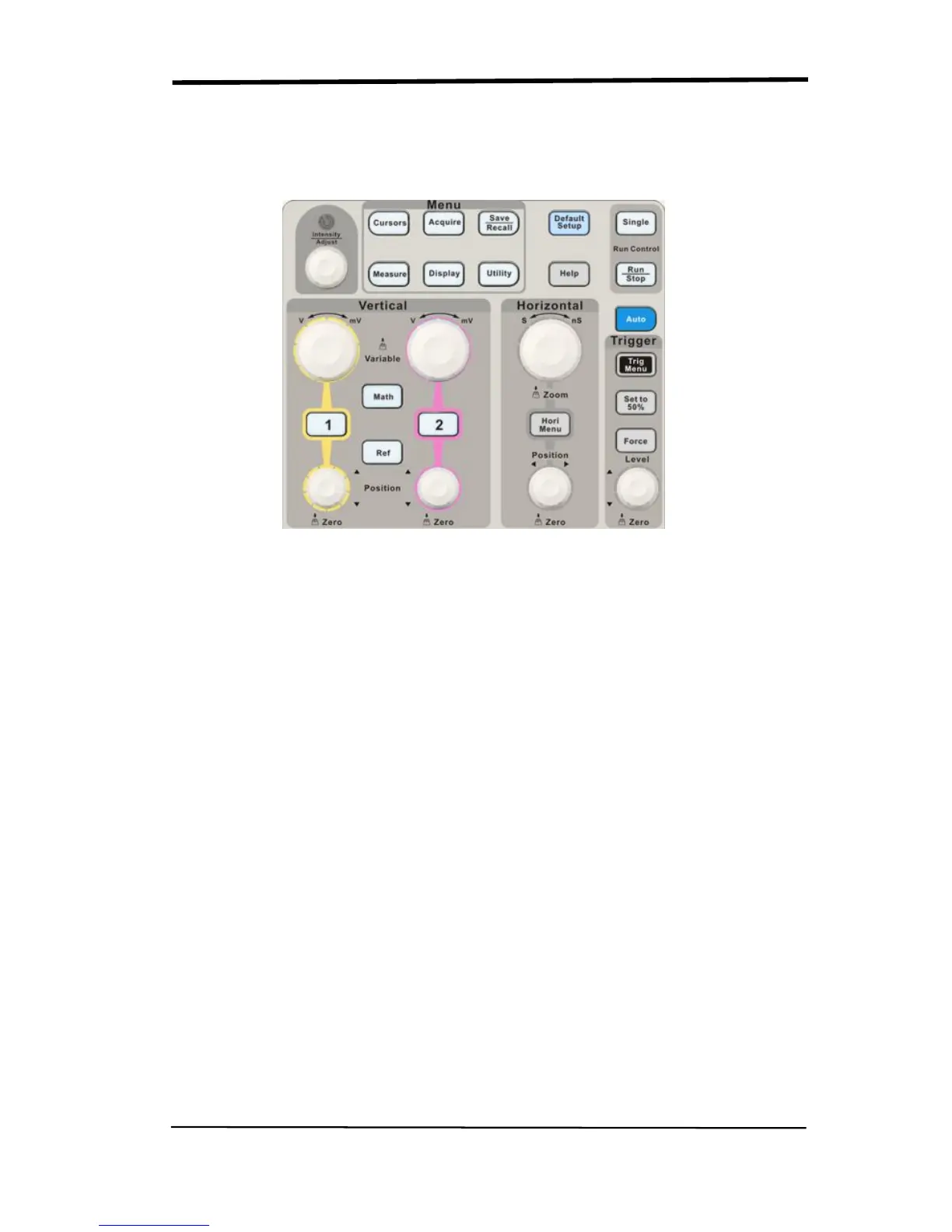
Showing as the following picture:
Picture 2-1
■ Channel buttons (1, 2): Press a channel button to turn that channel ON or OFF
and open the channel menu for that channel. You can use the channel menu to
set up a channel. When the channel is on, the channel button is lit.
■ MATH: Press to display the Math menu. You can use the MAH menu to use the
oscilloscopes Math functions.
■ REF: Press to display the Ref Wave menu. You can use this menu to save and
recall four or two reference waveforms internal memory.
■ HORI MENU: Press to display the Horizontal menu. You can use the Horizontal
menu to display the waveform and zoom in a segment of a waveform.
■ TRIG MENU: Press to display the Trigger menu. You can use the Trigger menu
to set the trigger type (Edge. Pulse, Video, Slope, Alternative) and trigger
settings.
■ SET TO 50%: Press to stabilize a waveform quickly. The oscilloscope can
set the trigger level to be halfway between the minimum and maximum
voltage level automatically. This is useful when you connect a signal to the
EXT TRIG connector and set the trigger source to Ext or Ext/5.










 To Next Page