© Jun 2022 7-6 TB24 Plus&26J Plus Maintenance Manual
REXROTH CONTROL SYSTEM
3. If re-calibrating the parameters at this position is
required, press
to return to the TEST-RUN INFO
interface, then re-enter the SENSOR
CALIBRATION interface, and repeat the previous
step.
4. Press
successively to return to the main
interface, and power off the machine as required.
Weight calibration
1. Make sure that no heavy objects are placed on the
platform and that the platform is stable without
shaking.
2. Enter the TEST-RUN INFO interface.
3. On the TEST-RUN INFO interface, select Weight
Calibration through
and , and press to
enter the WEIGHT CALIBRATION interface.
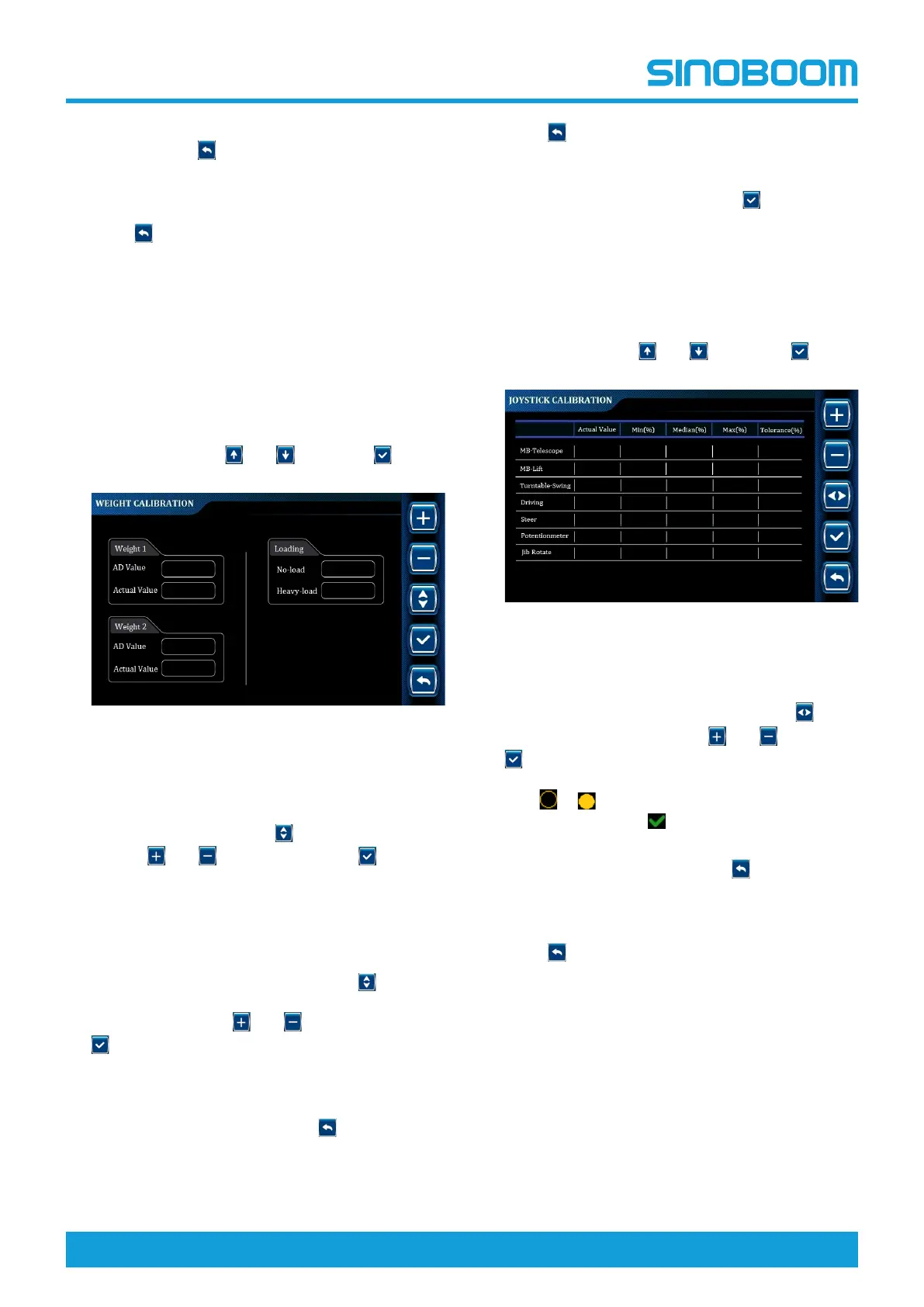
Figure 7-9 WEIGHT CALIBRATION
interface
4. On the WEIGHT CALIBRATION interface, select
No-load in the Loading column on the right side of
the display screen through
, adjust the value to 0
through
and , and press and hold for 3s to
complete the no-load calibration.
5. Place a heavy object with the weight equal to the
rated load of the machine on the platform, and
ensure that the platform is stable without shaking.
6. Select Heavy-load in the Loading column on the
right side of the display screen through
, adjust
the value to the weight value of the heavy object on
the platform through
and , and press and hold
for 3s to complete the heavy-load calibration (the
actual weight value on the left side of the
corresponding display screen is equal to the weight
value of loads on the platform).
7. If re-calibration is required, press
to return to the
TEST-RUN INFO interface, then re-enter the
WEIGHT CALIBRATION interface, and repeat the
previous step.
8. Press
successively to return to the main
interface, and power off the machine as required.
• If the machine is equipped with a dual-channel
sensor, when pressing and holding
for no-load
and heavy-load calibration, the weight of two
channels will be calibrated at the same time.
Joystick calibration
1. On the TEST-RUN INFO interface, select Joystick
Calibration through
and , and press to
enter the JOYSTICK CALIBRATION interface.
Figure 7-10 JOYSTICK CALIBRATION
interface
2. On the JOYSTICK CALIBRATION interface, select
the joystick option to be calibrated through
,
change the tolerance through
and , and press
to save the value and complete the calibration
(the icon before the selected option will be changed
from
to ,indicating calibration succeeded;
there will be the icon
on the interface when
tolerance value is saved.)
3. If re-calibration is required, press
to return to the
TEST-RUN INFO interface, then re-enter the
JOYSTICK CALIBRATION interface, and repeat the
previous step.
4. Press
successively to return to the main
interface, and power off the machine as required.






 To Next Page