REXROTH CONTROL SYSTEM
TB24 Plus&26J Plus Maintenance Manual 7-17 © Jun 2022
Solid
on
ECU receives the set status of regeneration
prohibiting switch, and active regeneration
can’t be performed
Note:
• When regeneration request indicator light
flashes, a yellow warning will appear on the EAT
INFO interface.
• When regeneration request indicator light is
solid on, a red warning will appear on the EAT
INFO interface.
• When regeneration execution indicator light (-
green) is solid on, it indicates that regeneration
is being performed at this time.
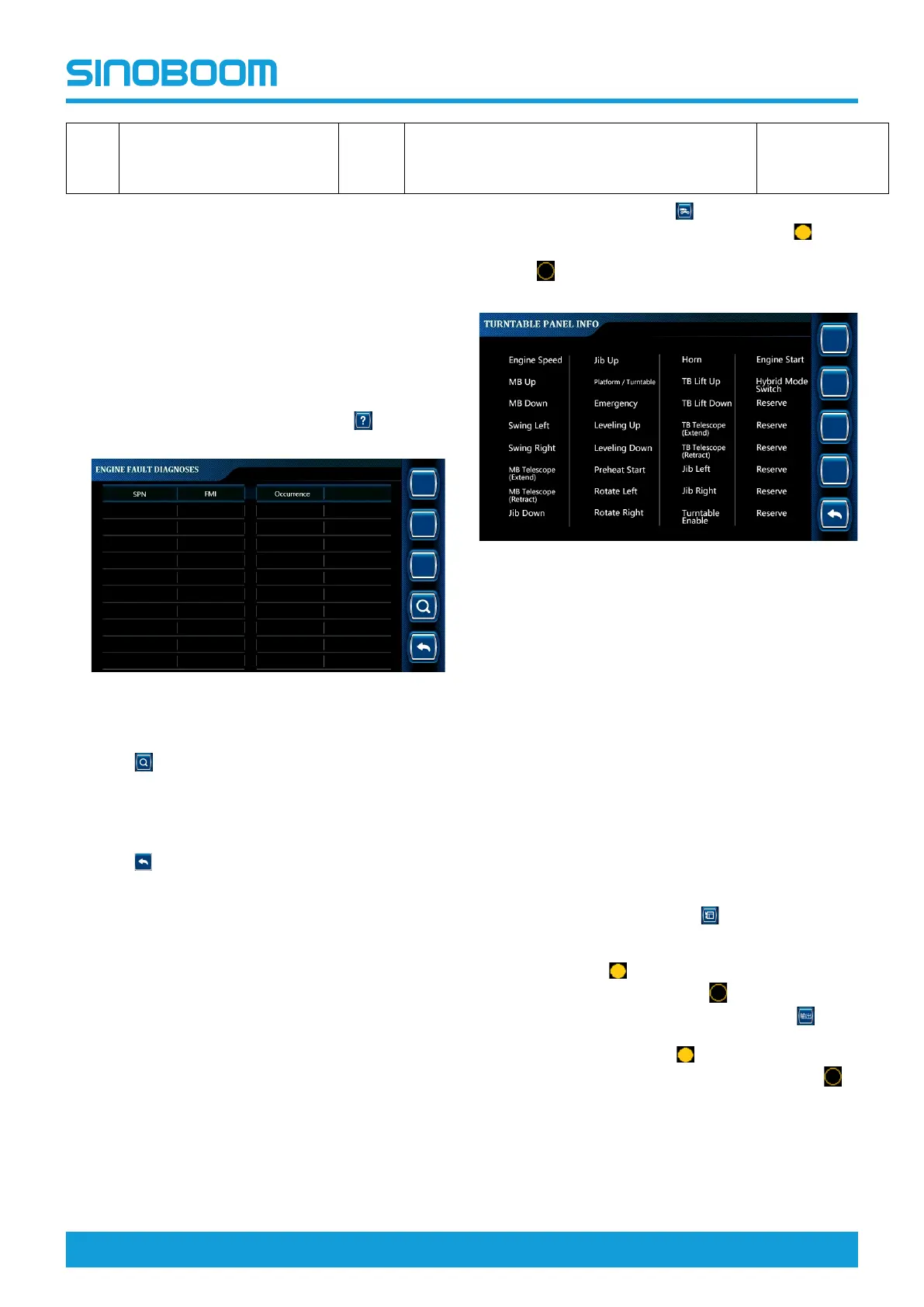
4. On the ENGINE INFO interface, press
to enter
ENGINE FAULT DIAGNOSES interface.
Figure 7-34 ENGINE FAULT DIAGNOSES
interface
5. Press to query the detailed description of the
main fault codes. For detailed fault descriptions,
please refer to the Main Engine Fault Codes and
Causes in the Maintenance Manual (if the machine
is equipped with an engine).
6. Press
successively to return to the main
interface, and power off the machine as required.
TURNTABLE PANEL
INFORMATION
• The turntable panel information option is mainly
used to query the input status of switches on the
ground controller panel, so as to check whether the
circuit from the switches to the controller, input
signal, etc. are normal, thus assisting in determining
the trouble causes.
• The configuration of switches on the turntable panel
is subject to the actual machine configuration.
On the main interface, press
to enter the
TURNTABLE PANEL INFO interface (the icon
before the option means that the switch has input, and
the icon
before the option means that the switch has
no input).
Figure 7-35 TURNTABLE PANEL INFO
interface
PLATFORM INFORMATION
• The platform information option is mainly used to
query the input and output status of switches on the
platform controller panel and the status of joystick
on the platform, so as to check whether the circuit
from the switches to the controller, input signal, etc.
are normal, thus assisting in determining the trouble
causes.
• The configuration of switches on the platform panel
and joystick is subject to the actual machine
configuration.
1. On the main interface, press
to enter the
PLATFORM PANEL INFO interface to check the
input status of switches on the platform controller
panel (the icon
before the option means that the
switch has input, and the icon
before the option
means that the switch has no input). Press
to
check the output status of switches on the platform
controller panel (the icon
before the option
means that the switch has output, and the icon
before the option means that the switch has no
output).






 To Next Page