REXROTH CONTROL SYSTEM
TB24 Plus&26J Plus Maintenance Manual 7-7 © Jun 2022
ADVANCED SETTING
Personnel who have not been professionally trained
and authorized by Sinoboom are not allowed to
modify the advanced setting (including sensor
configuration, turntable enable, standardization,
proportional configuration, parameter restore/save
and reserved setting); otherwise they will be
responsible for the consequences.
1. Press
on the main interface to enter
CONFIGURATION interface.
2. According to the navigation diagram of display
interface, enter Advanced Setting interface (-
password required) by pressing
, and
successively.
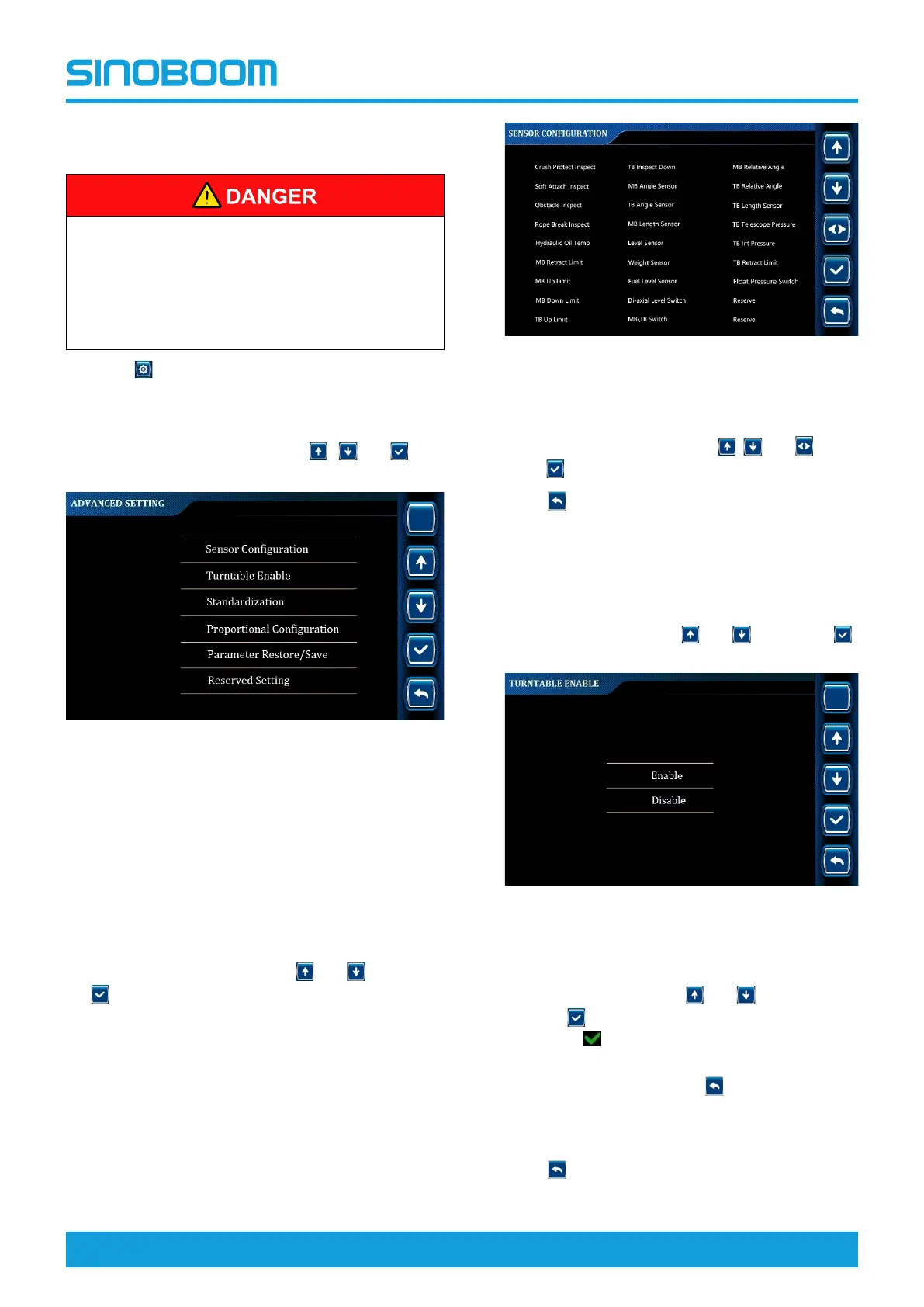
Figure 7-11 ADVANCED SETTING interface
Sensor configuration
• The sensor configuration function is mainly used to
turn on/off switches or sensors on the machine.
• The configuration of sensors is subject to the actual
machine configuration.
1. On the ADVANCED SETTING interface, select
Sensor Configuration through
and , and press
to enter SENSOR CONFIGURATION interface.
Figure 7-12 SENSOR CONFIGURATION
interface
2. On the SENSOR CONFIGURATION interface,
select the desired item through
, and , and
press
to turn on/off the selected item.
3. Press
successively to return to the main
interface, and power off the machine as required.
Turntable enable
1. On the ADVANCED SETTING interface, select
Turntable Enable through
and , and press
to enter TURNTABLE ENABLE interface.
Figure 7-13 TURNTABLE ENABLE
interface
2. On the TURNTABLE ENABLE interface, select
Enable or Disable through
and , and press
and hold
for 3s to confirm the setting (there will
be the icon
before the selected option after
successful setting).
3. To re-select the option, press
to return to the
ADVANCED SETTING interface, re-enter the
TURNTABLE ENABLE interface, and repeat the
above steps.
4. Press
successively to return to the main
interface, and power off the machine as required.






 To Next Page