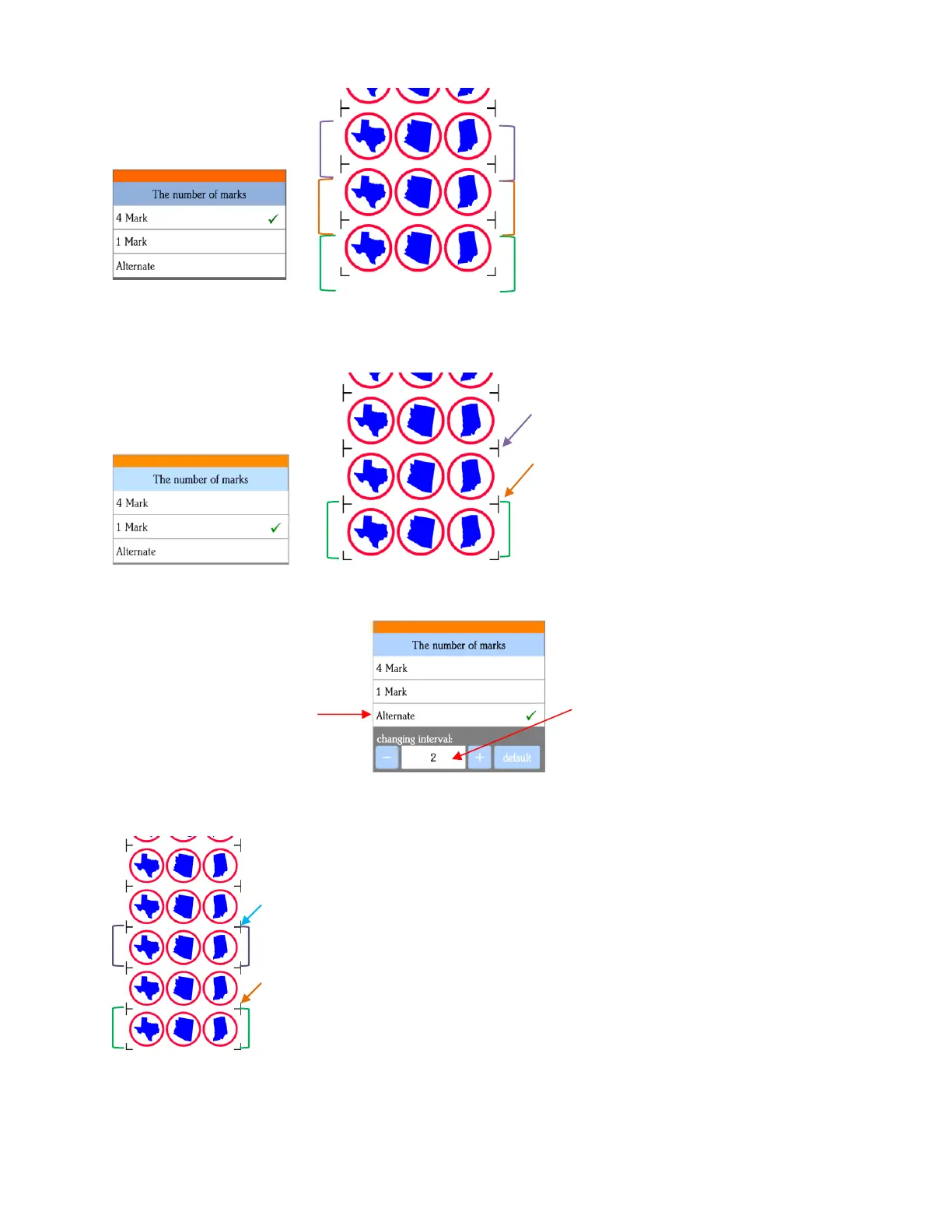
• 1 Mark: Scan first four marks on first set only. Then scan one mark only on each remaining repeat
• Alternate:
Interval set to 2
Alternate between scanning all 4
marks and scanning only 1
mark, based on a set
Combination of 4 Mark
and
1. Four marks in green set are scanned first and
first three shapes cut.
2. Single mark by orange arrow scanned, next
three shapes cut.
3. Single mark by purple arrow scanned, next
three shapes cut
etc.
1. Four marks in green set are scanned first
and first three shapes cut.
2. Four marks in orange set scanned, next three
shapes cut.
3. Four marks in purple set scanned, next three
shapes cut.
etc.
1. 1. Marks in green set scanned and first three shapes cut.
2.
3. 2. Single mark by the orange arrow scanned, next three shapes cut.
4.
5. 3. Marks in purple set scanned, next three shapes cut.
6.
7. 4. Single mark by blue arrow scanned, next three shapes cut.
8.
etc.



 To Next Page