Configuring Reminders
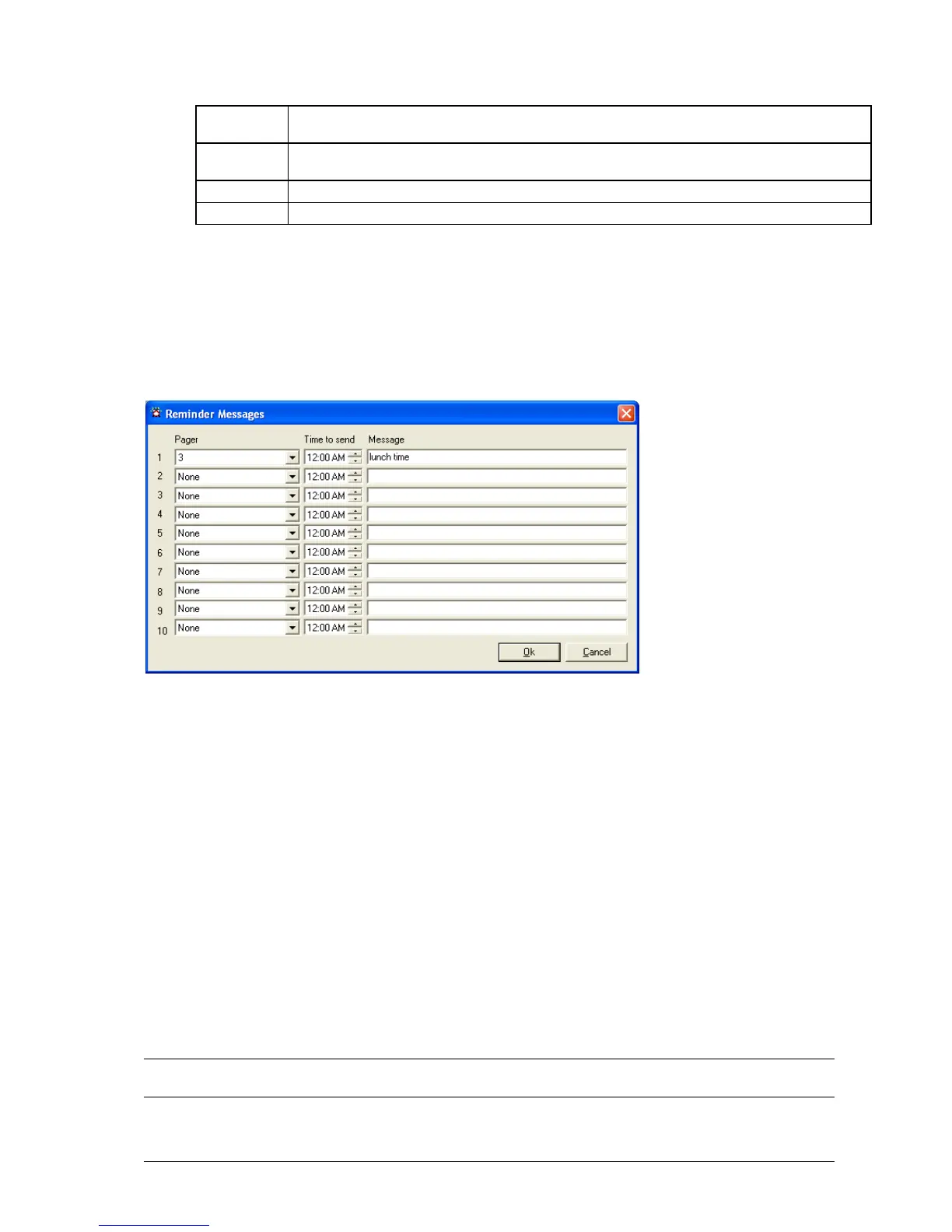
The Reminders button is used to configure the ten reminders that MAXPage is capable of storing.
Reminders are used to send pre-determined messages to a pager or group at a set time of the day. This is useful for
reminding staff of daily tasks etc.
1. Make changes within the Reminder Messages window.
2. Click the OK button to return to the main screen.
3. Click the Cancel button to return to the main screen without saving any recent changes.
Configuring Common Messages
The Common button is used to configure preset common messages.
The window shown below displays allowing 10 messages to be entered. This is the Common Messages screen.
These messages are displayed in the Common drop-down menu described in the more detail later on in this manual.
These messages also refer to the PBX Messages used in conjunction with the telephone (PBX) interface. When the
customer dials the MAXPage extension, they are prompted to “Enter Message.” They then need to type in a numeric
number from 0 – 9 which corresponds to the messages setup below. For this reason, any customers using the
Telephone (PBX) interface needs to know:
The extension number or phone number to dial in order to reach the MAXPage unit
A list of which pager numbers relate to which person. E.g.: John is pager 54
A list of which PBX Message ID relates to which message. E.g.: “3” means “call reception”
NOTE: For information on how to operate the Telephone (PBX) system, refer to Ports|PBX within the Config
Mode section above.



 To Next Page