Get Started 4
n ItisrecommendedthatyoukeepaseparatecopyofinformationthatisstoredonthenanoSIM
card.Thecompanyisnotresponsiblefordamagesfromstoredinformationthatislost.
n AlwaysfollowemergencyprocedurestosuspendserviceifyournanoSIMcardortablet(nano
SIMcardinserted)islost/stolen.Fordetails,contactCustomerService.
n Alwayspowerofftabletbeforeinserting/removingananoSIMcard.
Insert a Nano SIM Card
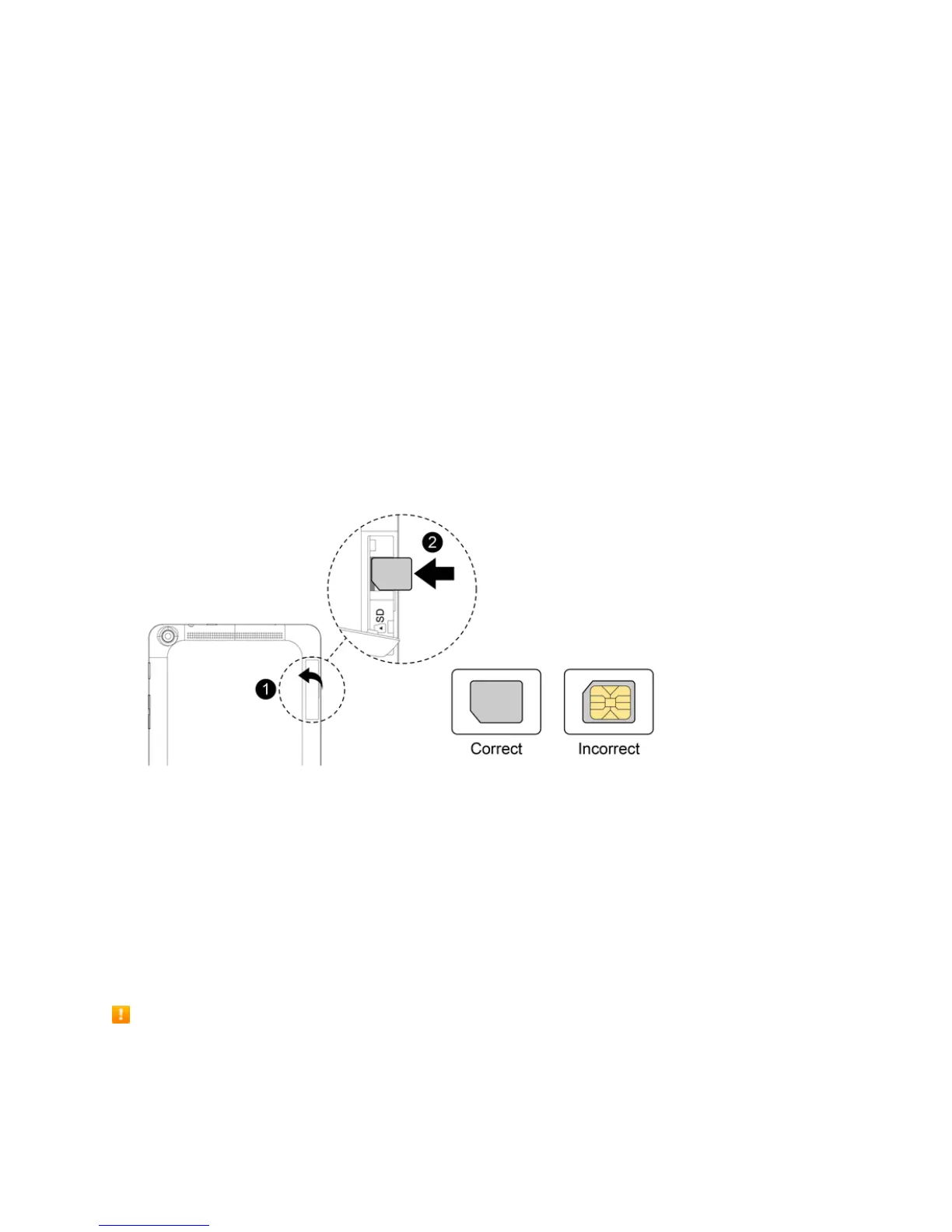
FollowtheseinstructionstoinsertananoSIMcard.Remembertopoweroffyourtabletbefore
insertingananoSIMcard.
Note:Yourtablet’snanoSIMcardispreinstalled.Theseinstructionsareforreferenceonly.
1. OpenthecoverofthenanoSIM/microSDcardslots.
l Liftupwardgentlyasshown.
2. InsertthenanoSIMcard.
l InsertgentlywithgoldICchipfacingdownward.
3. ClosethecoverofthenanoSIM/microSDcardslots.
o
Makesureallthetabsaresecureandtherearenogapsaroundthecover.
microSD Card
YourtabletsupportstheuseofanoptionalmicroSDcard(notincluded)toexpanditsstorage
capacity.Somecardsmaynotoperateproperlywithyourtablet.
microSD Card Cautions
Data:InformationstoredonthemicroSDcardcanbecomelostorchangedaccidentlyorasa
resultofdamage.Itisrecommendedthatyoukeepaseparatecopyofimportantdata.The
companyisnotresponsiblefordamagesfromdatathatislostorchanged.


 To Next Page