Connectivity 103
Connectivity
Thefollowingtopicsaddressyourtablet’sconnectivityoptions,includingUSBfiletransferand
tethering,Wi-Fi,Bluetooth,IRconnectivity,andmore.
Transfer Files between Your Tablet and a
Computer
YoucanusethesuppliedUSBcabletoconnectyourtabletdirectlytoyourcomputerandtransfer
music,pictures,andothercontentfiles.
Forexample,ifyouhaveamusicalbumstoredonyourcomputerthatyouwanttolistentoonyour
tabletwithanyofthemusicapps,justattachyourtablettothecomputerandcopythefilestothe
musicfolder.
File Transfer Tips
n Ifyouwanttosavedatatoamemorycardonyourtablet,makesurethemicroSDcardis
installedandactive.SeemicroSDCard.
n AvoidremovingthemicroSDcardwhiletransferringdata.
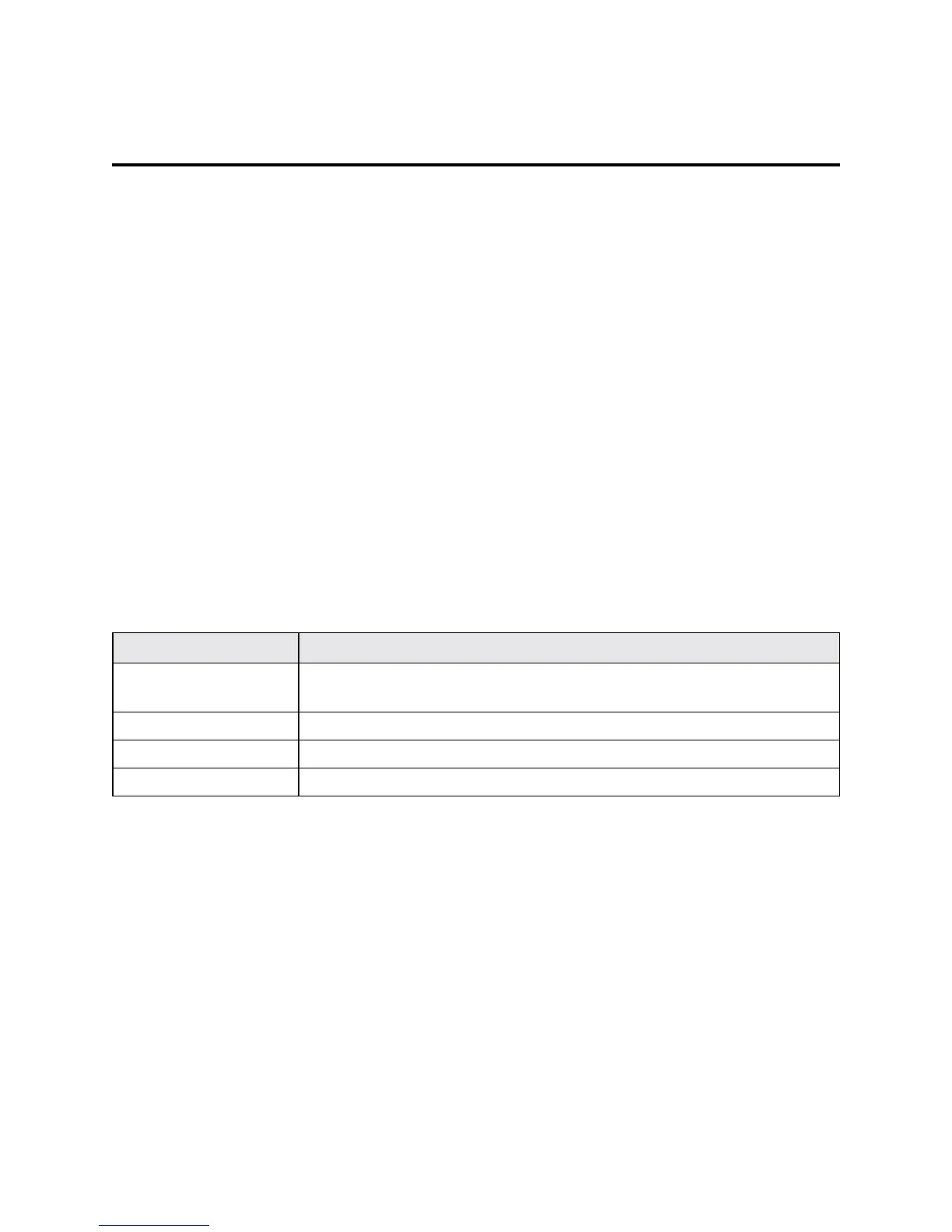
n Dataexchangemayusethemethodsoutlinedinthefollowingtable:
Method Description
Media Device (MTP) TransferfilesbetweenyourtabletandPCsuchaspictures,videos,and
music.
Camera (PTP) TransferpictureandvideofilesbetweenyourtabletandPC.
Mount SD card Transfermediafilesinthememorycardonthecomputer.
Charging Onlychargingthedevice.
Transfer Files between the Tablet and a Computer
1. ConnectyourtablettoyourcomputerusingthesuppliedUSB/chargingcable.
l Insertthelargerendofthecabletothecharger/accessoryjackatthetopofthetablet.
l InserttheUSBendofthecableintoanavailableUSBportonyourcomputer.Youmayneed
toremovetheUSBcablefromthechargingheadtoaccessit.
2. Pulldownthestatusbartodisplaythenotificationpanel.TheUSBconnectionoptionsappears.



 To Next Page