Get Started 5
Reading/Writing Data:Neverpoweroffwhilereadingorwritingdata.
Battery Level:Alowbatterychargemaypreventreading/writingtothemicroSDcard.
Handling SD Card:Use/storemicroSDcardsawayfromthereachofinfants.Maycause
chokingifswallowed.
Insert microSD Card
FollowthesestepstoinsertanoptionalmicroSDcard(notincluded).Makesuretopoweryourtablet
offbeforeinsertingorremovingamicroSDcard.
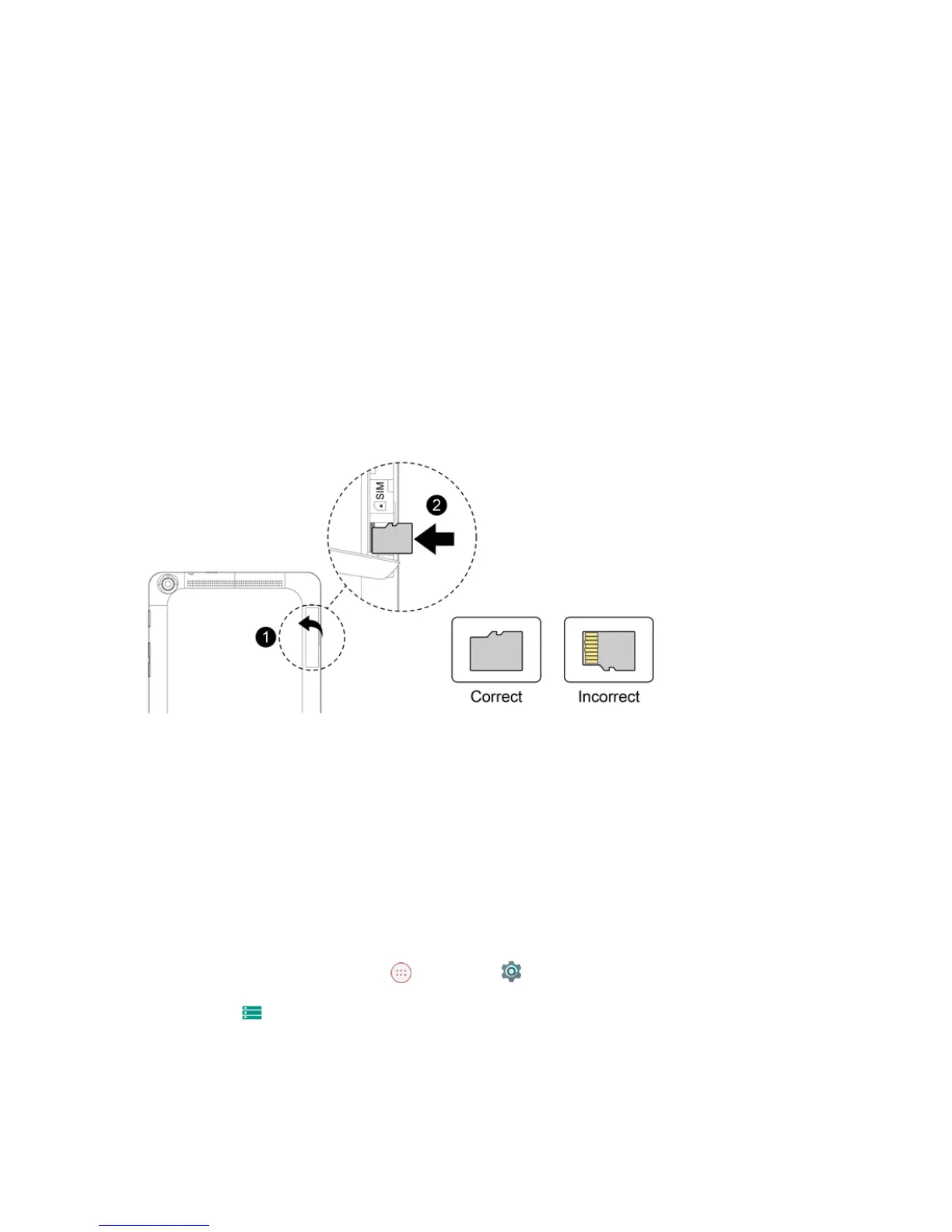
1. OpenthecoverofthenanoSIM/microSDcardslots.
l Opengentlyinthedirectionshown.
2. InsertthemicroSDcard.
l InsertthemicroSDcardallthewaygentlywithoutbendingandwithterminalsfacingupward.
l InsertonlymicroSDcards.
3. ClosethecoverofthenanoSIM/microSDcardslots.
l Makesureallthetabsaresecureandtherearenogapsaroundthecover.
Unmount the microSD Card
AlwaysunmountthemicroSDcardbeforeremovingitfromyourtablet.
1.
FromtheHomescreen,tapApps >Settings .
2.
TapStorage .



 To Next Page