Your Tablet Interface 41
Your Tablet Interface
Thefollowingtopicsdescribehowtouseandcustomizeyourtablet’shomescreen,understandthe
statusbar,andusethenotificationpanel.
Home Screen Basics
Thehomescreenisthestartingpointforyourtablet’sapplications,functions,andmenus.Youcan
customizeyourhomescreenbyaddingapplicationicons,shortcuts,folders,widgets,andmore.
Home Screen Layout
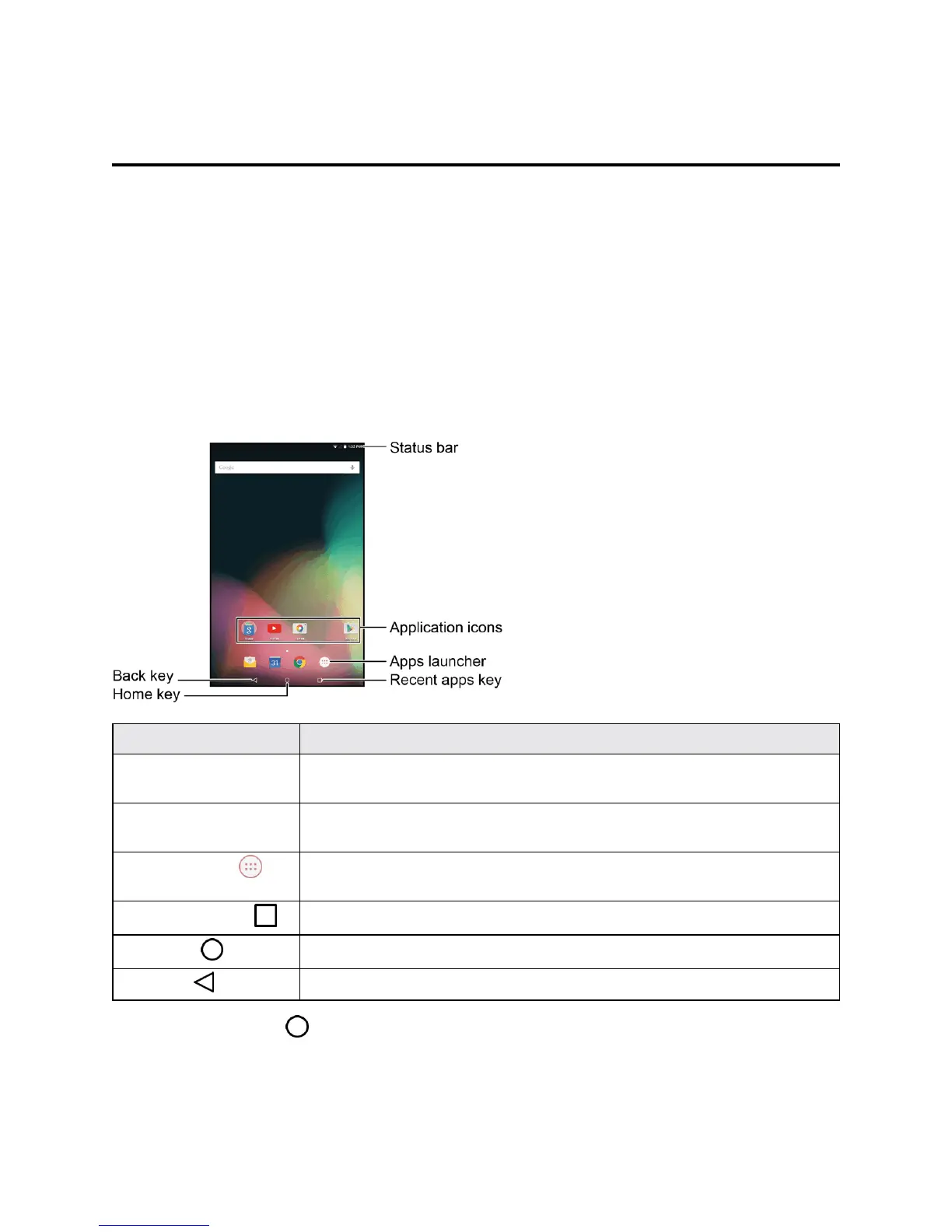
Thefollowingillustrationoutlinesyourtablet’shomescreenlayoutincludingstatusbar,application
icons,appslauncher,andkeys.
Item Description
Status bar Thestatusbardisplaysiconstonotifyyouofyourtablet’sstatus(onthe
rightside)andnotifications(ontheleftside).
Application icons Applicationiconsareshortcutstofavoriteapplications.Youcanaddand
removetheseshortcutsasyouwish.
Apps launcher
Taptoopentheapplications(apps)list.Theappslauncherisaprimary
shortcutavailablefromallhomescreens.
Recent apps key
Taptodisplayalistofrecentlyusedapplications.
Home key
Taptodisplaythemainhomescreen.
Back key
Taptoreturntothepreviousscreen.
Tip:TaptheHomekey toreturntothemainhomescreenfromanyotherscreen.



 To Next Page