2-1
764333-098
WARNING – PERSONAL INJURY AND/OR
EQUIPMENT DAMAGE HAZARD: Only
STERIS or STERIS-trained service technicians
should make repairs and adjustments to this
equipment. Maintenance done by inexperienced,
unqualified personnel or installation of unautho-
rized parts could cause personal injury, invalidate
warranty or result in costly damage. Contact
STERIS regarding service options.
IMPORTANT: Before entering Service mode, always
write down current cycle parameters. If printer is
present, always obtain a printout of current cycle
parameters.
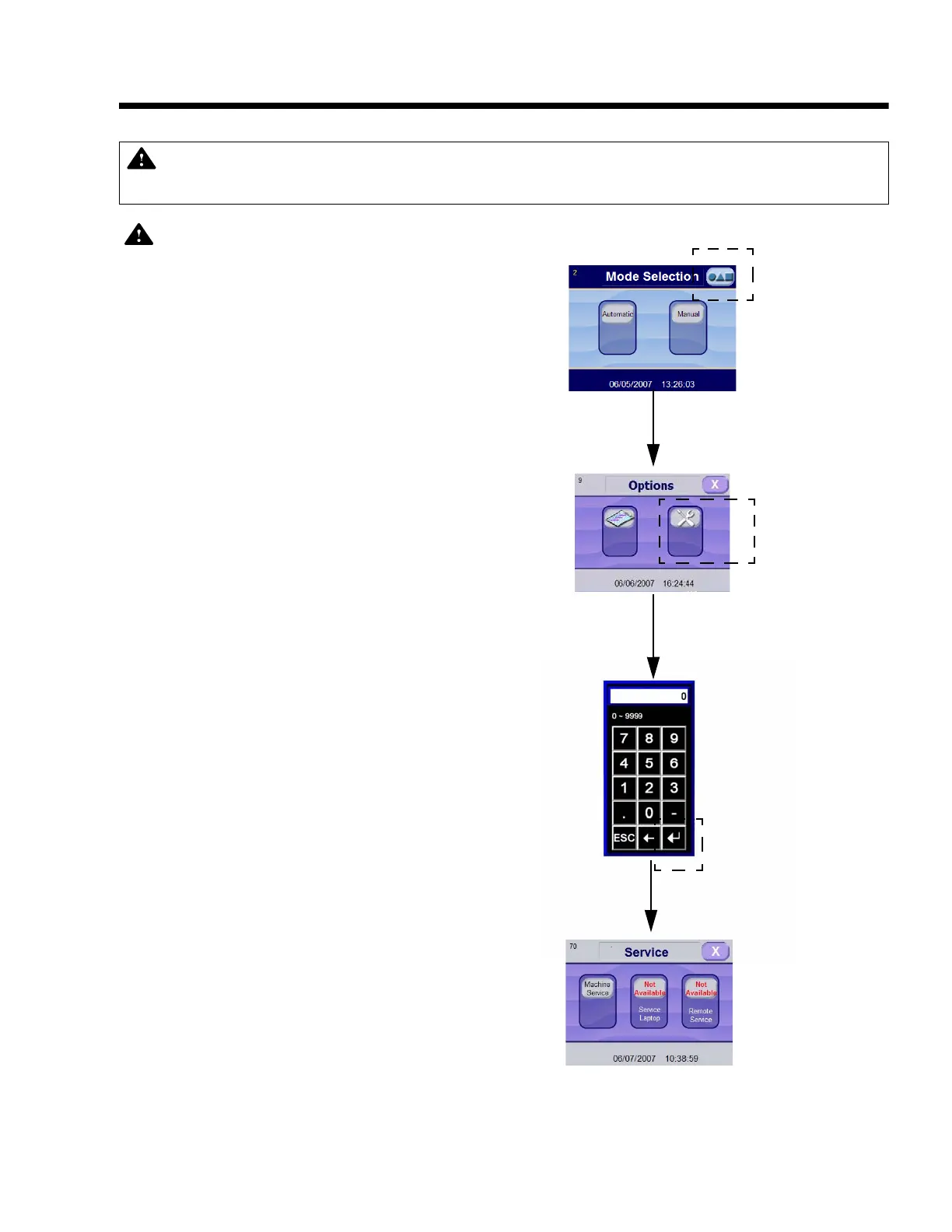
2.1 HOW TO ENTER SERVICE MODE
Service mode allows service technician to set general
operating parameters and to verify control inputs/
outputs for Basil
®
4700 Cage and Rack Washer proper
operation.
1. Press OPTIONS touch pad on mode selection
screen.
2. Press SERVICE touch pad on Options screen. A
numeric keyboard appears.
3. On numeric keyboard screen, enter predefined
PASSWORD using available touch pads.
NOTE: Predefined password is composed of last
four digits of washer serial number, inverted by
pairs. For example, if last four digits are 1234,
service access code is 3412.
4. Press ENTER on numeric keyboard. Display shows
Service Mode screen.
NOTE: If password entered is wrong or supervisor
user is selected, display shows: Username or
Password is Not Recognized Please Try Again.
IMPORTANT: A listing of the Safety Precautions to be observed when operating and servicing this Cage
and Rack Washer can be found in S
ECTION 1 of this manual. Do not operate or service the equipment
until you have become familiar with this information.
Figure 2-1. Enter Service Mode
Press OPTIONS
Touch Pad
Press SERVICE
Touch Pad
Enter Predefined
Password
Press
ENTER
Section 2: Service Mode Procedures













 To Next Page