2-6
764333-098
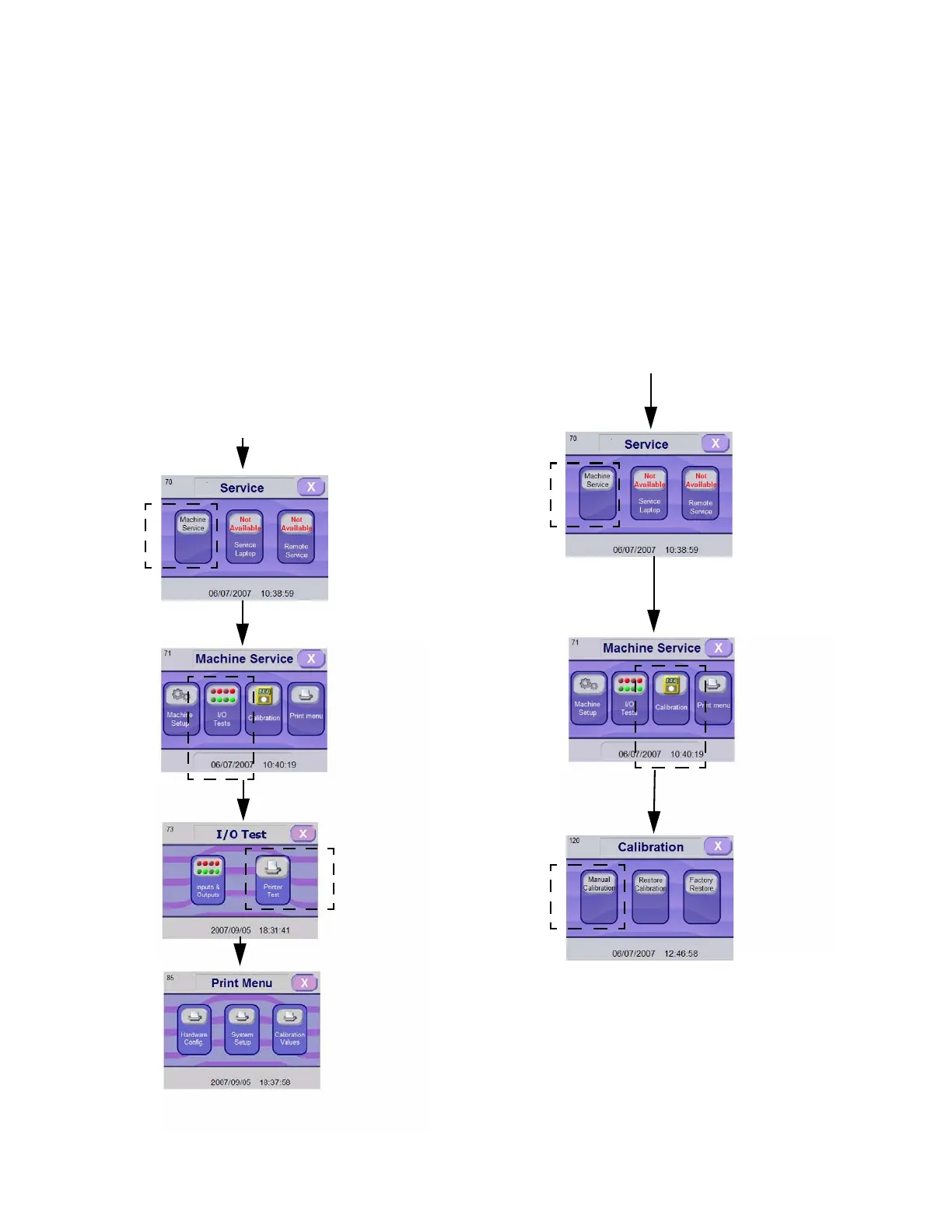
2.3.2 How to Test Printer
See Table 2-1, Hardware Configuration and Table 2-2,
System Options, for additional information on options
available through Test menu.
IMPORTANT: Printer must be enabled in Supervisor
mode before performing the following test (see S
EC-
TION 2.6, ENABLE/DISABLE PRINTER).
1. Enter Service mode as explained in S
ECTION 2.1,
H
OW TO ENTER SERVICE MODE.
2. In Service Mode screen, press I/O TESTS touch pad.
3. In I/O Test screen, press PRINTER touch pad.
4. Select and press any touch pad. Characters are sent
to printer. Verify generated printout.
2.4 CALIBRATION
1. Enter Service Mode as explained in SECTION 2.1,
H
OW TO ENTER SERVICE MODE
2. Press MACHINE SERVICE touch pad. Screen
advances to Machine Service screen.
3. Press CALIBRATION touch pad.
4. In Calibration screen, press MANUAL CALIBRA-
TION touch pad; then, follow calibration procedure
instructions appearing on screen. It is possible to
calibrate pH sensor and conductivity sensor.
• How to Restore Calibration Values
Restore Calibration touch pad allows entering cal-
ibration values saved after previous calibration.
Factory Restore touch pad restores factory's default
calibration.
Figure 2-6. Testing Printer
Enter SERVICE MODE as Explained in SECTION 2.1, HOW TO ENTER
S
ERVICE MODE
Press
Touch Pad
to Select
Press
Touch Pad
to Select
Press
Touch
Pad to
Select
Press Any
Touch Pad to
Print
Enter SERVICE MODE as Explained in SECTION 2.1, HOW TO ENTER
S
ERVICE MODE
Figure 2-7. Calibration
Press
Touch Pad
to Select
Press Touch Pad
to Select
Press
Touch
Pad to
Select













 To Next Page