2-2
764333-098
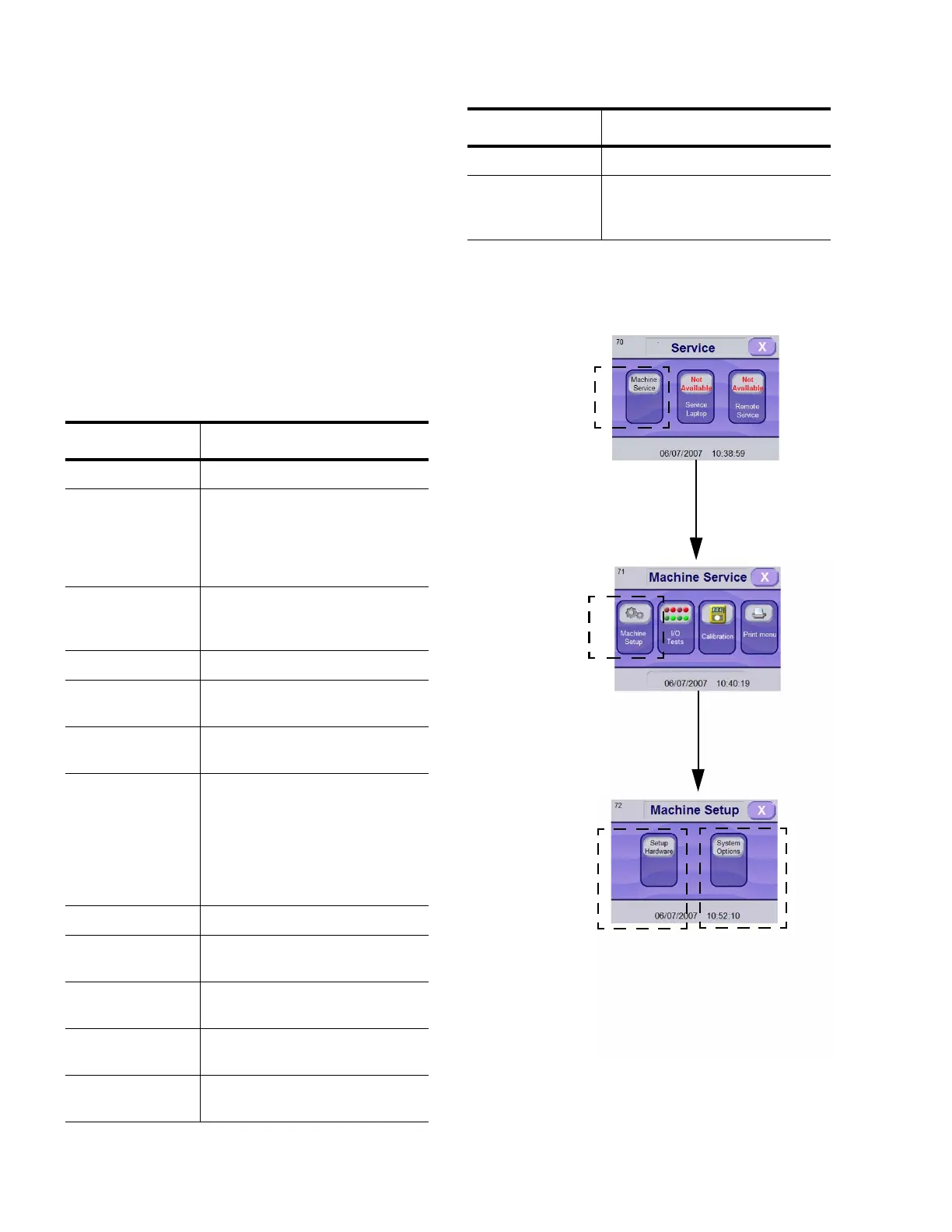
2.2 HOW TO CONFIGURE WASHER
1. Enter Service Mode as described in SECTION 2.1,
H
OW TO ENTER SERVICE MODE.
2. In Service Mode screen, press MACHINE SER-
VICE touch pad.
3. In Machine Service screen, press MACHINE
SETUP touch pad.
See Table 2-1, Hardware Configuration, and Table
2-2, System Options, for additional information on
selections available and default configurations.
IMPORTANT: Ensure all modifications are properly
completed before operating washer.
Table 2 - 1: Hardware Configuration
Parameter Description
Serial Number Unit Serial Number
Door Interlocks ON prevents doors from opening at
the same time to avoid cross contam-
ination
OFF allows doors to open at the same
time
Detergent Conduc-
tivity Option
Enables or Disables Conductivity
Detergent Injection Option
(if present)
Alkaline Tank Enables Alkaline Tank (if present)
Drain Cooldown Enables or Disables Drain Cooldown
Option (if present)
Filling Heat
Exchanger
Enables or Disables Heat Exchanger
Option (if present)
pH Neutralization To select type of neutralization:
- None: no neutralization
- Time Based: Time based injection is
performed before draining water
- pH meter: A pH meter is used to
inject proper amount of neutralizer
before draining
Cooldown Tank Enables Cooldown Tank (if present)
Non-Recirculated
Final Rinse
Enables or disables Non-Recirculated
Final Rinse System (if present)
Bottle Wash Enables Feeder Bottle Washing Sys-
tem (if present)
Fully Drainable
Sump
Enables Fully Drainable Sump func-
tion (if present)
Rack Flush Enables or disables Rack Flush Sys-
tem
Central Header Enables Central Header (if present)
Acid Option None
Without Acid Tank
With Acid Tank
Table 2 - 1: Hardware Configuration (Cont’d)
Parameter Description
Figure 2-2. Washer Configuration
Enter SERVICE MODE as Explained in SECTION 2.1, HOW TO ENTER
SERVICE MODE
Press MACHINE
SERVICE Touch Pad
Press MACHINE
SETUP Touch Pad
See Figure 2-3 for
Hardware Setup
Sequence
See Figure 2-4
for System
Options
Sequence













 To Next Page