2-5
764333-098
2.3 HOW TO PERFORM TESTS
See Table 2- 2 for an overview of options available
through Test menu.
2.3.1 How to Test (Energize and De-Energize)
Outputs
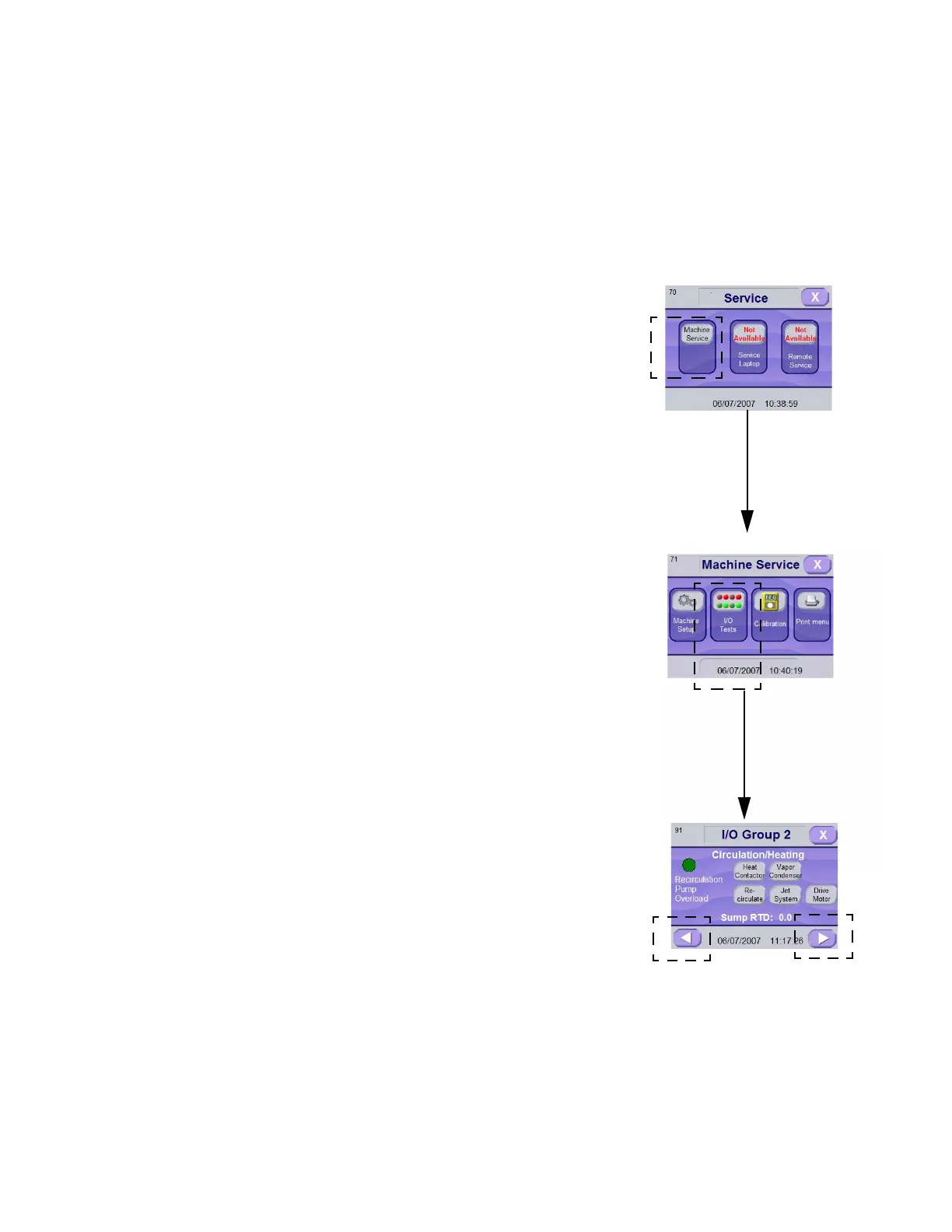
1. Enter Service Mode as explained in SECTION 2.1,
H
OW TO ENTER SERVICE MODE.
2. Press MACHINE SERVICE touch pad. Screen
advances to Machine Service screen.
3. In Machine Service screen press I/O TESTS touch-
pad. Screen advances to I/O Group screen.
4. Press RIGHT arrow to advance screen to desired I/
O screen menu.
Some outputs are interlocked with other outputs or
inputs, i.e. they cannot be activated before a certain
condition has been met:
• When traveler reaches a position sensor, trav-
eler movement is stopped (start position sensor
is not considered if traveler is going in the
opposite direction).
• If door interlock option is present, a door can
be locked only if it is closed.
• To activate wash chamber circulation pump,
washer door(s) must be closed.
• To activate alkaline or acid tank dump, washer
door(s) must be closed.
• To activate non-recirculated final rinse, washer
door(s) must be closed.
• To activate sump filling sequence, washer
door(s) must be closed.
• To activate rack flush system, washer door(s)
must be closed.
• To activate alkaline pump, washer door(s) must
be closed and acid pump must be off.
• To activate acid pump, washer door(s) must be
closed and alkaline pump must be off.
• To activate alkaline neutral pump, washer
door(s) must be closed and acid neutralizer
pump must be off.
• To activate acid neutralizer pump, washer
door(s) must be closed and alkaline neutralizer
pump must be off.
5. In I/O Test screen, press INPUTS & OUTPUTS
touch pad. Use RIGHT arrow to advance screen
until desired I/O group.
6. To energize output, press desired touch pad.
Selected touch pad darkens.
7. Press touch pad again to de-energize output.
8. Input state can be visualized on left side of screen.
Red circle on left side of screen indicates corre-
sponding condition is true.
Enter SERVICE MODE as Explained in SECTION 2.1, HOW TO ENTER
SERVICE MODE
Figure 2-5. Performing Tests
Press MACHINE
SERVICE Touch Pad
Press I/O TESTS
Touch Pad
Press LEFT Arrow to
Return to Previous
Menu
Press RIGHT
Arrow to Advance
to Next Menu













 To Next Page