3 Overview
Operating display
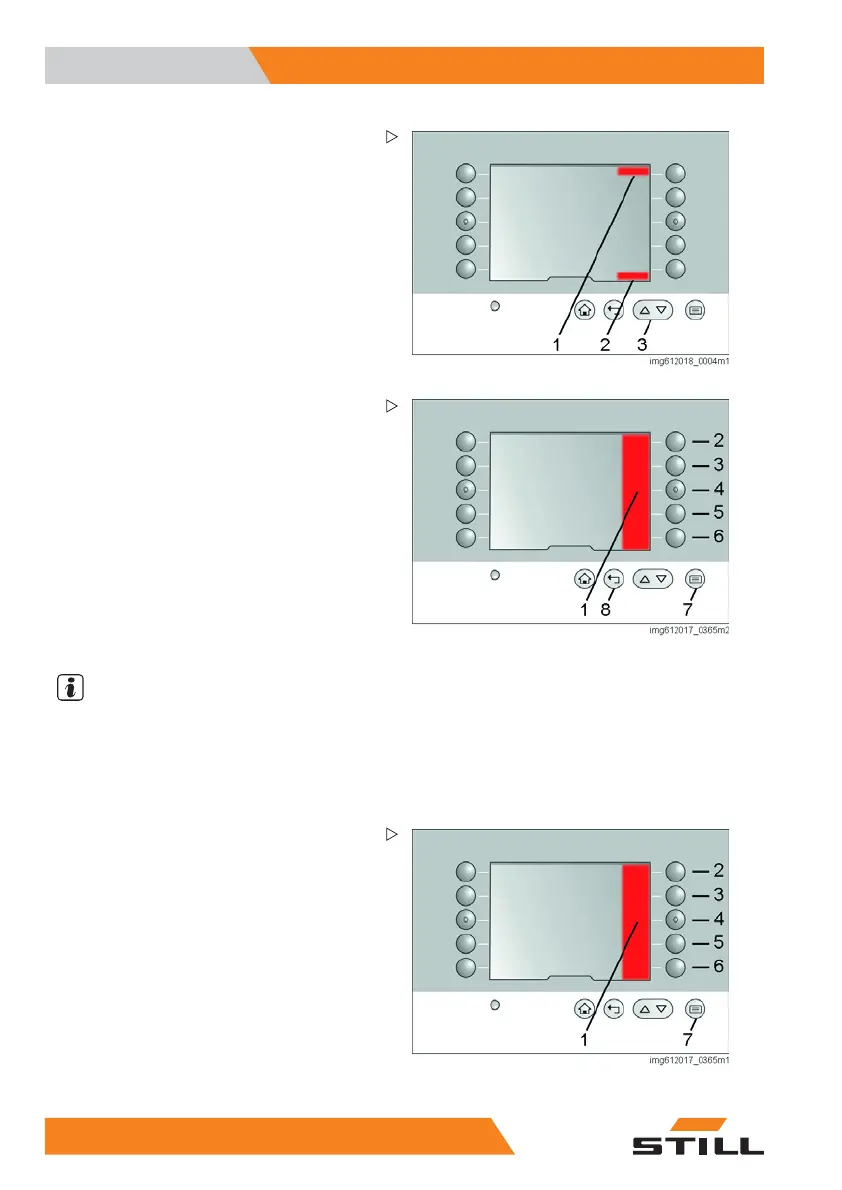
Scrolling through the menu bar
If an arrow appears in area (1) or (2), then the
list contains additional entries. The arrow keys
(3) can be used to scroll through the menu. If
there is no longer an arrow in area (1), the
start of the list has been reached. If there is no
longer an arrow in area (2), the end of the list
has been reached.
Changing the language
The texts are available in 25 languages.
The language can be set using a fixed key
combination. This combination is the same for
all languages.
Procedure
– Push button (7). The menu in area (1)
opens.
– Press key sequence (6), (3) and (4).
– Use buttons (2) to (6) to select the desired
language in the list.
NOTE
Only five langu
ages are shown here. The
other 20 langu
ages can be found by scrolling.
See "Scrollin
g through the menu bar"
– Exit the list by pressing button (8).
Favourites
The ten membrane switches can be freely
configured to display your favourite functions
on the main page. The following functions are
available as favourites:
• Energy-saving mode
• Navigation
• Lighting
• Life height preselection
Complete, ind
ividual areas or individual
heights
• Fans
36 5
231 804 2502 EN - 11/2017


 To Next Page