36 72-1048E MM FL23SE REV A www.stryker.com
Return To Table of Contents
SIDERAIL CONTROL PANEL MEMBRANE REPLACEMENT
Tools Required:
No. 2 Phillips Screwdriver•
Note
The replacement of a membrane implies that the one facing it on the inner or outer control panel also has to be replaced.
Service kits, including both membranes are available.
Procedure:
Completely raise the bed and apply the brakes. Bring the head section to horizontal position. 1.
Unplug the bed power cord from the wall outlet. 2.
Raise the head siderail needing repair. 3.
Properly ground yourself (see 4. pg. 19).
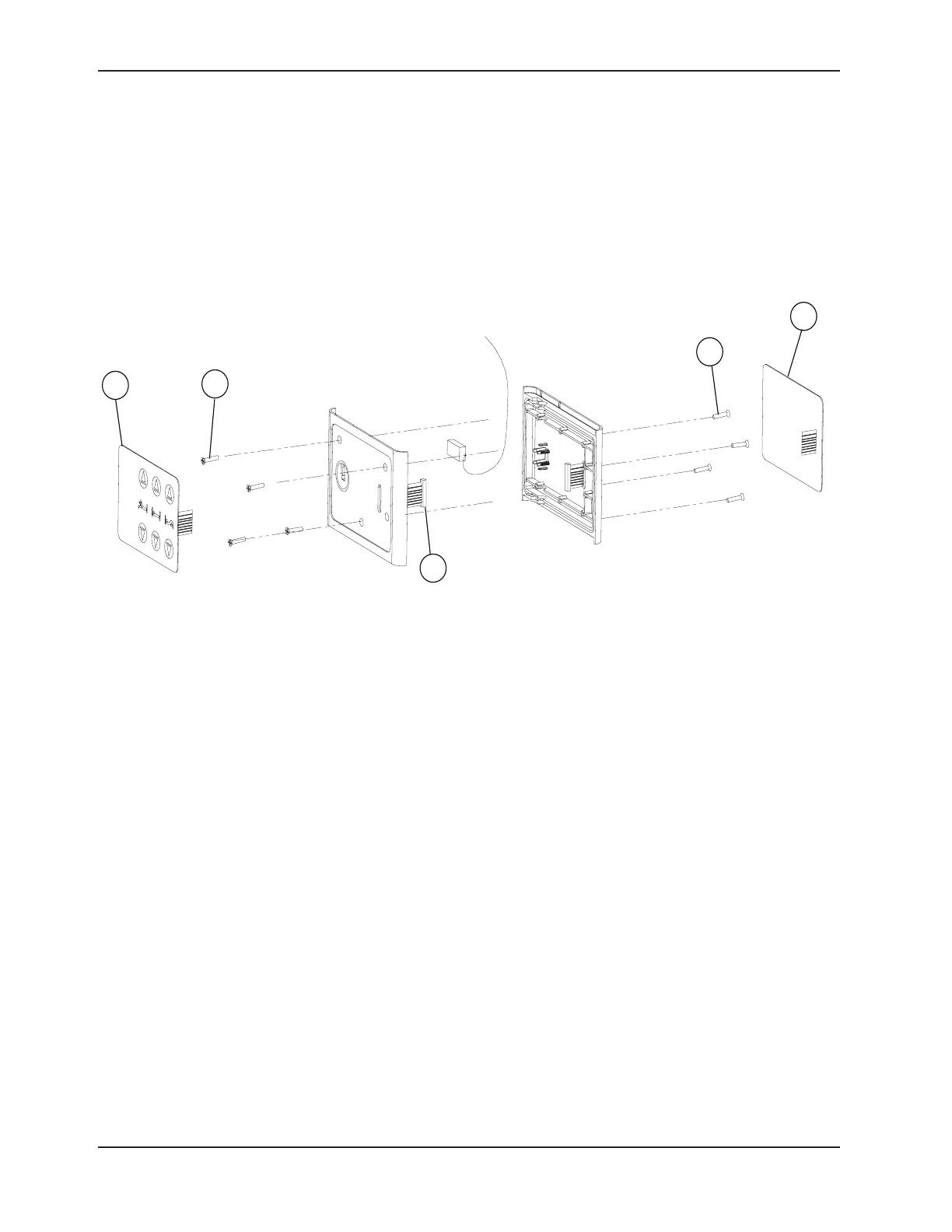
Detach the two membranes (A) from their mounting plates and let them hang down. 5.
Using a No. 2 Phillips screwdriver, remove the eight screws (B) holding together the two sections of the control 6.
panel housing.
Open the housing, disconnect the defective membrane cable (C) and remove the membrane. 7.
Reverse the above steps to install the new control panel membranes.8.
Note
Make sure to connect the membrane cables before fastening together the two sections of the control panel housing.
Stick the membranes to the support at the end of the replacement procedure.
Verify all the siderail functions for proper operation before returning the bed to service.9.
Figure 4.2 C
Service Information








 To Next Page