EN-28
Note: In the Save Settings screen , “FTP” or “PACS” must be selected. If “FTP” is
selected, the drop-down menu will be populated with IP addresses. If “PACS” is selected,
it will be populated with connection names.
9� If “PACS” is selected in Save Settings, the AE Title and IP address of the selected connection
will be displayed�
10� Pressing the NETWORK SAVE
button saves to the selected network� Cases can be saved to
another network after the previous save action is completed�
11� Pressing the STUDIO3 button saves to the Studio3�
12� The progress bar displays the status of the write process�
Other functions:
13� Selecting the SETTINGS tab opens the “Save Settings” screen�
Saving to a Network
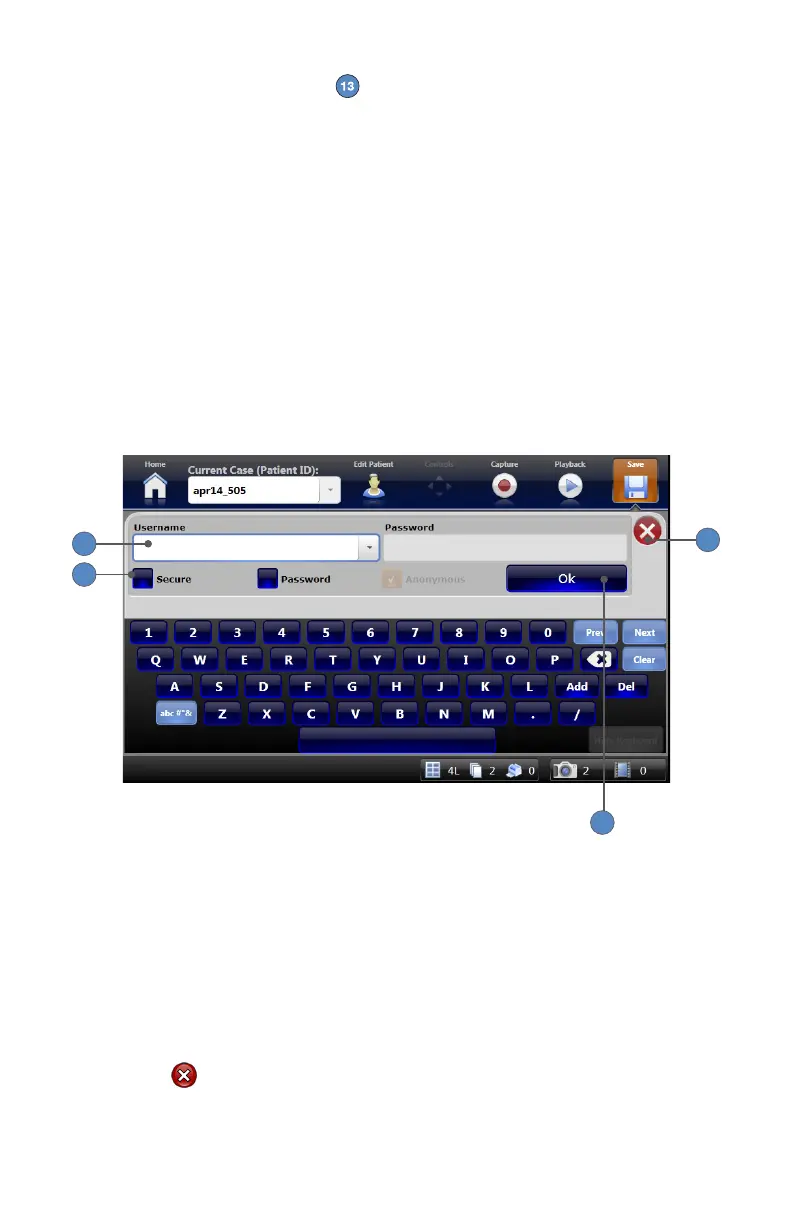
When saving to a network location, a login screen will appear�
4
3
2
1
1� Select the type of network transmission:
• Secure—for secure transmission of data to the network� Data will be encrypted� A user
name and password will be required�
• Password—for password-protected access to the network� A user name and password
will be required�
• Anonymous—for open access to the network� User name and password are not required�
2� If required (per type of network selected), enter the user name and password�
3� Press OK.
4� Press the button to close the login screen�












 To Next Page