Chapter 4: Removal and Reinstallation Procedures
4 –43
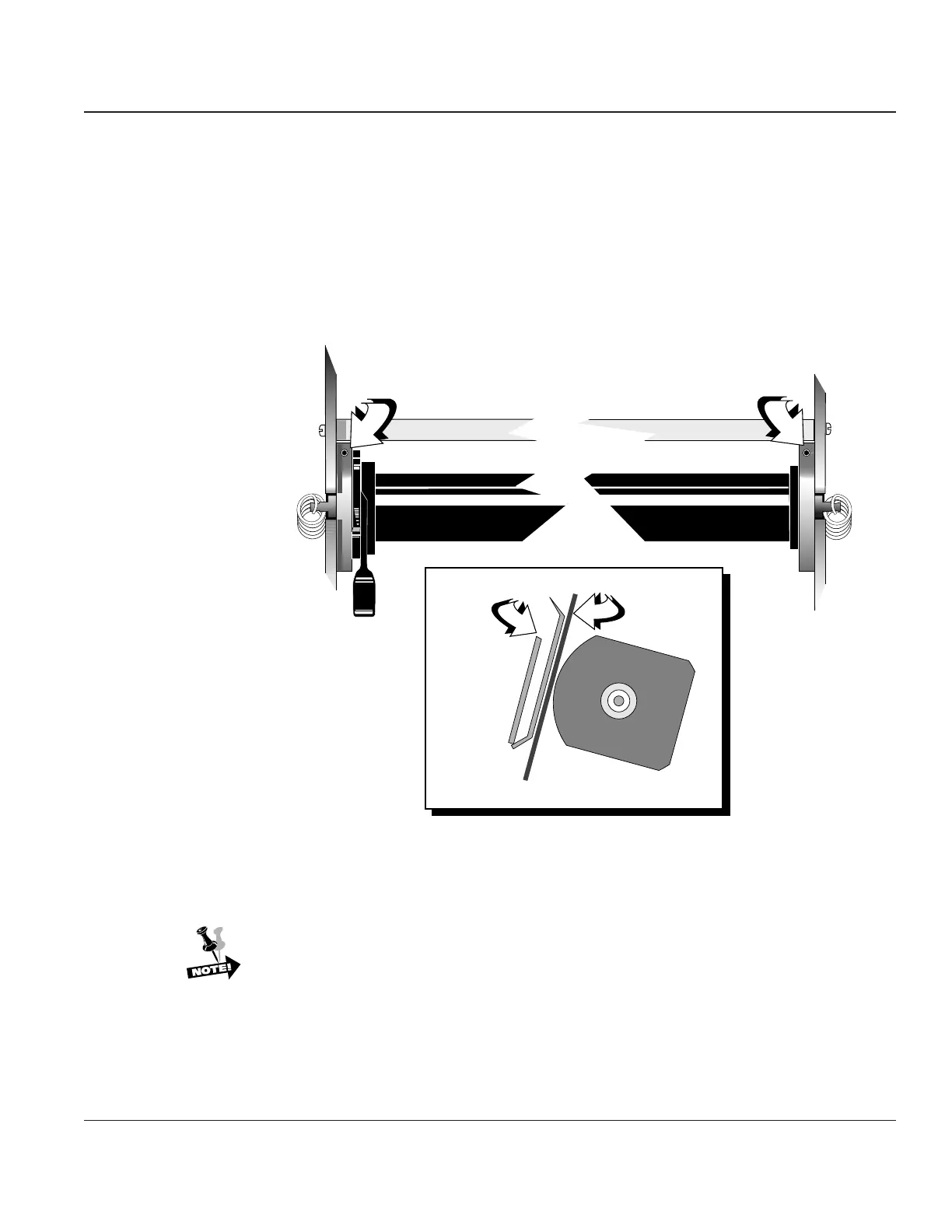
Procedure 25 – Platen Gap Adjustment Procedure
Before beginning this procedure, turn the printer off and disconnect the power cable.
STEP 1. Insert your .012" or .014" shim gauge (in tool kit #081147) between ribbon shield and platen.
If your gauge will not fit, don’t force it, proceed to step 2.
STEP 2. Using a 5/64" Allen wrench, (in tool kit 081147) insert it into the left hand tensioning set
screw. Turn wrench clockwise to tighten the existing gap. Turn wrench counterclockwise to
loosen the existing gap.
Platen Gap Adjust Plates
Platen
Ribbon
Shield
Shim
Gauge
Right Side View
Figure 4–40. Platen Gap Adjustment
STEP 3: Using a 5/64" Allen wrench, insert it into the right hand tensioning set screw. Turn screw
clockwise to tighten the existing gap. Turn the screw counterclockwise to loosen the existing
gap.
Tool kit 081147 includes both .012" and .014" shim gauge. You can use either, governed
by print quality.
Repeat STEPs 2 & 3 until gap is equal across Hammer Bank. After adjusting the platen gap
perform a Hammer Calibration Procedure (see PrntCal Parameter in Chapter 2).



 To Next Page