Telephone Line Emulator User’s Manual
40-400-00020, Rev. M 24
Dial Tone
Dial Tone is the audible signal issued to a calling party when the Central Office is ready to
receive digits. The TLE issues a Second Dial Tone after a series of digits are dialed to
emulate operation of a PABX or other switch platforms. (See Revert to Dial Tone phone
number.) Other types of dial tones include Recall Dial Tone (an interrupted Dial Tone,
a.k.a. Stuttered Dial Tone, indicating recognition of a FLASH Hook to access other
features), Message Waiting Dial Tone (an off-hook interrupted Dial Tone indicating
messages in voice mail), and Confirmation Dial Tone (an interrupted dial tone sequence
indicating that a feature has been properly used, such as Cancel Call Waiting).
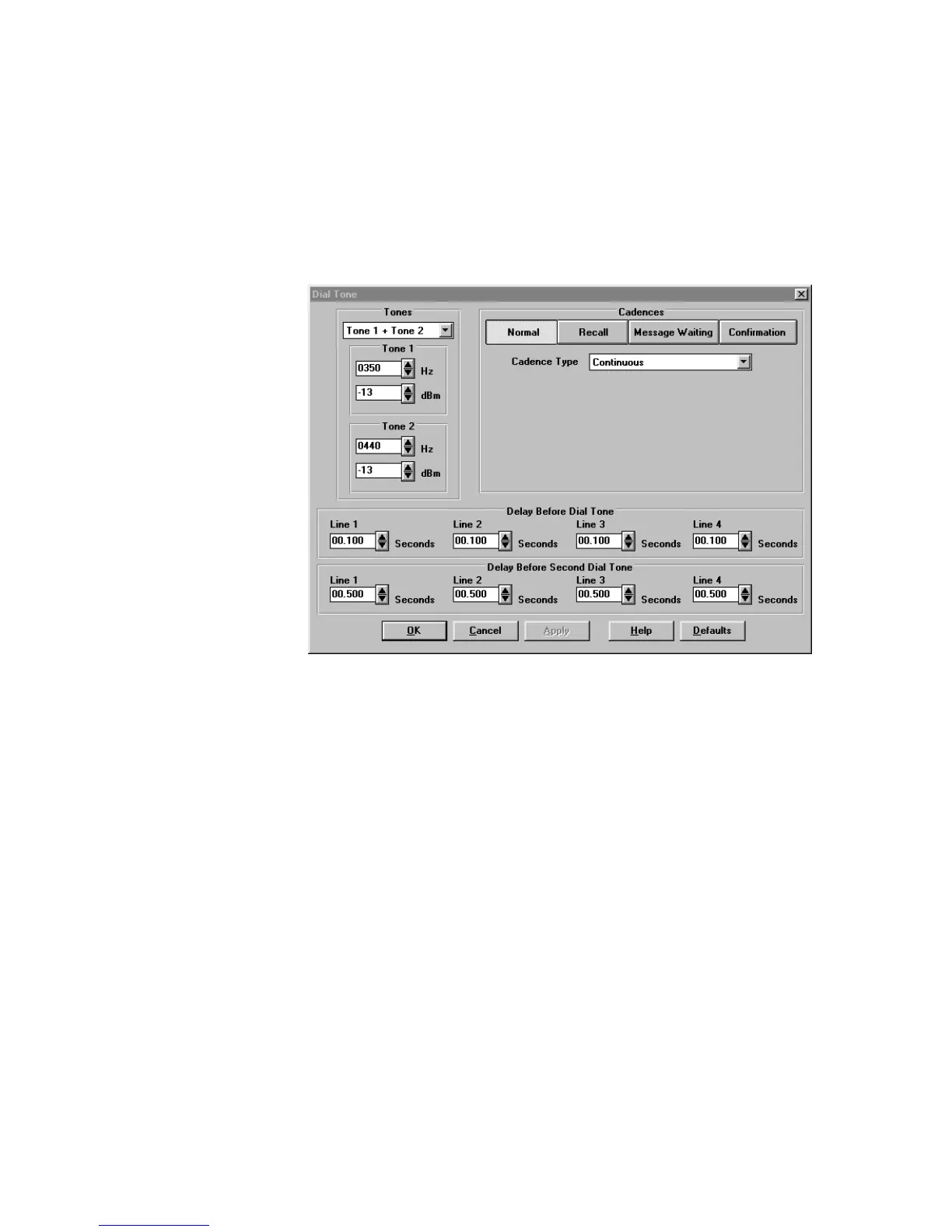
Figure 14. Dial Tone Screen
Dial Tone Level and Frequencies
Dial Tones may be single or dual frequencies with individually adjustable amplitudes.
With a selection of Single Tone the system will only generate the first tone. With a
selection of Tone 1 + Tone 2 the system will generate both tones with the specified
frequencies and amplitudes. Purchase of the International Module adds the selection of
Tone 1 x Tone 2. The system will generate Tone 1 modulation by Tone 2. In this
implementation only the fundamental and upper side tone are generated, both at the
amplitude programmed for Tone 1.
Frequency for both tones may be set from 10 Hz to 1000 Hz in 1 Hz increments and signal
level from -06 dBm to -60 dBm in 1 dB increments.
Dial Tone Cadences
The TLE supports multiple dial tones. These include Normal, Recall, Message Waiting,
and Confirmation dial tones. Each dial tone may be configured for continuous, simple or
complex cadence.
Simple cadence has one on and one off time. Default is 0.1 seconds on, 0.1 seconds off.
Complex cadence has two separate on/off times. Default is 0.1 seconds on, 0.1 seconds



 To Next Page