Telephone Line Emulator User’s Manual
40-400-00020, Rev. M
41
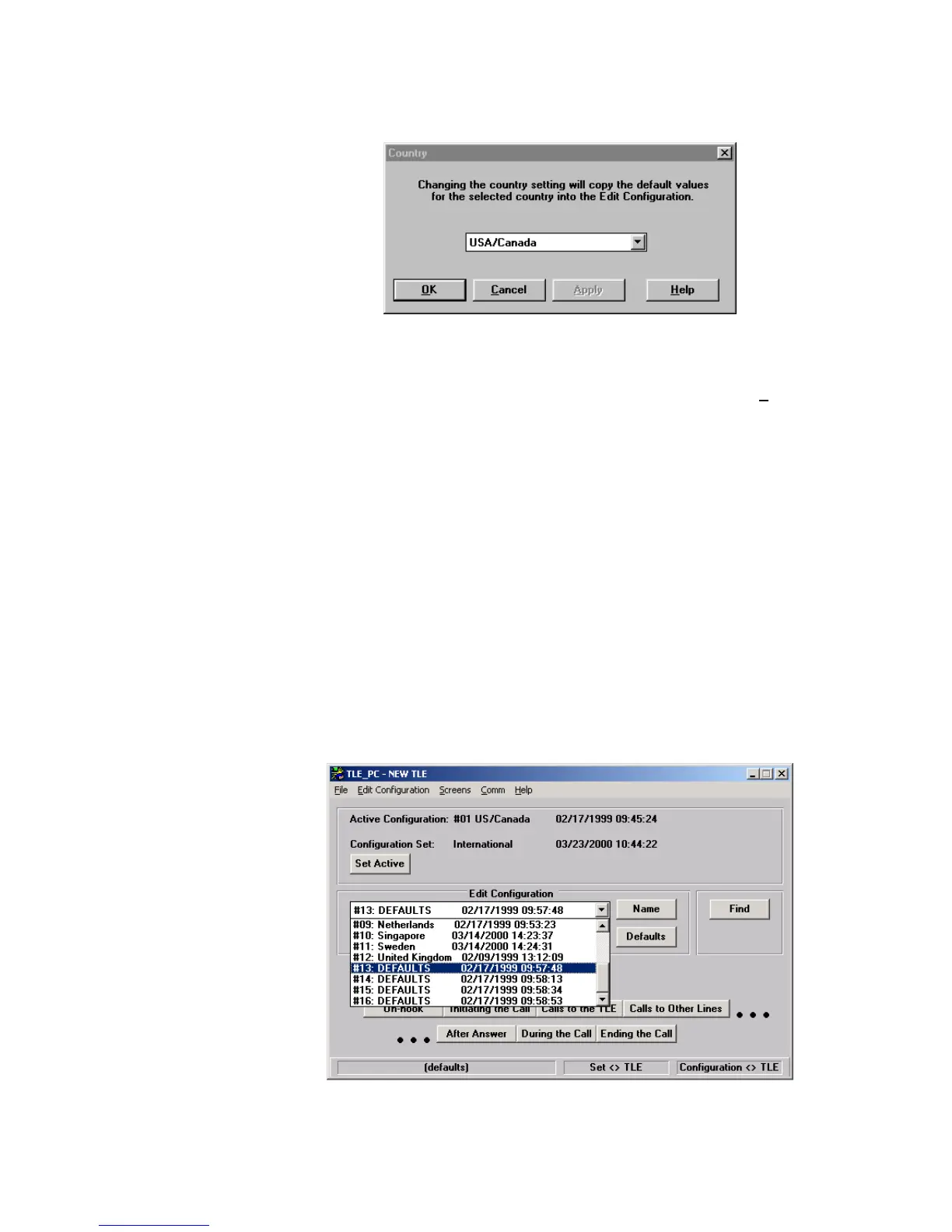
Country Screen
Figure 26. Country Screen
This screen copies the default values of the selected country into the current Edit
Configuration. For example, from the Main screen, under Edit Configuration, select
configuration “#16 DEFAULTS”. Then using the General Setup button or the S
creens pull
down menu, select Country. Choose one of the stored countries default values to copy
into the current Edit Configuration, such as United Kingdom. After OK or Apply is
selected, a screen will appear requesting confirmation of your selection. Selecting OK will
copy the default values for the selected country into the current Edit Configuration. If
additional changes are made - it is recommended that the Name be changed, using the
Main screen Name button, to an appropriate name.
Importing Additional Countries
The TLE maintains a maximum of 16 independent configurations. When you import a
country configuration file, the imported configuration replaces one of the existing 16
configurations.
To import additional country configurations, follow the steps below:
1. In the Edit Configuration area of the main TLE screen, select one of the 16
configurations. The configuration that you select will be replaced by the imported
additional country settings. To maximize the capabilities of the TLE, select a default
configurations (for example, #13 DEFAULTS).
Figure 27. Selecting a Configuration to be Replaced by the Additional Country



 To Next Page