3.
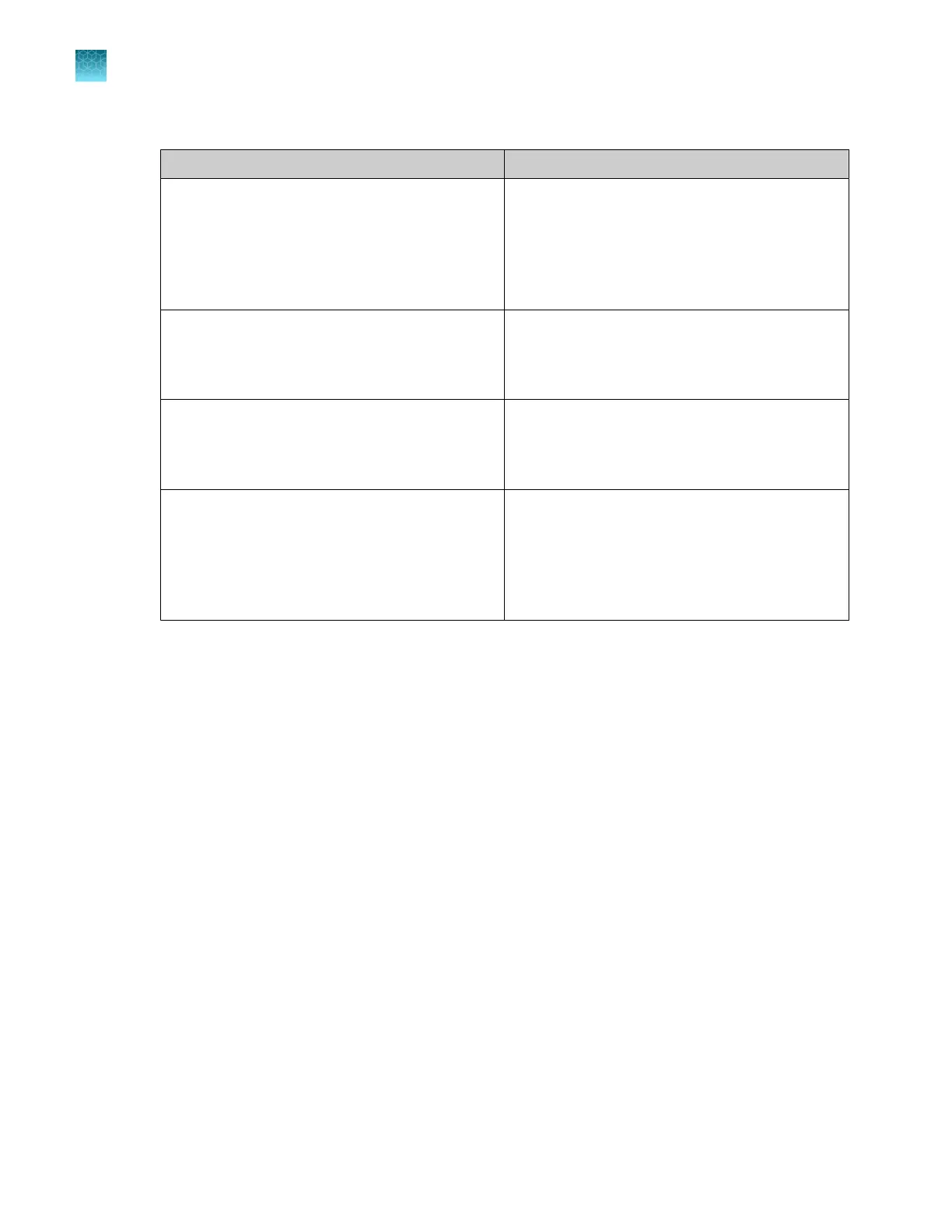
Click Change, then select the folder for the following items.
Folder Description
OpenArray Plate File Folder
(TPF or SPF files)
The folder that is opened when a TPF or SPF file
is imported to set up a run.
The folder where a new TPF or SPF file is saved
when it is downloaded or created from a template.
Default location: C:\OpenArray\OpenArray
Plates
Loaded OpenArray Plate File Folder
(Loaded TPF or loaded SPF files)
The folder where a loaded TPF or SPF file is saved
after a run is completed.
Default location: C:\OpenArray\Loaded
OpenArray Plates
Input Sample Plate Folder
(CSV files)
The folder that is opened when a sample plate file
is imported to set up a run.
Default location: C:\OpenArray\Sample
Plates
Export Data Folder
(CSV or XLSX files)
The folder where a new sample plate file or
OA.csv file is saved when mapping plates.
The folder where the instrument log or the loading
history is saved when it is exported.
Default location: C:\OpenArray\Export
Data
The selected folder for each option is the default folder in the Folders menu.
4.
Click Save.
Set the plate mapping defaults (full run workflow)
This setting defines the selections when the Full Run page is selected. It can be changed on the Full
Run screen when setting up a run. See “Overview of the Full Run screens” on page 48.
1.
Click Preferences.
2.
In the Preferences dialog box, select the Plate mapping defaults tab.
3.
Select the experiment type.
•
Gene Expression
•
Genotyping
•
3-Sample Fixed Panel
•
4-Sample Fixed Panel
4.
Select the OpenArray Plate from the dropdown list.
The items in the dropdown list depend on the selection made in step 3.
Chapter 2
Basic operations and one-time procedures
Set the preferences
2
16
QuantStudio
™
12K Flex OpenArray
™
AccuFill
™
System User Guide













 To Next Page