Perform a tip ejection test
The ability of the robotic tip handler to eject tips is tested.
1.
Click Service4Diagnostics.
2.
Select the Tip Ejection Test tab.
3.
Enter a number in the Run 1 of field.
The number specified in this field is the total number of times that the instrument performs the tip
ejection test sequentially.
4.
Click Start test.
The status of each task in the tip ejection test is displayed.
If more than one run was specified, the number in the Run 1 of field is updated, for example, Run
2 of, Run 3 of.
If the test fails, contact Service.
Perform a tip pickup test
The ability of the robotic tip handler to pick up tips is tested.
Ensure that there are tip boxes and a waste bin on the instrument deck. The test does not begin unless
there are enough tips to perform the test.
1.
Click Service4Diagnostics.
2.
Select the Tip Pickup Test tab.
3.
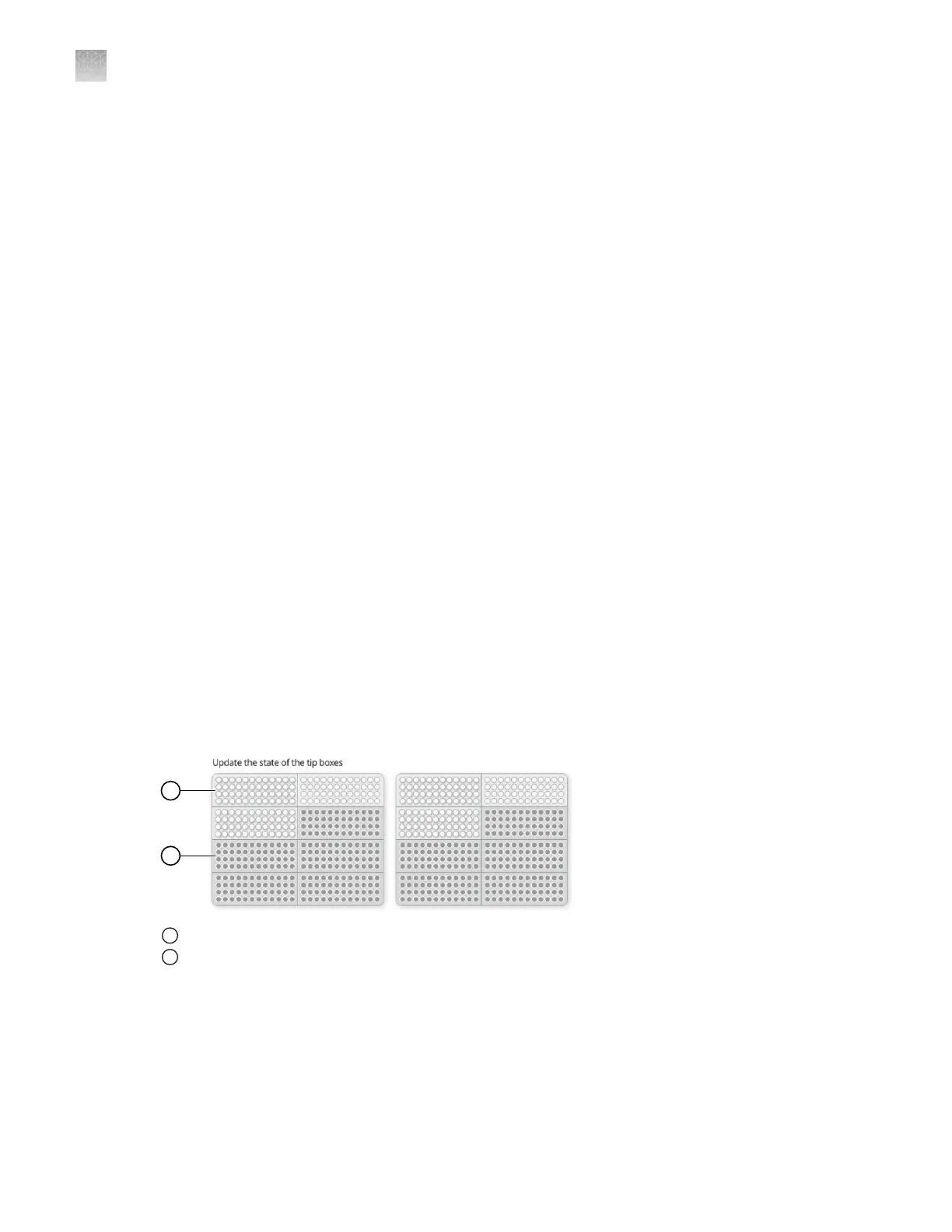
Click each tip box so that the status on the Tip Pickup Test tab matches the physical tip box in
the instrument.
1
Tip box full
2
Tip box empty
4.
Enter a number in the Run 1 of field.
The number specified in this field is the total number of times that the instrument performs the tip
pickup test sequentially.
5.
Click Start test.
The status of each task in the tip pickup test is displayed.
Appendix D
Manage the service settings
Perform diagnostics tests
D
80
QuantStudio
™
12K Flex OpenArray
™
AccuFill
™
System User Guide













 To Next Page