• Number of Failed Sample Pickups
• Number of Attempted Tip Injections
• Number of Failed Tip Injections
• Number of Plate Holder Locks
• Number of Door Locks
• Number of Missed Interrupts
Copy or save the instrument statistics
View the instrument statistics (see “View the instrument statistics” on page 76).
1.
Click Copy all to copy the instrument statistics.
The statistics are copied to the computer clipboard and can be pasted into a text editor.
2.
Click Save as, then navigate to a folder to save the instrument statistics.
The statistics are saved as a TXT file.
View the status of the sensors
1.
Click Service4Diagnostics.
2.
Select the Sensor Management tab.
The sensors and the status of each sensor are displayed at the top of the screen.
3.
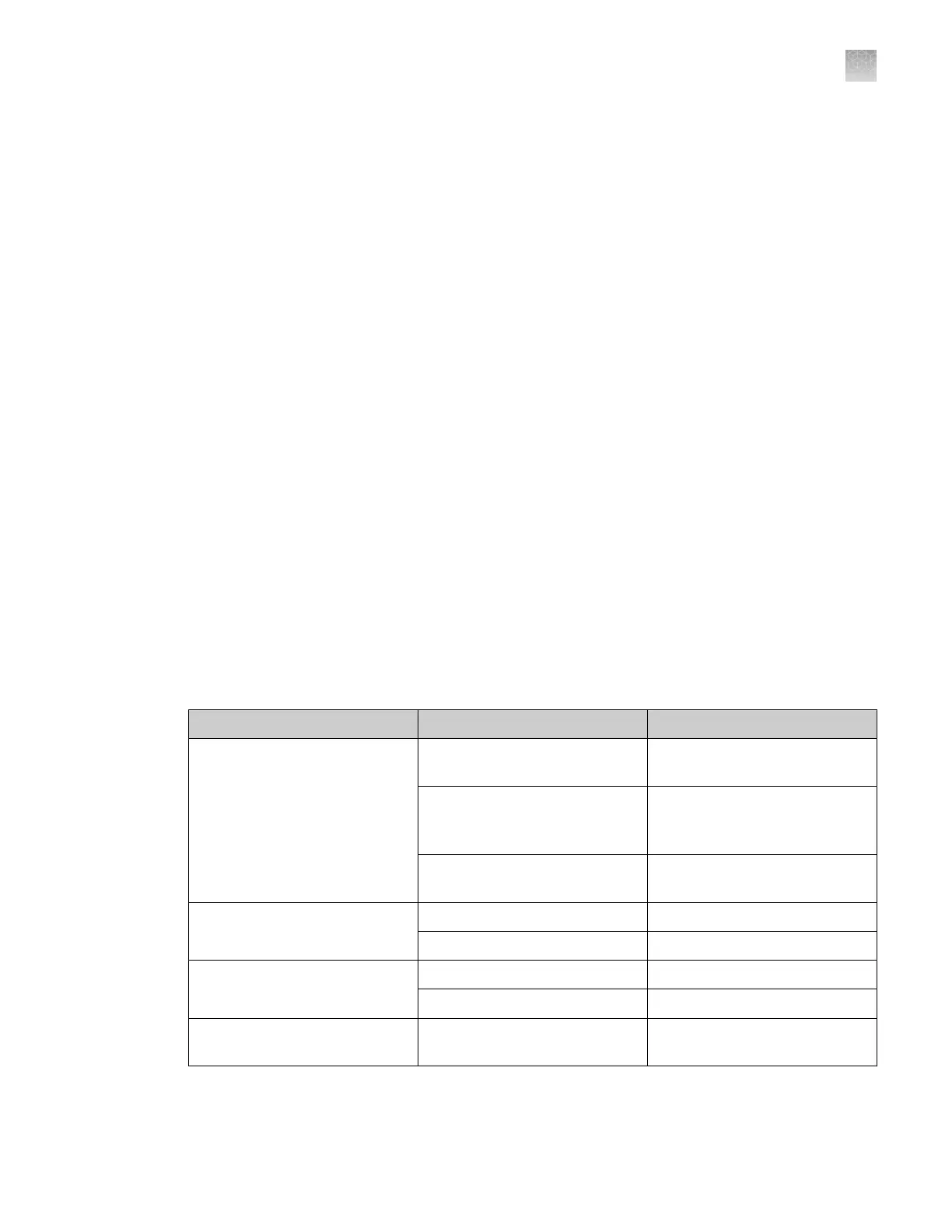
View the status of each sensor.
Sensor type
Color Status
Presence sensor
Blue The sensor for the item is
detected.
Black The sensor for the item is
enabled but the object is not
detected.
Grey The sensor for the item is
disabled.
Door closed
Blue The door is closed.
Black The door is open.
Door locked
Blue The door is locked.
Black The door is unlocked.
Actuators (tip ejection magnet,
plate holder lock)
Blue The sensor for the item is
detected.
Appendix D Manage the service settings
Copy or save the instrument statistics
D
QuantStudio
™
12K Flex OpenArray
™
AccuFill
™
System User Guide
77













 To Next Page