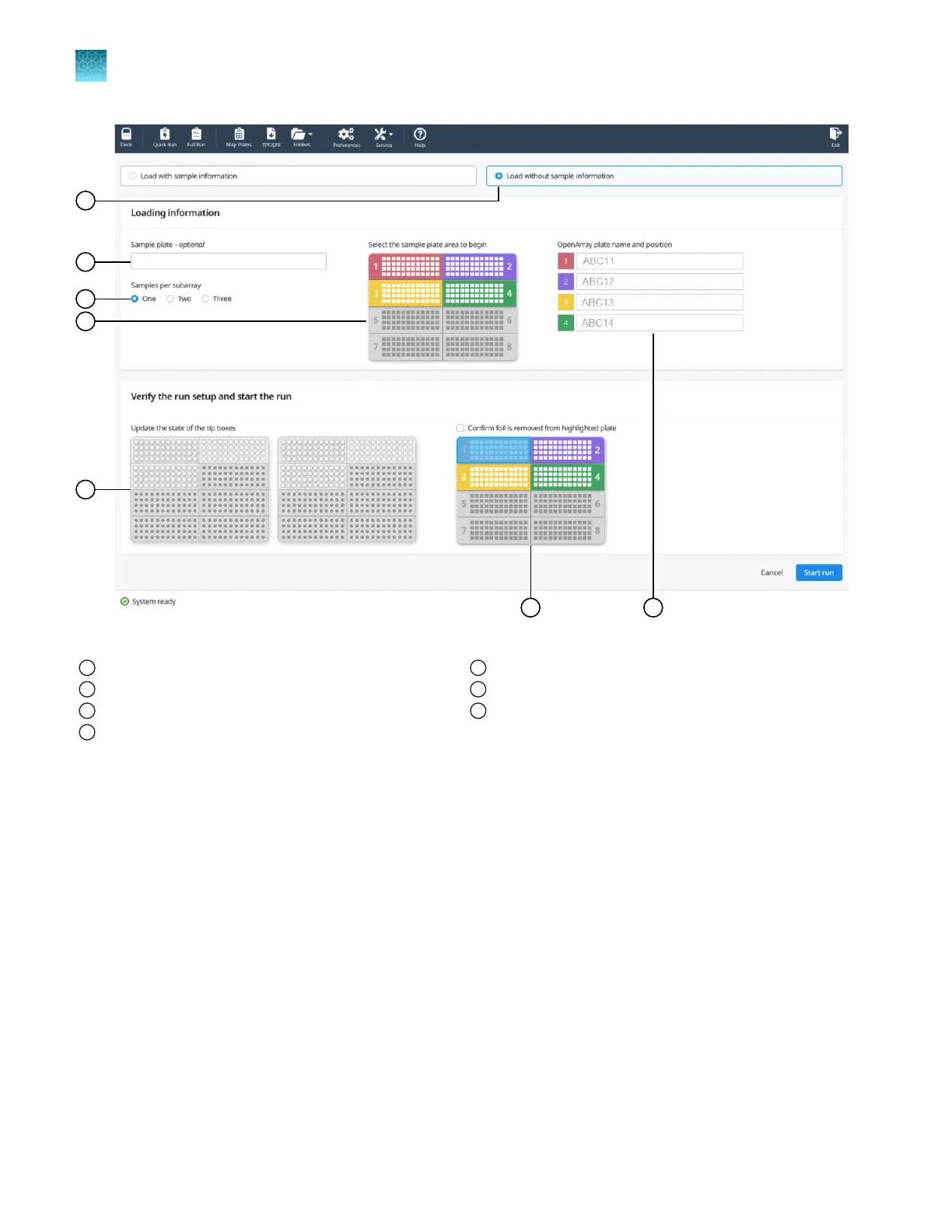
Figure 22 Configure run pane (without sample plate information)
1
Load plate without sample information radio button
2
Sample plate name or serial number
3
Samples per subarray
4
Sample plate (color-coded to correspond to the OpenArray
™
Plate)
5
Tip box status
6
Sample plate (to confirm foil is removed)
7
OpenArray
™
Plate name and position
Before you begin—quick run workflow
•
If samples are prepared in a 96-well plate, map the samples to a 384-well plate (see “Map a
384-well plate from 96-well plates” on page 30).
•
Ensure that you have the files required for your workflow, for example, a sample file in CSV format
or a TPF or SPF file.
•
Prepare samples (DNA and PCR reaction mix) in a 384-well plate, according to the user guide or
the application guide for your assay. Distribute the samples according to the layout determined in
the Map Plates workflow.
•
Place the sample plate in the sample plate holder on the instrument deck, with the notch to the left.
Do not stack sample plates.
Chapter 6
Set up and start the run with the quick run workflow
Before you begin—quick run workflow
6
42
QuantStudio
™
12K Flex OpenArray
™
AccuFill
™
System User Guide













 To Next Page