Adding 1 1 kg (25 lb) W eights
For traction unit/attachment congurations that require up to 2 weights (1 1 kg or 25 lb each) :
1. Refer to your authorized T oro distributor to order the W eight Bracket Kit (Part Number 144-0480).
2. Install the W eight Bracket Kit; refer to the kit Installation Instructions .
For traction unit/attachment congurations that require more than 2 weights (1 1 kg or 25 lb each): [e.g.,
traction unit Model 31900A equipped with MSC23345 and 31990]
1. Refer to your authorized T oro distributor to order the following parts:
Part Name
Quantity
Part Number
Bolt (3/8 x 4 inches)
2 323-16
Nut (3/8 inch)
2 3256-3
W eight (1 1 kg or 25 lb)
1 144-0484-03
W eight Bracket Kit (includes mounting hardware
and 2 weights)
1 144-0480
2. Perform the following steps per your specic situation:
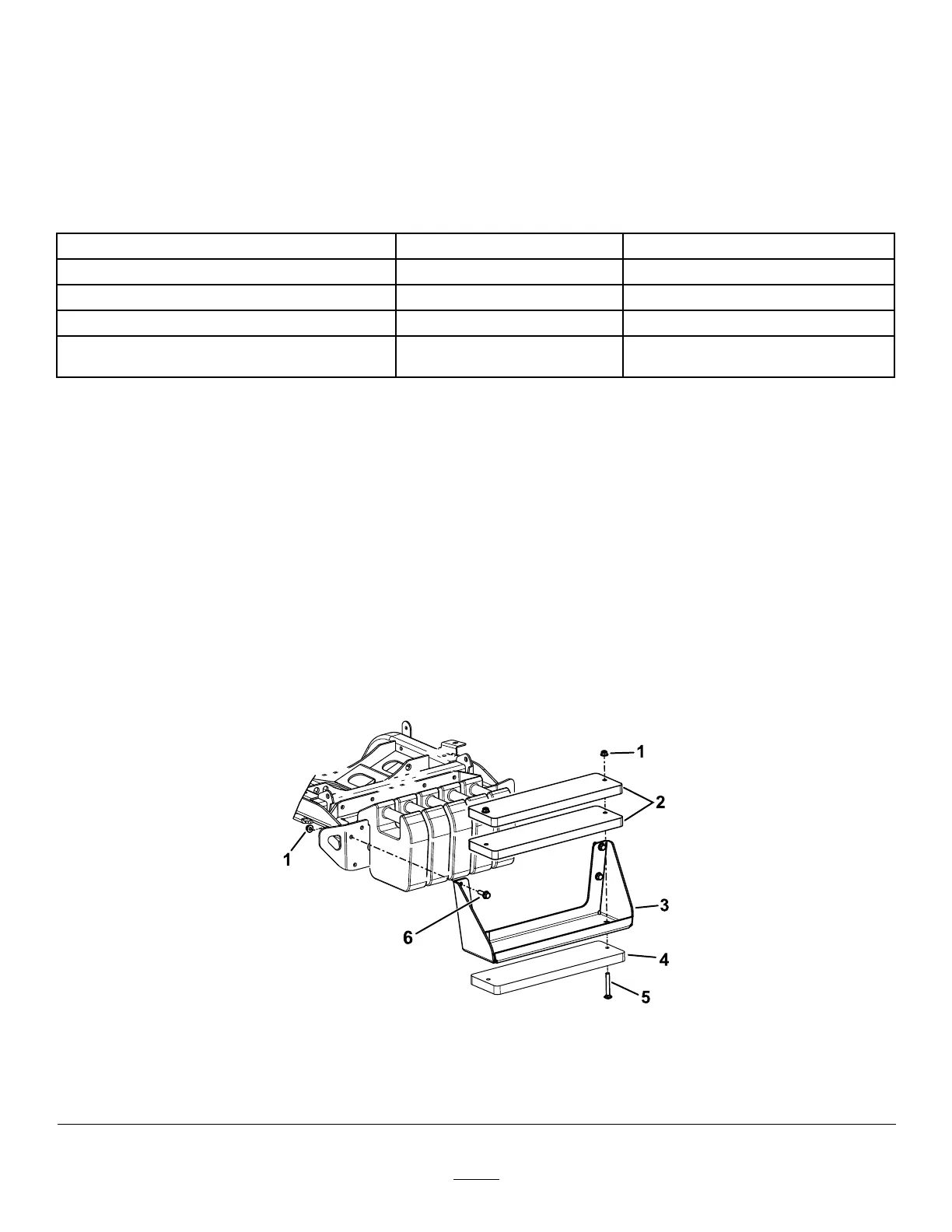
Note: Refer to Figure 21 for these steps.
• For yet-to-be-installed W eight Bracket Kits:
A. Use the bolts (3/8 x 4 inches) and nuts (3/8 inch) to secure the 3 weights to the bracket ( Figure 21 ).
B. Use the hex-head bolts and nuts (included in the kit) to secure the weight bracket to the machine
( Figure 21 ).
• For previously installed W eight Bracket Kits:
A. Remove the weight bracket from the machine ( Figure 21 ).
Retain the hardware.
B. Remove the existing hardware that secures the weights to the bracket.
C. Use the bolts (3/8 x 4 inches) and nuts (3/8 inch) to secure the 3 weights to the bracket ( Figure 21 ).
D. Use the previously removed hardware to secure the weight bracket to the machine ( Figure 21 ).
g331756
Figure 21
1. Nut (Part Number 3256-3)
4. Additional weight
2. W eights (included with kit) 5. Bolt (Part Number 323-16)
3. W eight bracket
6. Hex-head bolt (included with kit)
26


 To Next Page