V7 / V9
750 50 0042 03 25
7.4 Resolution
To modify the display resolution, press the key shown
alongside.
7.5 Buffer Management
Each measurement is stored in the buffer. It can contain 9999 values.
7.5.1 Deleting Values from the Buffer
Deleting the last value from the buffer
To delete the last value from the buffer, press the key
shown alongside.
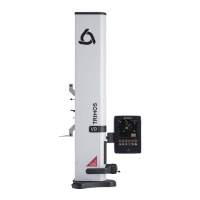
Deleting specific lines from the buffer
It is possible to delete specific lines from the buffer To do
this, select the lines to be deleted on the touchscreen and
press the delete key.
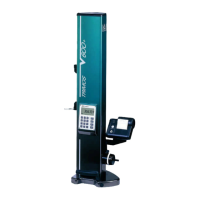
Deleting the buffer completely
To delete the buffer completely, press the same key for 2
seconds and then confirm the choice.
> 2 s



 To Next Page