V7 / V9
750 50 0042 03 55
10.2 Programming a Sequence
Programming a new measurement sequence starts with
pressing the next button.
Then just make the measurements exactly as if the
instrument was used normally. Each action is stored and
displayed as a program step.
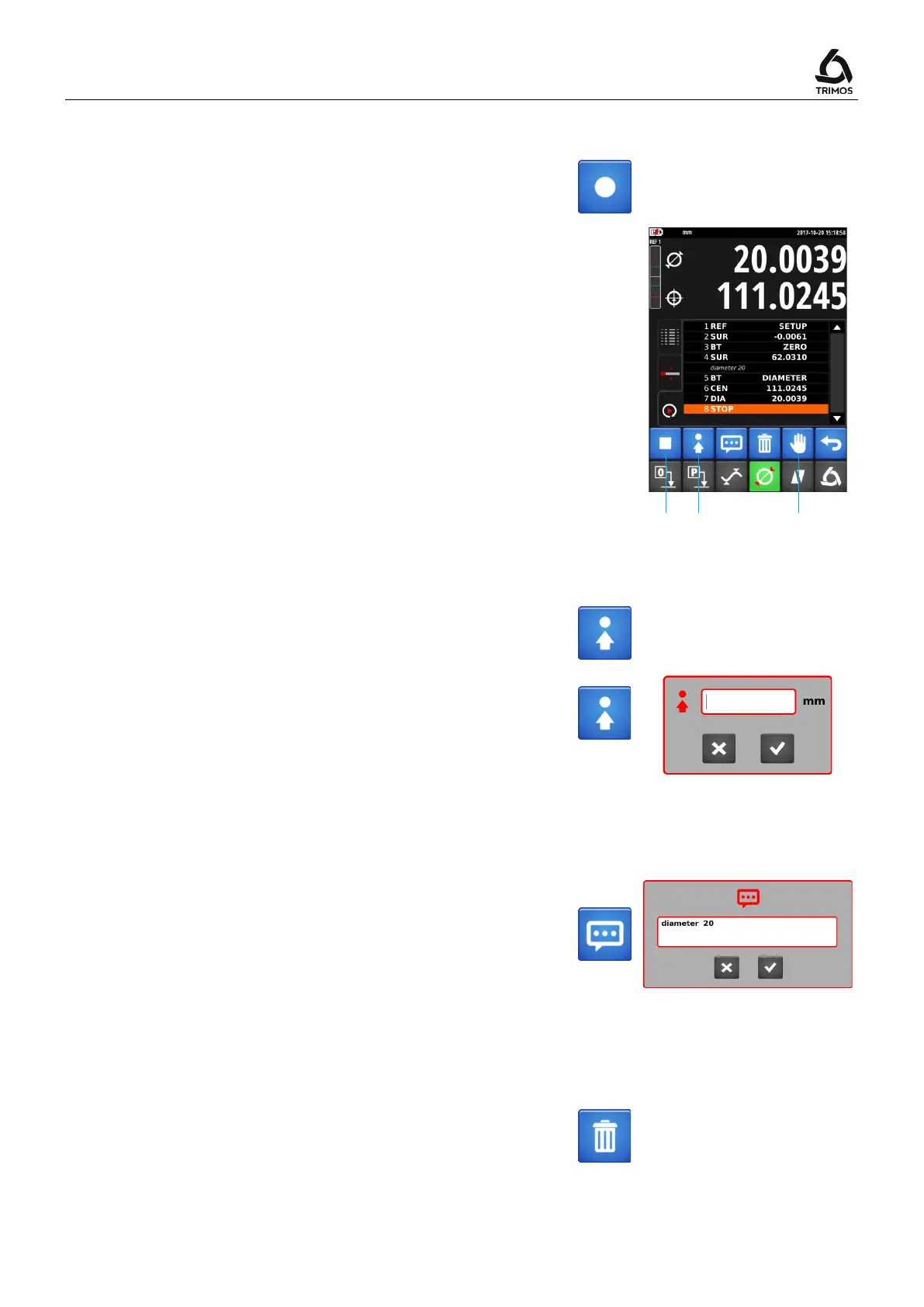
In programming mode the menu displays new functions:
1. Stop - terminate programming
2. Position - Sends the carriage to a target position
3. Pause - Temporarily stops the program (eg to allow
part positioning)
10.2.1 Moving to a Target Position
This function sets the current position as "target". When
running the program in motorized mode, the instrument
will move to this position.
By pressing the same key for 2 seconds, it is possible to
manually enter the position at which the probe is to be
positioned.
>2 s
10.2.2 Comments
Each program step can be commented to guide the user
in the measurements to be made.
1. Select a line in the programming buffer before which a
comment is to be inserted.
2. Press the key opposite and enter the comment (up to
50 characters).
3. After confirmation, the comment appears above the
selected line.
10.2.3 Deleting a Step from the Sequence
At any time a program line can be erased. To do this,
select the line to be displayed and press the following
button.



 To Next Page