77
77
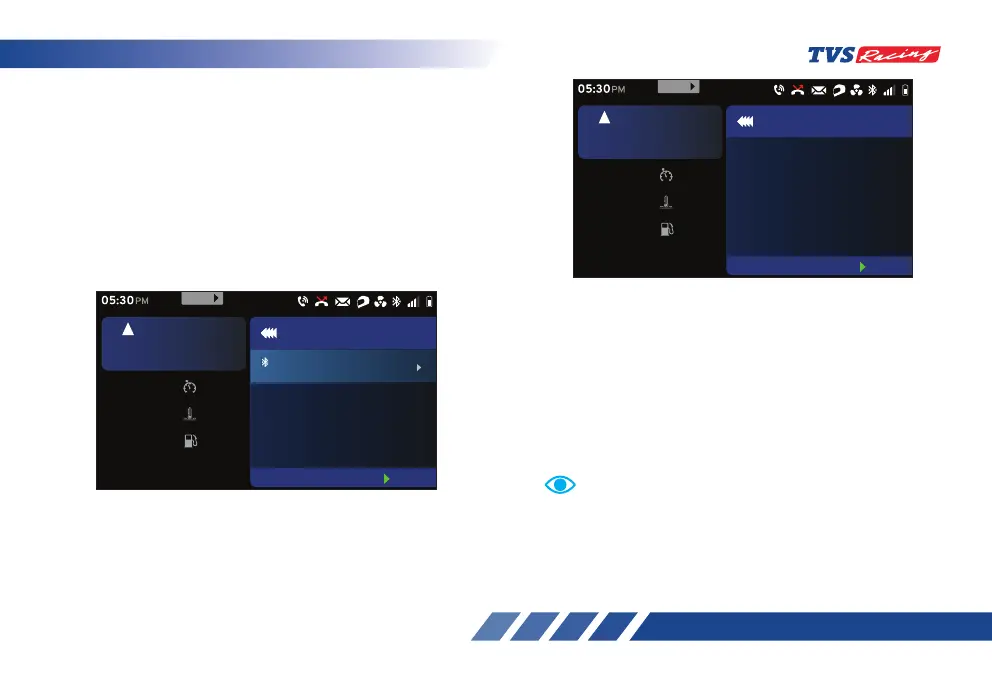
Paired devices:
By selecting this option you can view the list of
devices paired with the connected TFT instrument
cluster. To select paired device option:
- After entering the ‘Connectivity’ menu, select
the ‘Paired devices’ option using ‘Up’ (D2) or
‘Down’ (D3) arrow (ref. Fig. 24).
- Once the ‘Paired devices’ option is selected,
press the ‘ENT’ (D1) button.
• To remove the paired device from the TFT
instrument cluster, press the ‘ENT’ button on the
selected device name.
• To add new device to the TFT instrument cluster,
navigate to the ‘Pair new device’ tab and press
the ‘ENT’ button. Refer page 103 for the
detailed procedure of pairing a new device.
• Incase there is no device connected to the
TFT instrument cluster, the cluster displays the
message ‘Currently there is no paired devices’ as
shown.
Set
km/h
60
oc
Coolant Temp 30
km
Range 30
rpm
6700
5
km/h
URBAN
05:30
PM
Paired Devices
Amar Ok
Forget
DISCONNECTED
999
MENU
Pair new device
Set
km/h
60
oc
Coolant Temp
30
km
Range
30
rpm
6700
5
km/h
URBAN
05:30
PM
Paired Devices
Currently there is no paired
devices
999
MENU
Pair new device
Telephony features are disabled in ‘Track’ mode for a
safe ride.
Note













 To Next Page