PaX-i (PCH-2500) User Manual
95
7. Acquiring CEPH Images
F. Place the ear rods along the patient’s
ear canals. Make sure that the ear rods
are comfortably, yet rmly in place.
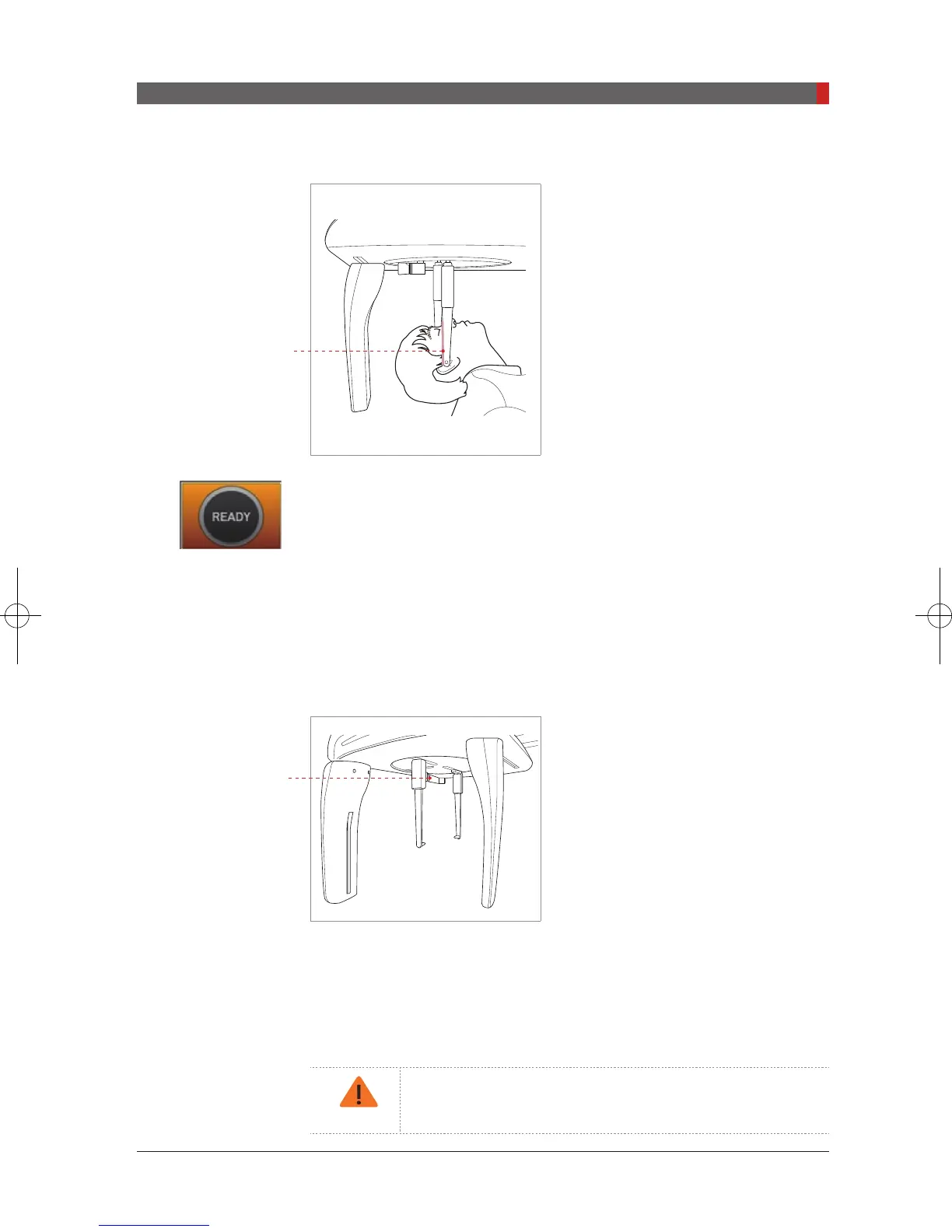
G. Gently tilt the patient’s head back until
his/her Frankfurt plane is perpendicular to
the oor, as shown below.
H. Click the
Ready
button after the patient has been properly positioned. No
X-Ray will be emitted at this point. The CEPH sensor and the 2
nd
collimator will
enter positioning mode.
I. Proceed to section
7.4: Initiating X-Ray Exposure.
7.2.4 Waters View Mode
Follow the procedure below to prepare and position the patient for Waters View
mode image acquisition.
A. Widen the distance between the two
ear rods.
B. The nasal positioner should be ipped
to the side and up to prevent it from
obstructing the image acquisition.
C. Guide the patient to the CEPH unit.
D. Ask the patient to stand upright facing the sensor. Make sure that the
patient’s shoulders are level and that his/her neck is relaxed.
E. Adjust the height of the unit to suit the patient by pressing the column up/
down button or switch (optional).
After adjusting the column to suit the height of the patient,
t the ear rods along the patient’s ear canals.
Frankfurt plane
Nasal positioner
Pi_u272_en_20180514.indd 95 2018-05-14 오전 11:03:29













 To Next Page