Videojet DataFlex 6530 Operator Manual - Rev AA 4-9
Startup
2. Open a new shrink-wrapped roll of ribbon, and unwind about 12 inches of ribbon (30 cm).
The spool holders on the cassette have different colored discs:
• The black disc is for the new roll of ribbon.
• The silver disk is for the empty roll.
When the printer is running, the new ribbon unwinds from the black holder, and winds onto
the silver holder.
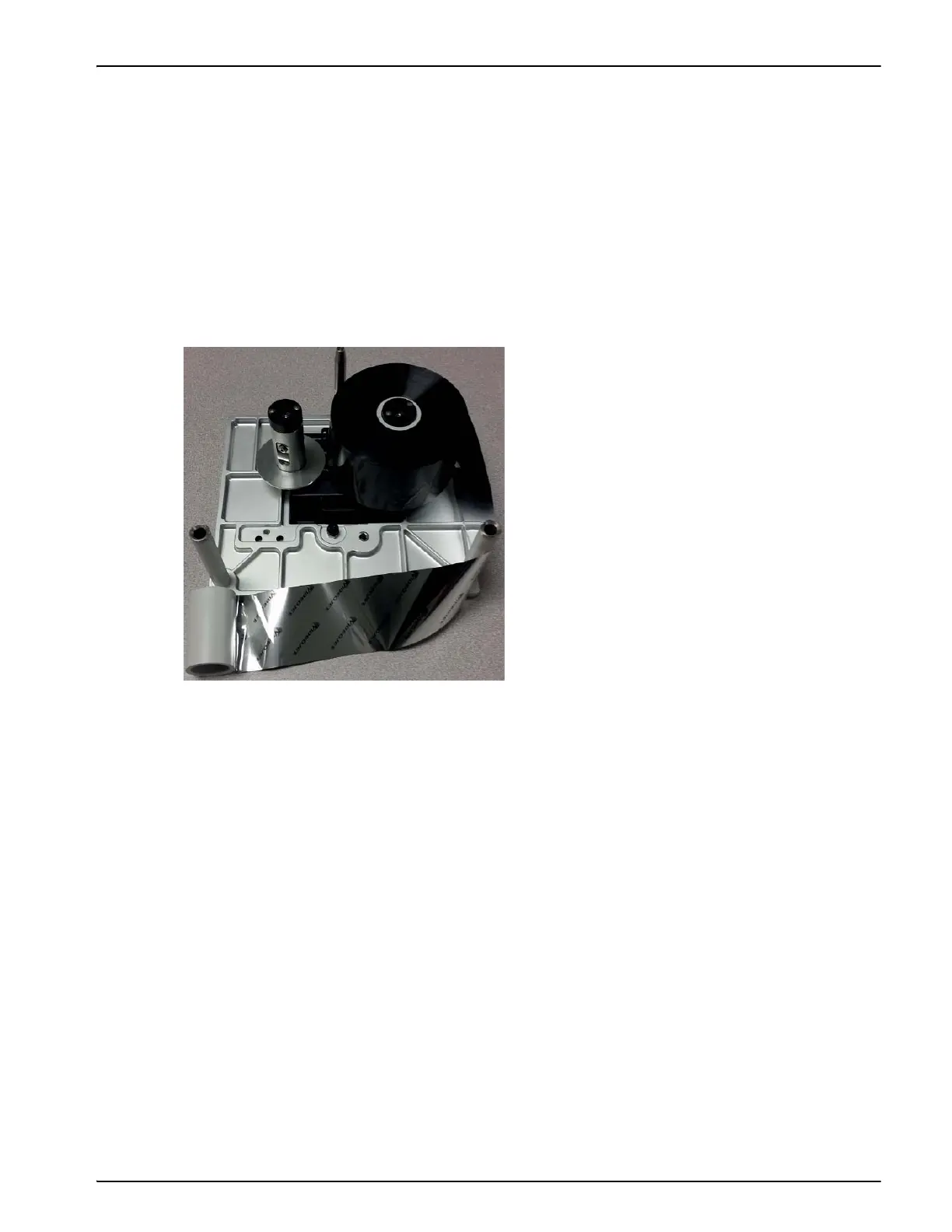
3. Slide the full spool onto the holder that has the black disc. The roll should be located such
that the ribbon unwinds in the direction as shown in Figure 4-12.
Note: Ensure that the spool is pushed completely down onto the holder.
4. Route the ribbon so that it:
• unspools from the outside of the full roll
• goes around the outside of the white roller that is nearest to the full roll
• runs along the bottom of the cassette
• goes around the outside of the second white roller
• passes around the outside of the empty spool
5. Slide the empty spool completely down onto the holder that has the silver disc.
Figure 4-12: Ribbon Spool Installation



 To Next Page