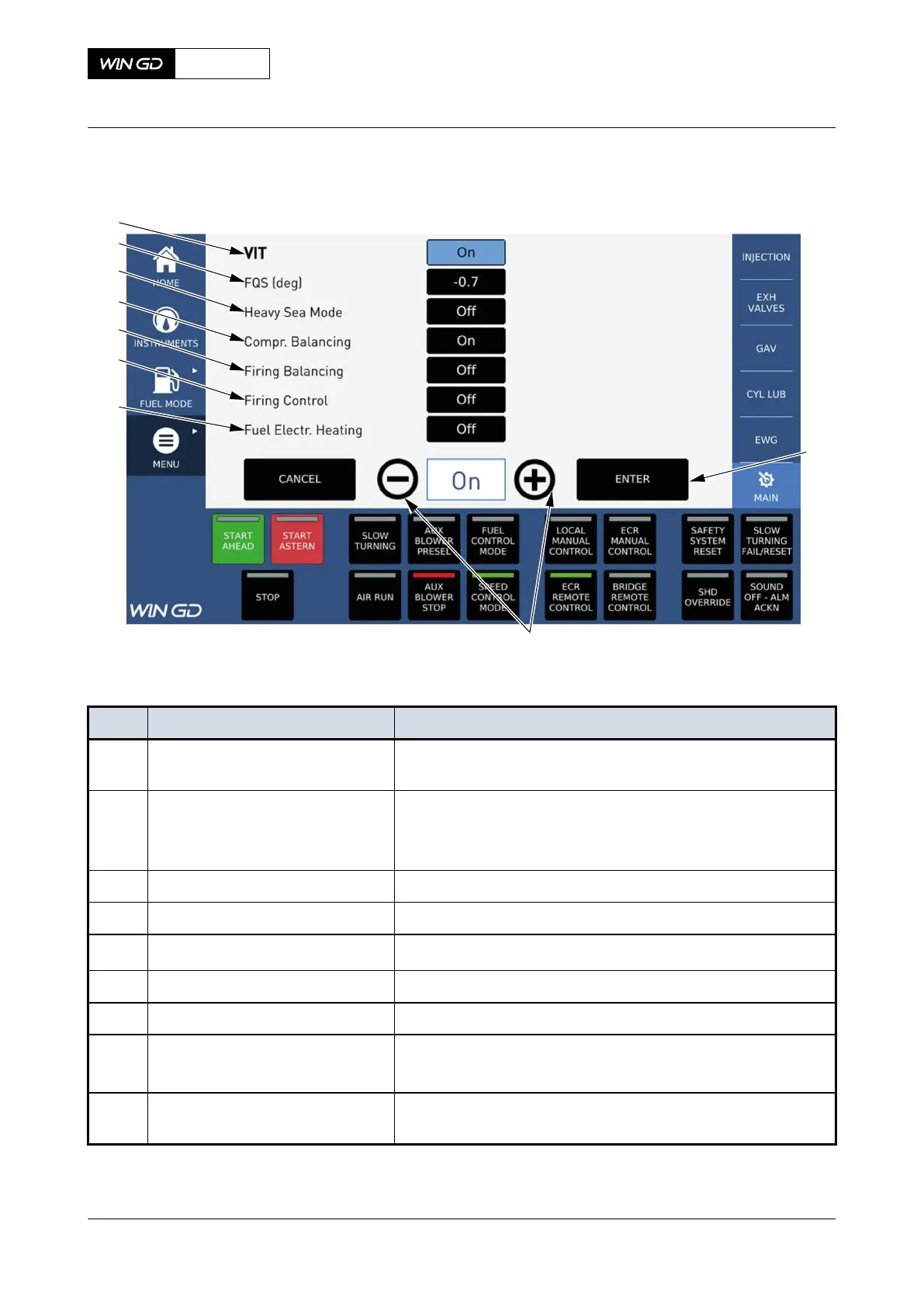
Fig 6-20 MCP page - Adjust user parameter
001
002
003
004
005
006
007
008
009
Tab 6-11 MCP page - Adjust user parameter
Item Function Effect
001 Enter field Makes the related adjustable user parameter option non-ad-
justable
002 User parameter regulators Two possible effects:
•
Increase or decrease user parameter value or
•
Set user parameter value to ON/OFF
003 Fuel Electr. Heating Shows the fuel electr. heating is ON/OFF
004 Firing Control Shows the firing control is ON/OFF
005 Firing Balancing
Shows the firing balancing is ON/OFF
006 Compression balancing Shows the compression balancing is ON/OFF
007 Heavy Sea Mode Shows the heavy sea mode is ON/OFF
008 FQS Shows the FQS adjustment in degree
+/-3.0° for firing pressure control
009 Adjustable user parameter Make the related adjustable user parameter option non-ad-
justable
X72-B
AA00-4618-05AAA-043B-A
Operation Manual MCP page - Adjust user parameters
Winterthur Gas & Diesel Ltd.
- 262 - Issue 003 2021-12



 To Next Page