Setups
Xerox 4112/4127 Copier/Printer 9-23
System Administration Guide
Customize Keyboard Button
Select this option for frequently used information (e.g. domain names, IP addresses, or other
related data) to create a customized button on the UI keyboard screen.
Note
You can customize one button only, not multiple buttons.
1. From the Customize Keyboard Button screen, select Change Settings.
2. Enter in your desired information that will appear on the customized button (e.g. “.com”, or
“john.doe@xerox.com”).
3. Press the Preview button to see the selection displayed on the customized button, located
in the lower, RIGHT corner of the keyboard screen.
4. Press Save.
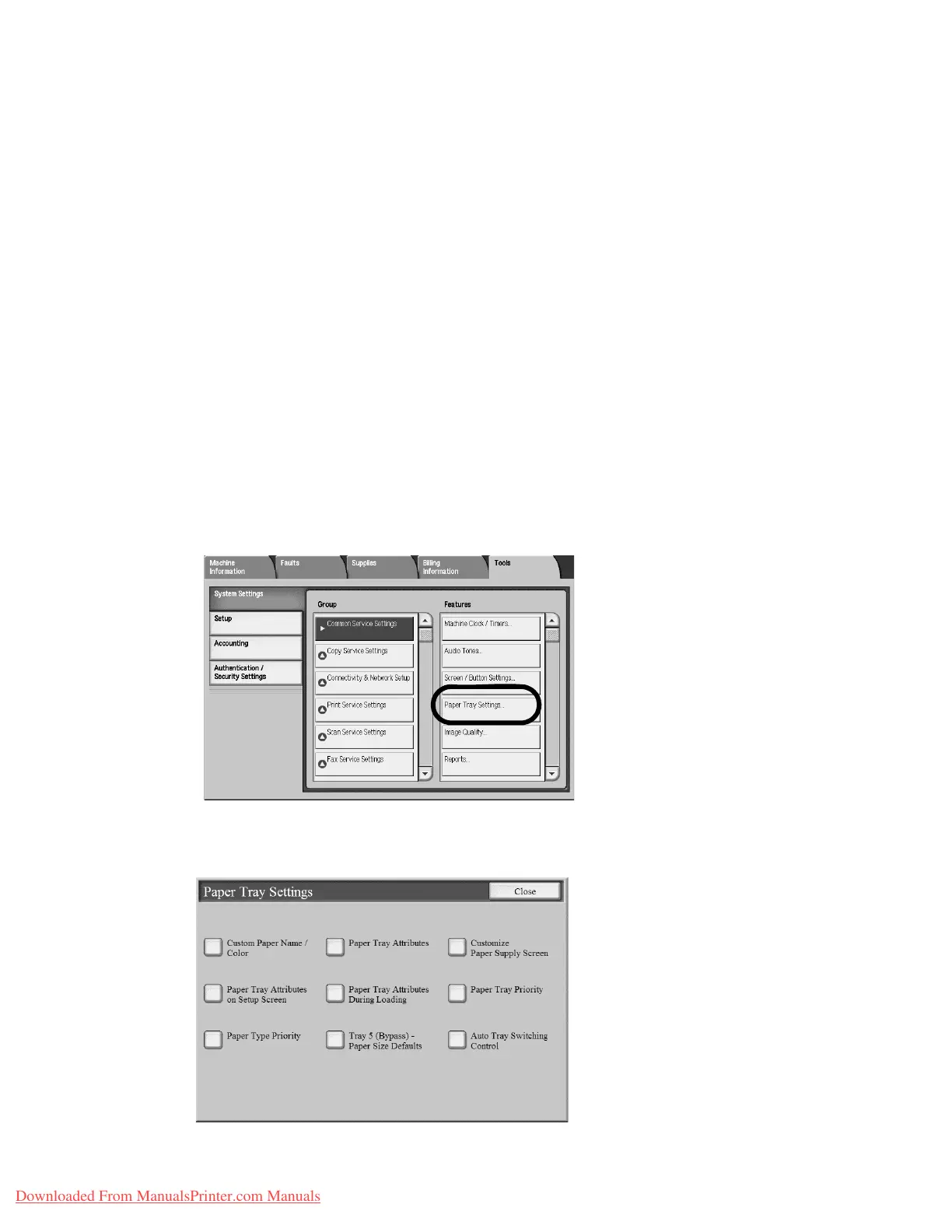
Paper Tray Settings
Set the items relating to the paper and trays, including the types of paper loaded in each tray,
the priority order of the trays, the priority order of the paper types, custom paper information,
and more.
1. From the Common Settings screen, select Paper Tray Settings.
The Paper Tray Settings screen opens.
Downloaded From ManualsPrinter.com Manuals


 To Next Page
 Loading...