PUTTING THE INSTRUMENT INTO OPERATION
Axio Vert.A1
Mounting Standard Components Carl Zeiss
05/2012 431030-7044-001 57
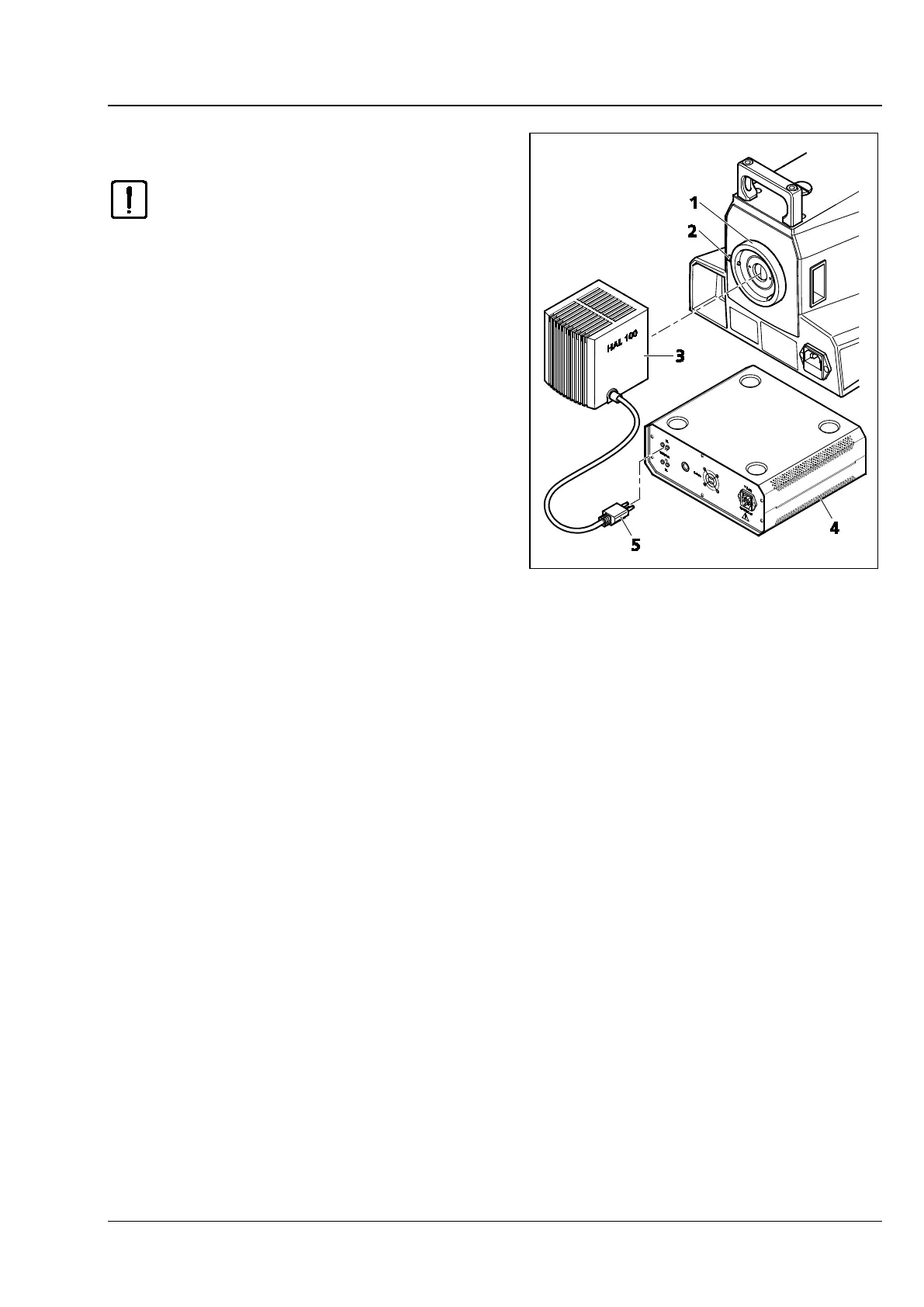
3.1.11.5 Attaching the HAL 100 Illuminator
Before using the halogen lamp, be
sure to remove the replacement tool
for the halogen lamp from the
housing, as the tool might otherwise
get damaged by the heat generated.
(See Section 3.1.13.)
The ha
operated with the
supply unit.
• Loosen the clamping screw (Fig. 3-21/2) on the
reflected light port (Fig. 3-21/1) and remove the
cap.
• Insert the illuminator housing (Fig. 3-21/3) with
the dovetail ring into the port (Fig. 3-21/1). Use
ball-headed screwdriver SW 3 and the locking
screw (Fig. 3-21/2) to fix the illuminator firmly
into position.
• Insert the plug of the HAL 100 (Fig. 3-21/5) into
the RL socket at the back of the external power
supply unit (Fig. 3-21/4).
Fig. 3-21 Attaching the HAL 100 Illuminator









 To Next Page