OPERATION
Axio Vert.A1
Illumination and Contrast Techniques in Transmitted Light Carl Zeiss
05/2012 431030-7044-001 81
Setting DIC
• Open the aperture diaphragm on the condenser completely. Put on the specimen.
• On the nosepiece, rotate in the objective suitable for DIC.
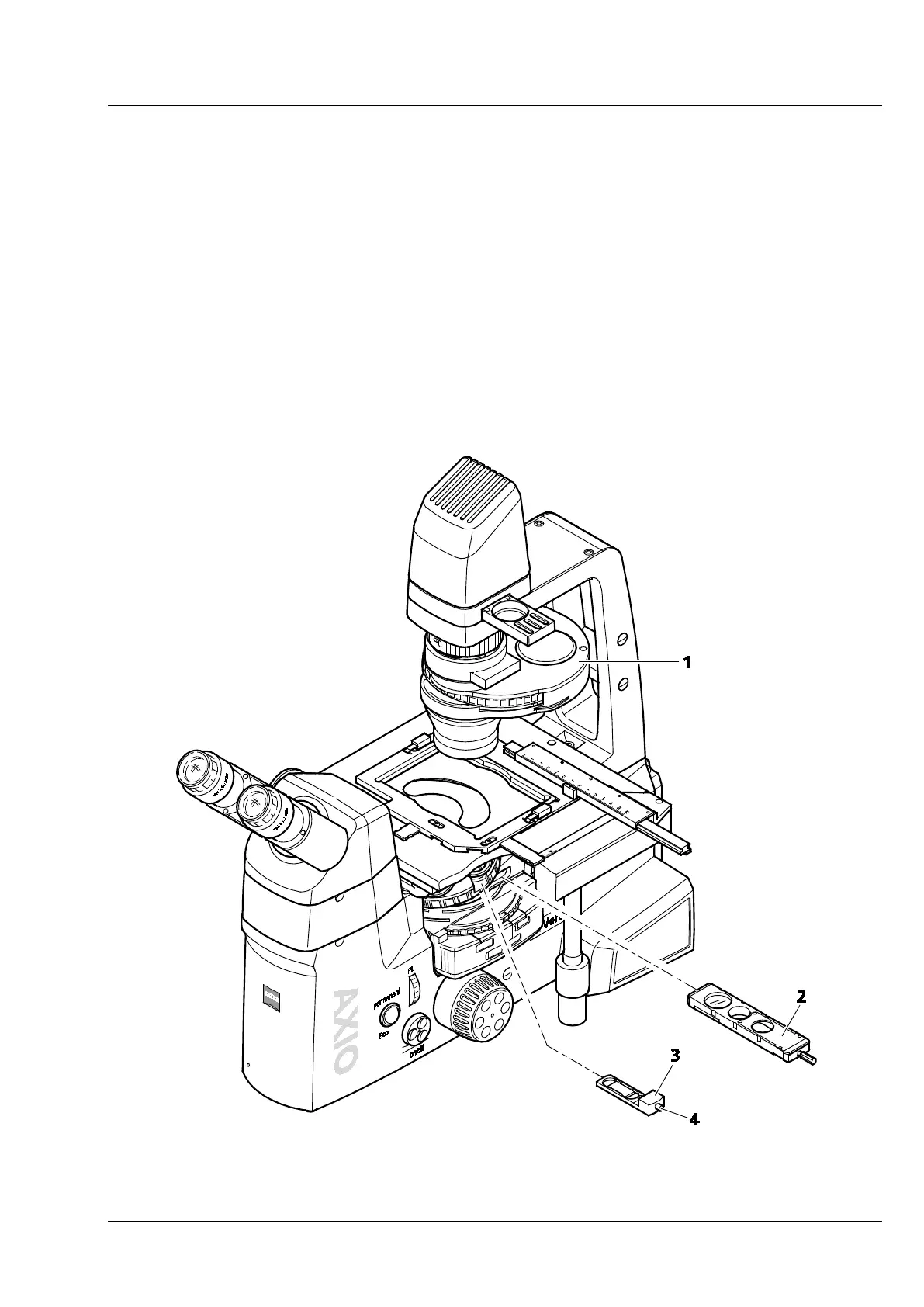
• Put the corresponding DIC slider (Fig. 4-8/3) into the slot on the nosepiece. Make sure the DIC slider
snaps safely into position.
• On the condenser, (Fig. 4-8/1) rotate the proper DIC I, II or III condenser module (as identified by the
stickers on the front of the condenser) into the light path.
• Put the three-position contrast slider (Fig. 4-8/2) with the analyzer position into the stand or rotate in
the D P&C analyzer module on the reflector turret. Watch for the correct locking position.
• Adjust optimum contrast, using the knurled thumb screw on the DIC slider (Fig. 4-8/4). By adjusting
the DIC slider symmetrically around its middle position, you can render specimen details spatially as
though they were raised or recessed.
Fig. 4-8 Setting DIC









 To Next Page