Output settings
Setting signals sent to the output jacks (Routing)
92
Setting signals sent to the output jacks (Routing) (continued)
Setting signals sent to the MAIN OUT
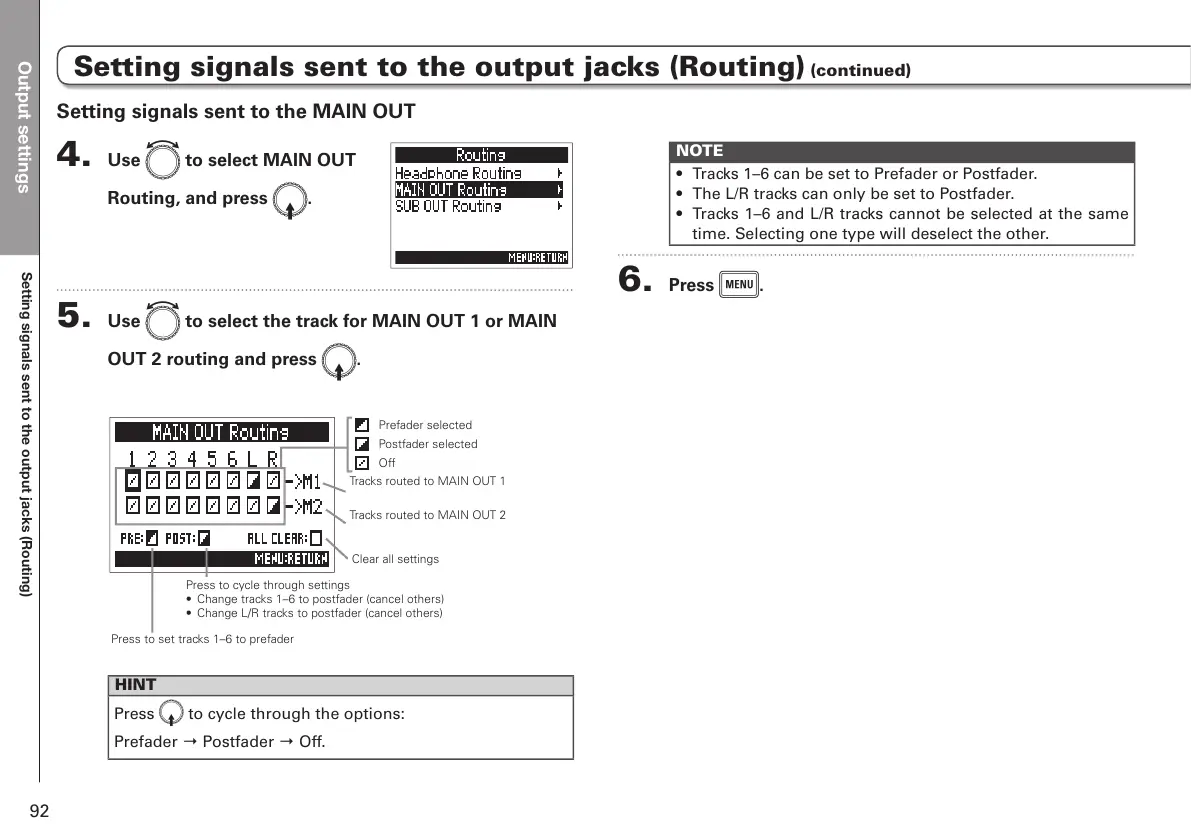
4. Use e to select MAIN OUT
Routing, and press E.
5. Use e to select the track for MAIN OUT 1 or MAIN
OUT 2 routing and press E.
Tracks routed to MAIN OUT 1
Tracks routed to MAIN OUT 2
Press to set tracks 1–6 to prefader
Press to cycle through settings
• Change tracks 1–6 to postfader (cancel others)
• Change L/R tracks to postfader (cancel others)
Prefader selected
Postfader selected
Off
Clear all settings
HINT
Press
E
to cycle through the options:
Prefader → Postfader → Off.
NOTE
• Tracks 1–6 can be set to Prefader or Postfader.
• The L/R tracks can only be set to Postfader.
• Tracks 1–6 and L/R tracks cannot be selected at the same
time. Selecting one type will deselect the other.
6. Press m.



 To Next Page