ADT-HC4500 Flame/Plasma Cutting Machine CNC System
- 41 -
1.2.2.1 Jog
Manual / Speed: / Program name:
G / G: switch Manual/Jog Ethyne control / Torch up
X X X: Set coordinates of X axis Preheating control / Torch down
Y Y Y: Set coordinates of Y axis Cutting Control / Height control
Shift Z Shift: Set coordinates of Z axis Current coordinates:
Preheating delay:
Prompt:
Enter value: Working state: Stopped / Flame
Return / Jog / Break point / Clear / Return reference / Return
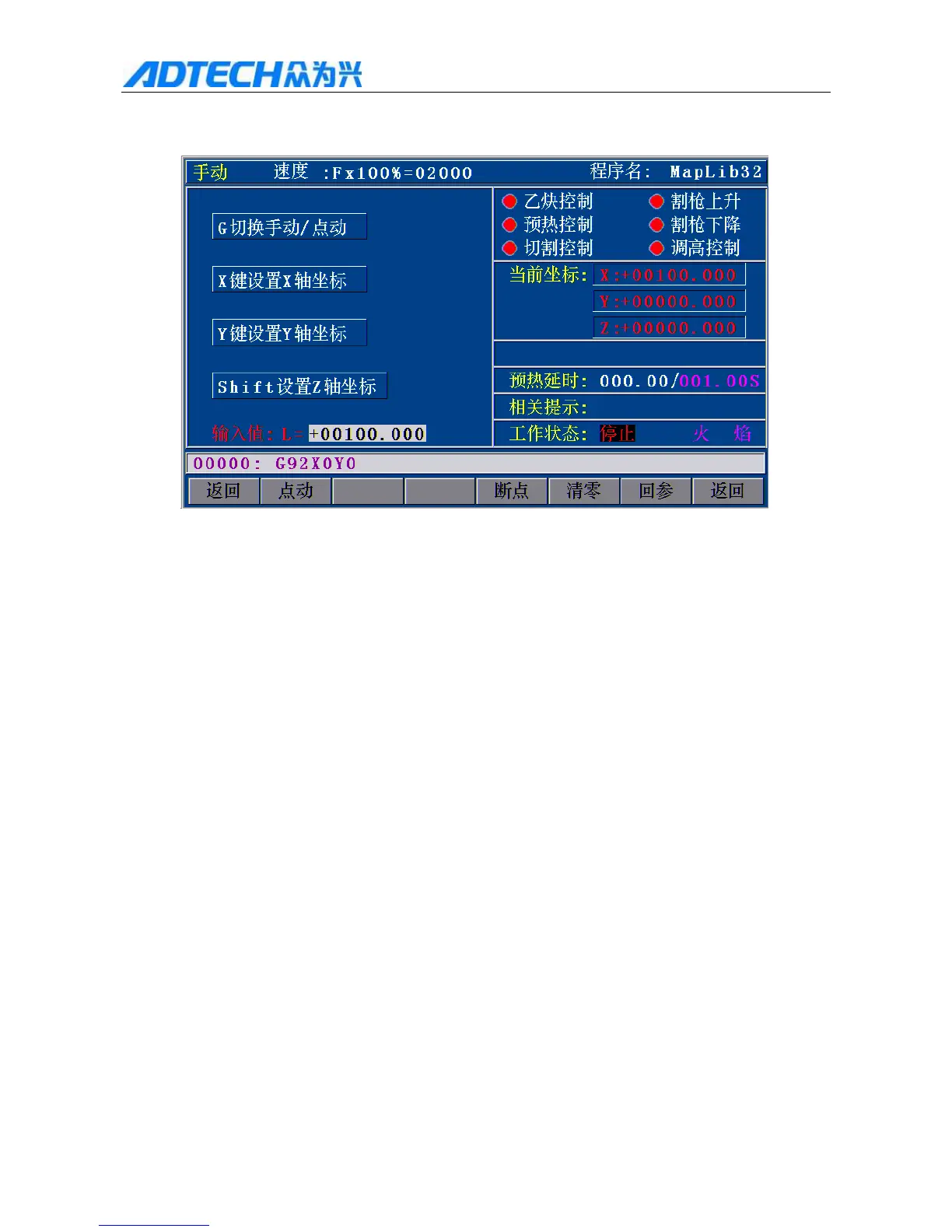
Fig. 3.1.2.2.1 Jog Setting Interface
In Fig. 3.1.2.2 Manual interface above, press [F1] (Jog) to have the interface above; at this moment, “Jog”
is highlighted, and “Input value L=” in the bottom of the screen; press number keys to enter the length
(unit: mm) of jogging. After that, press [X+], [X-], [Y+] or [Y-], and the corresponding motor moves the
entered length. The plasma has the same function (the figure is omitted).
If “Jog” isn’t highlighted, press and release [X+], [X-], [Y+] or [Y-], and every axis performs continuous
motion; when you press [X+], [X-], [Y+], [Y-] again or press [Stop], the system will decelerate and stop
motion.
If you press [G], the system will switch between Manual and Jog. In jog state, if you press and hold [X+],



 To Next Page