REF: LE5 Alcohol Tester User Manual V16.docx Page 66 © Alcolizer Technology
Uncontrolled when printed
3 4 5
12
2
1
6
7
8
9
12
11
10
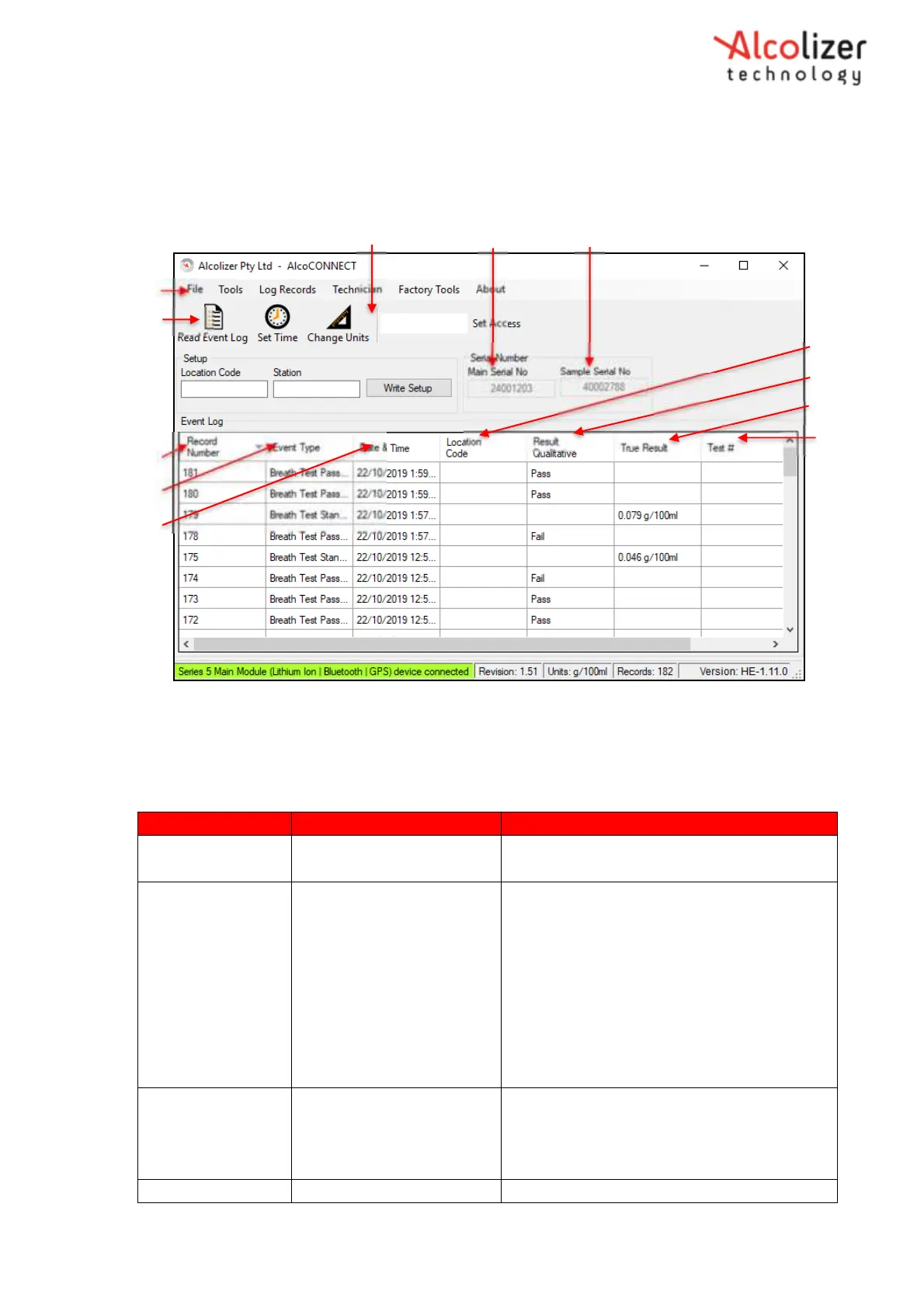
Figure 116- Event Log
20.2.1 Navigating Around the Event Log Page
Refer to Table 4 for a description of the Event Log page.
Figure Reference Icon, Button or Heading Description
1 Read Event Log Icon Select to download records from the LE5
to AlcoCONNECT Toolbox
2 File Icon Select for:
Save Event Log- Save as a .csv or xml file
to a file location in computer or
elsewhere.
Language- Choose a language if the LE5 is
configured for multiple languages.
Options- Set Log Setting. Refer to
paragraph 11.2.2 for a description of Log
Settings.
3 Set Access
Used by authorised persons to access
certain AlcoCONNECT functionality. Select
the icon after inputting correct access
code.
4 Main Serial Number The serial number of the LE5.



 To Next Page