III-11
DISPLAYS
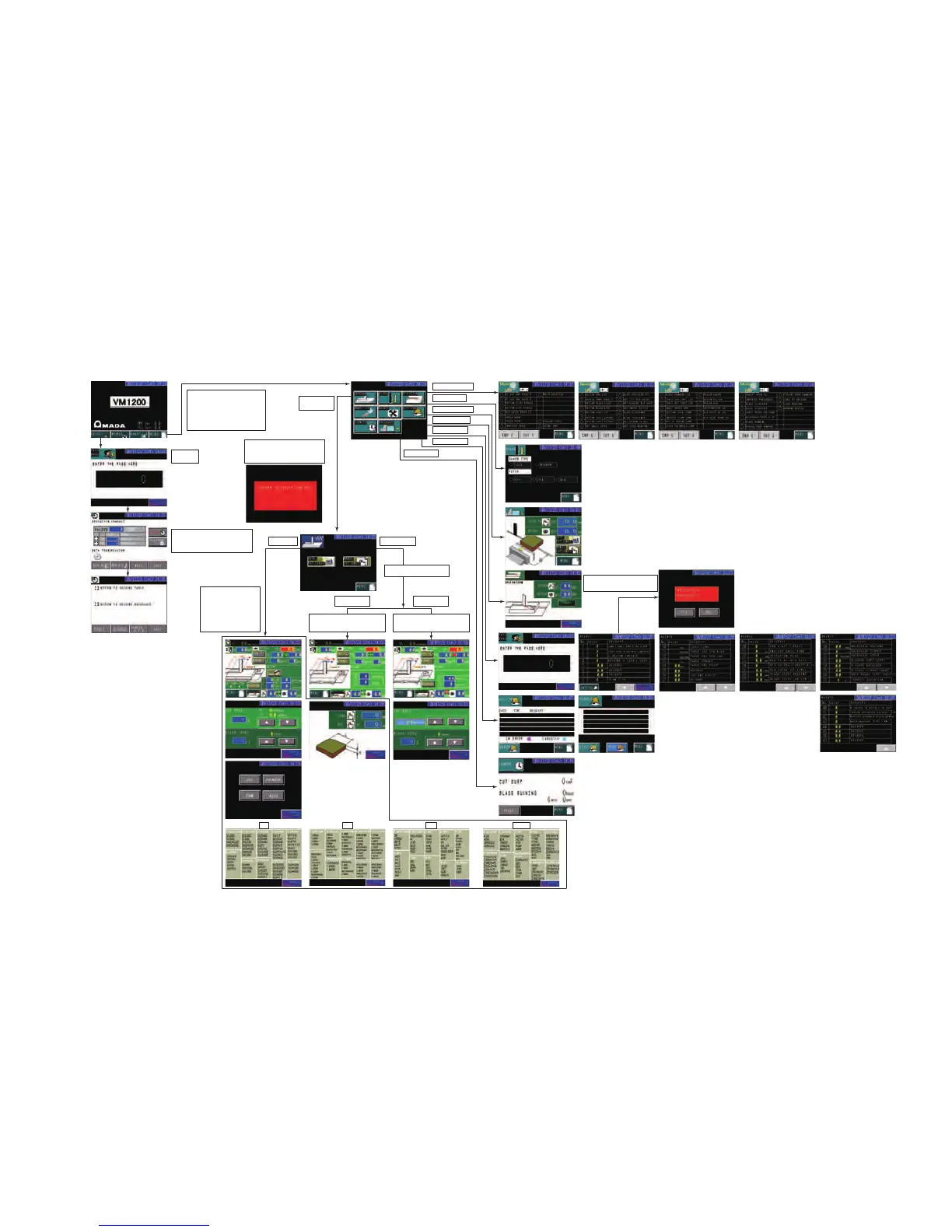
Schematic diagram of displays
Password:
“1200”
CNC input
In database transfer, data of cutting
conditions are transferred. Once data
of cutting conditions are transferred,
REGIST indication flashes.
Message display when zero-return of
upper saw blade guide, table, and
backgauge (option) has not been
completed.
Cutting conditions are
automatically set and
shown when work length (L),
height (H), and material
type are set. After start of
saw blade, cutting
conditions can be changed
on OVERRIDE display.
Touch screen goes to MENU display
when zero-return of upper saw blade
guide, table, and backgauge (option)
has been completed.
(Zero-return of table: Execute
zero-return of table on ADJUST
display.)
Enter desired cutting rate and saw blade
running speed. After start of saw blade,
cutting conditions can be changed by
entering desired values.
Enter desired table feed speed and saw
blade running speed. After start of saw
blade, cutting conditions can be changed
on OVERRIDE display.
JIS DIN AISI AFNOR
Manual input
Monitor I/O display
BLADE display
BACKGAUGE display
DEVIATION display
MAINTENANCE display
HIST. ERR display
COUNTER display
PROGRAM
display
Confirmation display when
INITIALIZE button is pressed.
Input method can be changed
by setting parameter.
Table feed speed
"mm/min" input
Cutting rate
"cm
2
/min" input



 To Next Page