IV-14
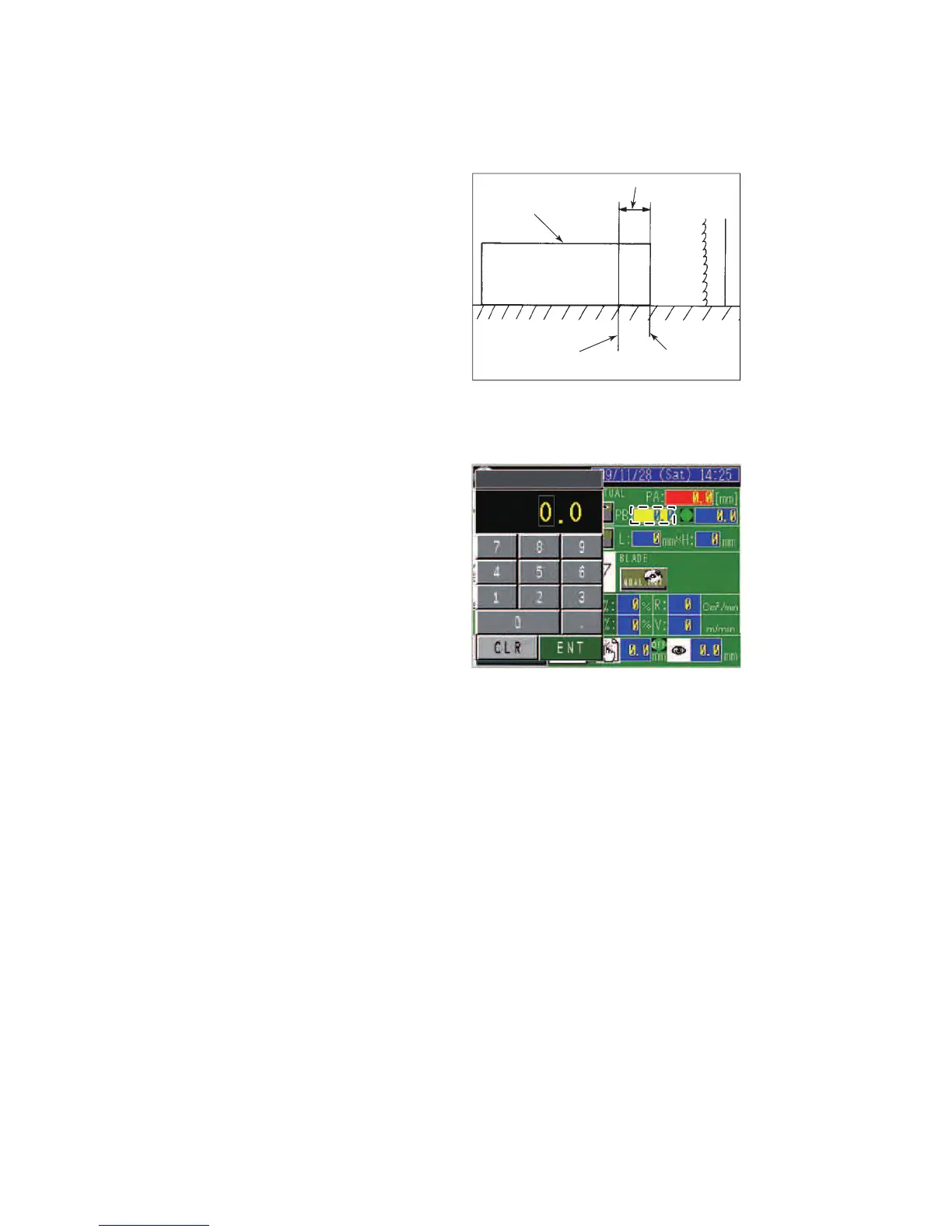
Setting cutting length
S
et the cutting length to
suit the work length or
depth of cut as described
below.
When the table moves over
the set length, the machine
automatically stops.
When the table moves over
its stroke length, the
machine stops.
WORK TO
BE CUT
DEPTH OF CUT
WORK CUTTING
END POSITION
WORK CUTTING
START POSITION
Relative coordinate system
Set in the PB field the cutting length to suit the depth of cut.
1 Press the PB field to
open the numeric
keypad.
2 Press the 0 to 9 and •
keys to set the cutting
length.
3 Press the ENT key.
When the work contacts the saw blade after the start of cutting feed,
press the CLR button to illuminate the RELATIVE COORDINATE light.
The field at the right of the PB field shows zero and then shows the
table move distance.
When cutting proceeds and the value shown in the field at the right of
the PB field reaches the value shown in the PB field, the cutting feed
stops.
Absolute coordinate system
When cutting the work completely, check that the work length (L) is set
in the L field.
After the start of cutting feed, the cutting feed stops when the table
move distance reaches the work length (L) shown in the L field.



 To Next Page