Email
- 71 -
♦ There must be no spaces or dashes within an SMS address. Do not include a
PABX prefix (such as 9 or –)
♦ You may include only one SMS address in the To: box – note that subsequent
SMS addresses will be ignored.)
♦ If your email message is longer than 160 characters, SMS will discard the
remainder (as well as any text typed in the Subject: box) – only the first 160
characters will be displayed on the recipient's mobile phone.
As SMS text messages are sent via land and mobile network service providers,
Amserve cannot guarantee their delivery.
Do not send messages with picture or sound attachments to an SMS address –
such messages will not display correctly on mobile phones.
Viewing weblinks from email
➣
FAST TRACK: Display message, press INTERNET, select weblink.
You can surf directly to weblinks sent to you within an email message. This saves you
the task of copying down addresses from the email message and then typing them in
later when you enter Amsurf.
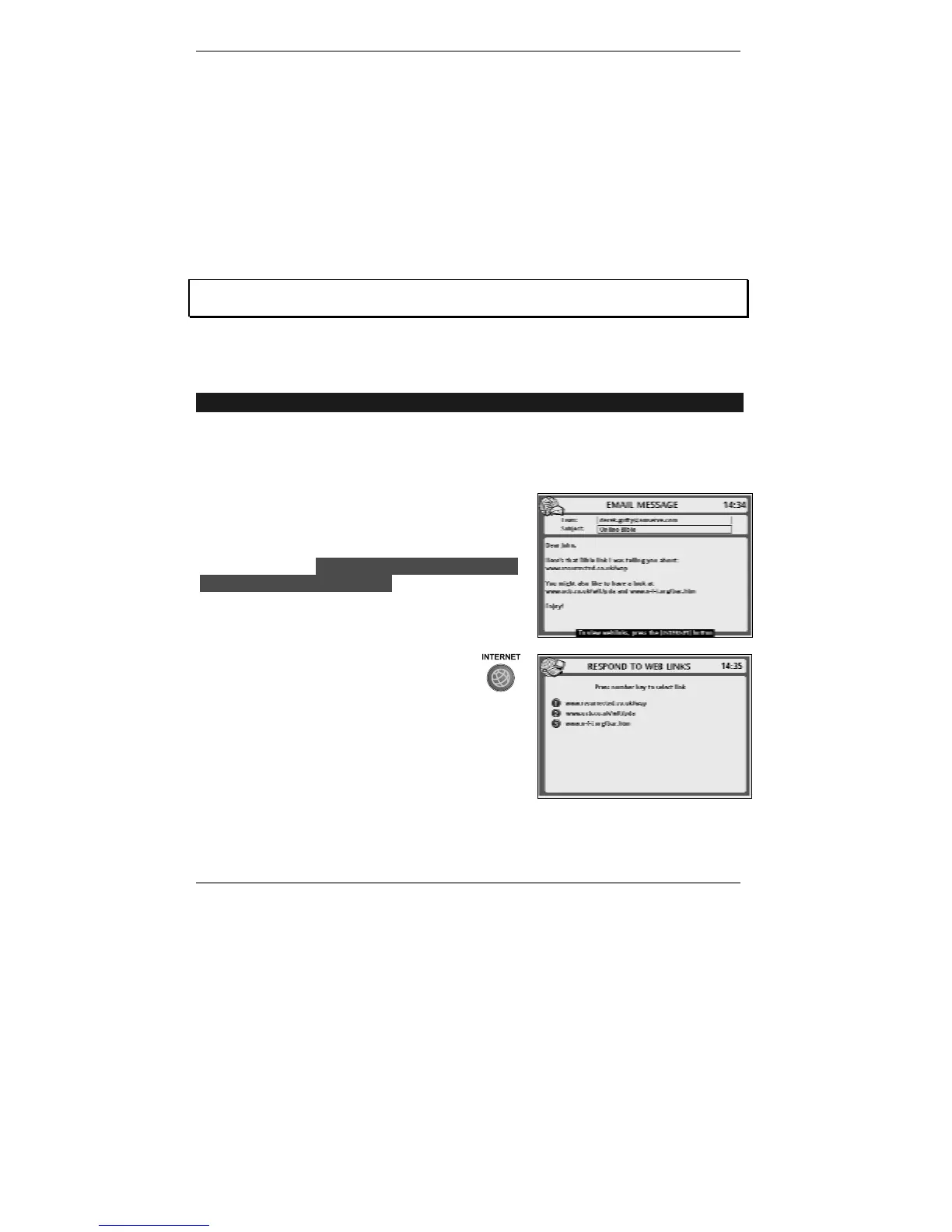
1. Display the message containing the
weblink(s), for example:
Note, if a valid web address is detected, you will
see the message lTo view weblinks, pressl
lthe [INTERNET] buttonl at the bottom of the
screen (see right).
2. Press INTERNET to display a list of
web-links, for example (right):
3. Press the appropriate number to select the
required weblink. The
e-m@iler will connect to
Amsurf and display the selected site.
Normal Amsurf charges apply. See page 79 for full information about surfing
the internet using Amsurf.



 To Next Page