21
COMBIFIT installation, use and maintenance manual
GB
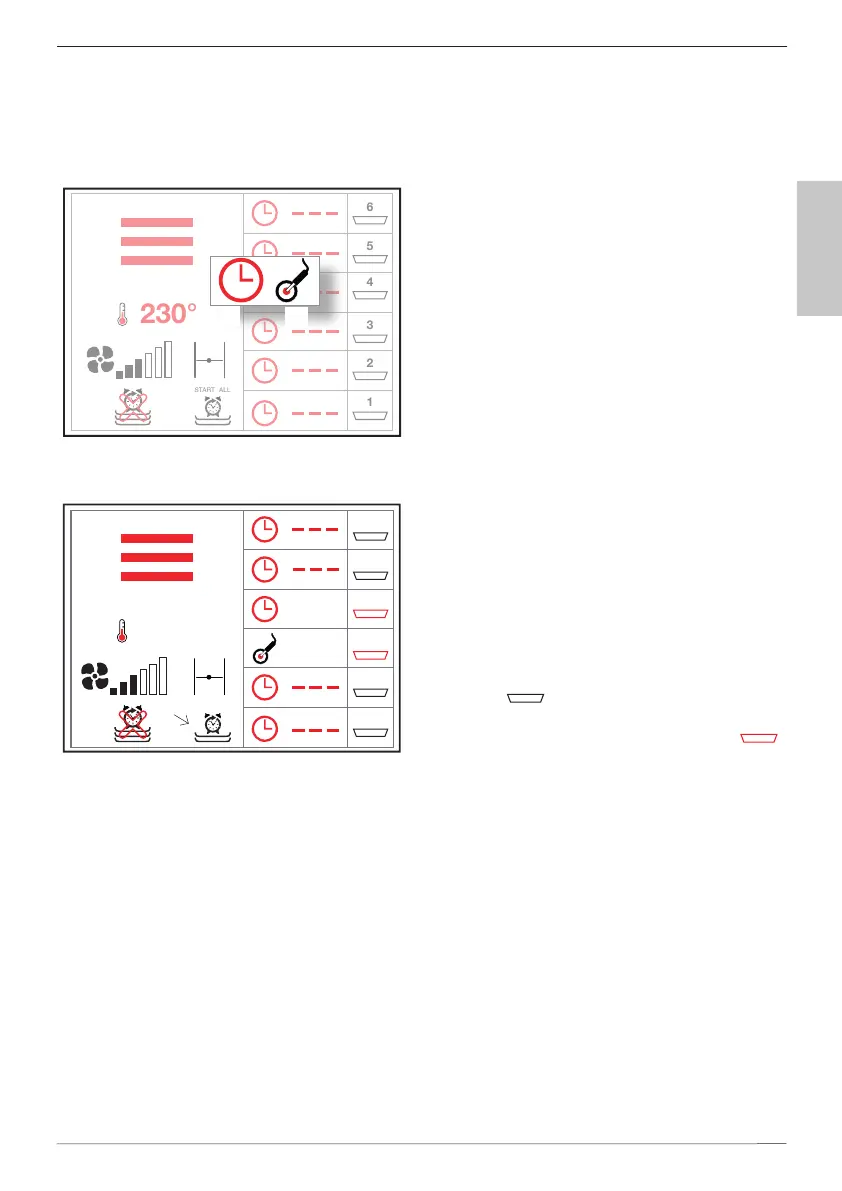
Set the timer or core probe temperature to the desired level by select-
ing the relative level. A pop-up will be displayed, enabling you to select
the timer () or core probe () mode. Select the desired mode, and set
the value by turning the dial MM or the
pop-up.
ON the left side of the screen it
is possible to set or modify the
cooking parameters (mode, tem-
perature, fan, etc.)
RACK CONTROL can be
used in two different modes:
with oven in STOP mode
(programming);
with oven in START mode
(cooking already started).
Setting the values of various
levels with the oven in STOP
mode; one you have pressed the
Start button ( 9) the
oven will start cooking with the
values set for: cooking mode,
temperature, etc. .. set (with the
relative automatic pre-heating
then manually start the timer/
control of core temperature for
each level by pressing on the pan
icon (
) related to the desired
level. When a level has been ac-
tivated the icon will turn red .
YOU can start all the levels at once by pressing the corresponding key
.
If you use the RACK CONTROL mode, instead, with the oven set to
START, after you have set the timer or core probe temperature value,
the value set.
Upon reaching the set core temperature or at the end of the time set
on the relative level, on display appears the writing END and the oven
emits an acoustic signal. At this point you can open the oven door and
-
matically.
when a level is completed and the writing END appears on the
relative level, the oven enter the Stop mode, but continues
5
6
4
3
2
1
230°
START ALL
5
6
4
3
2
1
0:05
55°
230°
START ALL



 To Next Page