24
COMBIFIT installation, use and maintenance manual
GB
-
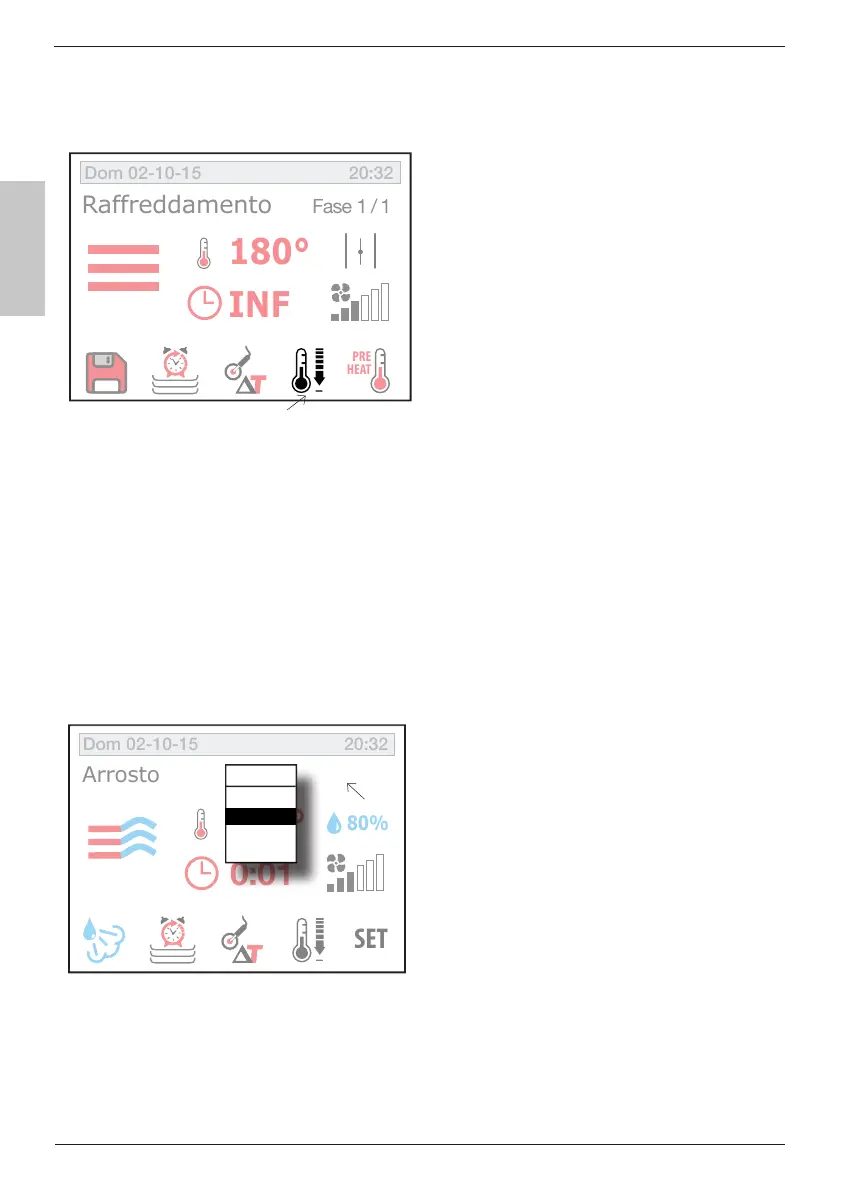
perature in the cooking chamber.
cooking chamber, the oven shoud
be set to Stop mode. Select the
cooling key (), press
Start (page ) and open the
door.
By default, the oven sets a cool-
ing temperature up to 50 ° C inside the cooking chamber;HOWEVER,
you can set a different value following the procedure described in the
cooking temperature setting section (page ).
Upon reaching the cooking temperature, the oven stops cooling and
emits an acoustic signal.
Every single cooking phase described above can be stored for compos-
ing a cooking program with multiple phases.
press the key
you will access the hidden menu
().
M clockwise show-
ing the writing “New” and con-
M or
click directly on the word “New”.
Now you can enter the cooking
parameters of the second phase.
IF you repeat the steps above, you can enter into the same cooking
program up to 9 different phases.
INF
Fase 1/1
Dom 02-10-15 20:32
180°
INF
PRE
HEAT
Raffreddamento
80%
Dom 02-10-15 20:32
180°
INF
SET
Arrosto
0:01
Fase
1
New?



 To Next Page