A3 PLUS - A5 - A6 PLUS - L6
SURGICAL SINGLE CART
5.1.1.1.2. LONG FLUSHING CYCLE SETTING (LCD Touch console only)
We recommend performing this operation at the beginning of
each working day.
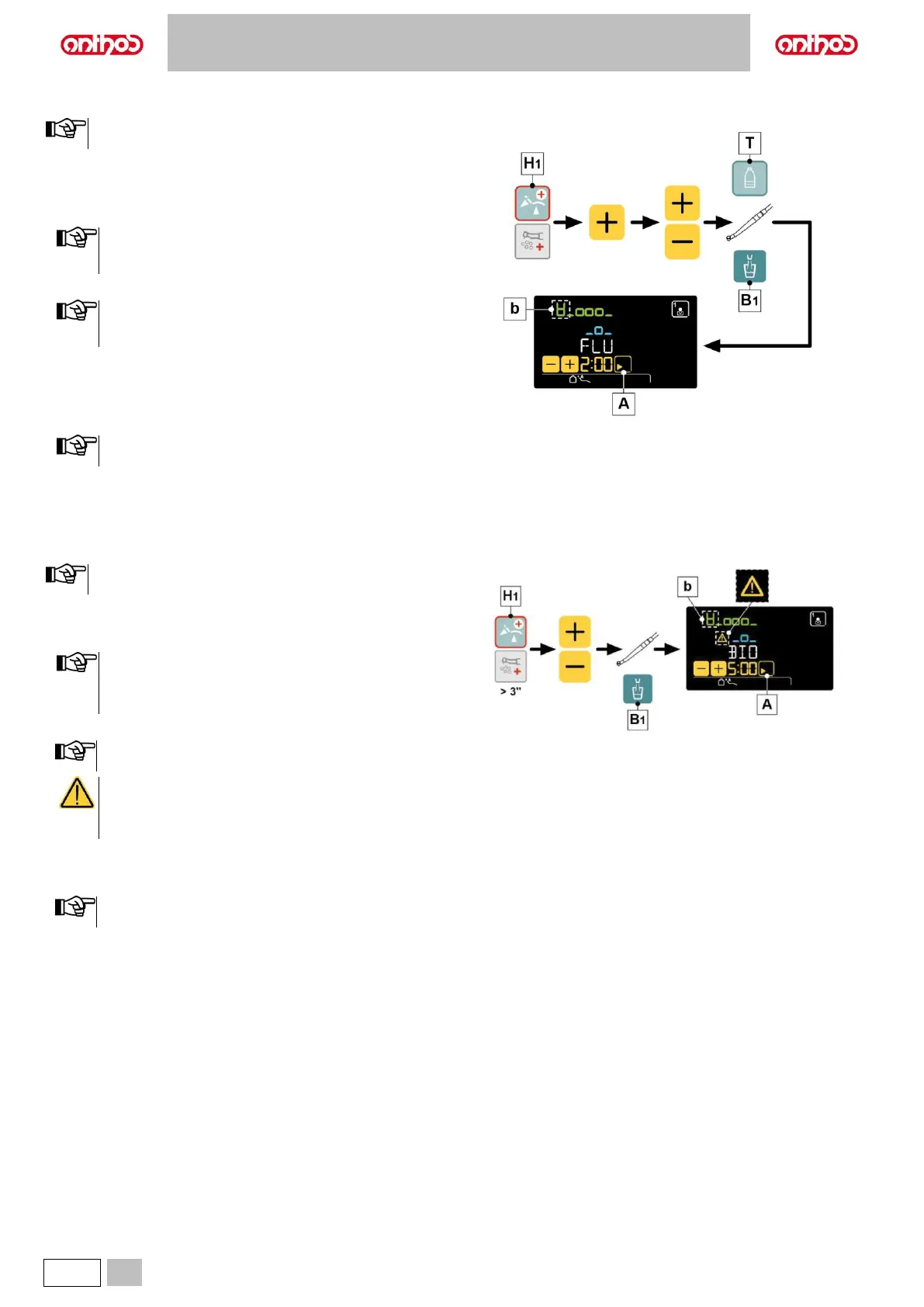
Performing the cycle.
• Press button (H1) on the assistant's board to select the FLUSHING
cycle.
• Press the “+” touch button to select the LONG FLUSHING cycle.
When independent water supply is used for flushing,
submenu will NOT be available if level is in reserve. (see
paragraph 7.2).
• Set cycle time by using buttons “+” or “-”.
Time setting ranges from a min. of 1 minute to a max. of 10
minutes. When using the distilled water tank, do not set a
time higher than 2 minutes.
• Extract the instruments to be treated (the selected instruments will be
highlighted on the LCD Touch DISPLAY).
• Press the button (T) to activate/deactivate independent water supply
(with S.H.S. system, only).
• Press button (B1) to select/deselect the flushing of cup duct.
The selection of the cup is indicated on the display by the
icon (b).
• Press the touch button (A) to start the LONG FLUSHING cycle (see
paragraph 7.5.).
5.1.1.1.3. BIOSTER DISINFECTION CYCLE SETTING (LCD Touch console only)
We recommend carrying out this operation at the end of each
working day.
Performing the cycle.
• Press and hold the button (H1) on the assistant's board to select the
BIOSTER cycle.
Cycle will not start if:
• disinfectant tank is in reserve (see paragraph 7.4.);
• an instrument is extracted;
• there is an error in the W.H.E. system
• Set cycle time by using buttons “+” or “-“.
Time setting ranges from a min. of 5 minutes to a max. of 10
minutes.
Disinfection according to the manufacturer's
specifications is guaranteed by the 10-minute cycle, a
shorter time may not guarantee the same levels of
disinfection.
• Extract the instruments to be treated (the selected instruments will be
highlighted on the LCD Touch DISPLAY).
• Press button (B1) to select/deselect the flushing of cup duct.
The selection of the cup is indicated on the display by the icon
(b).
• Press the touch button (A) to start the BIOSTER cycle (see paragraph
7.4.).



 To Next Page