A3 PLUS - A5 - A6 PLUS - L6
SURGICAL SINGLE CART
5.1.7. CONSOLE CONTROL PANEL LOCKING BUTTON
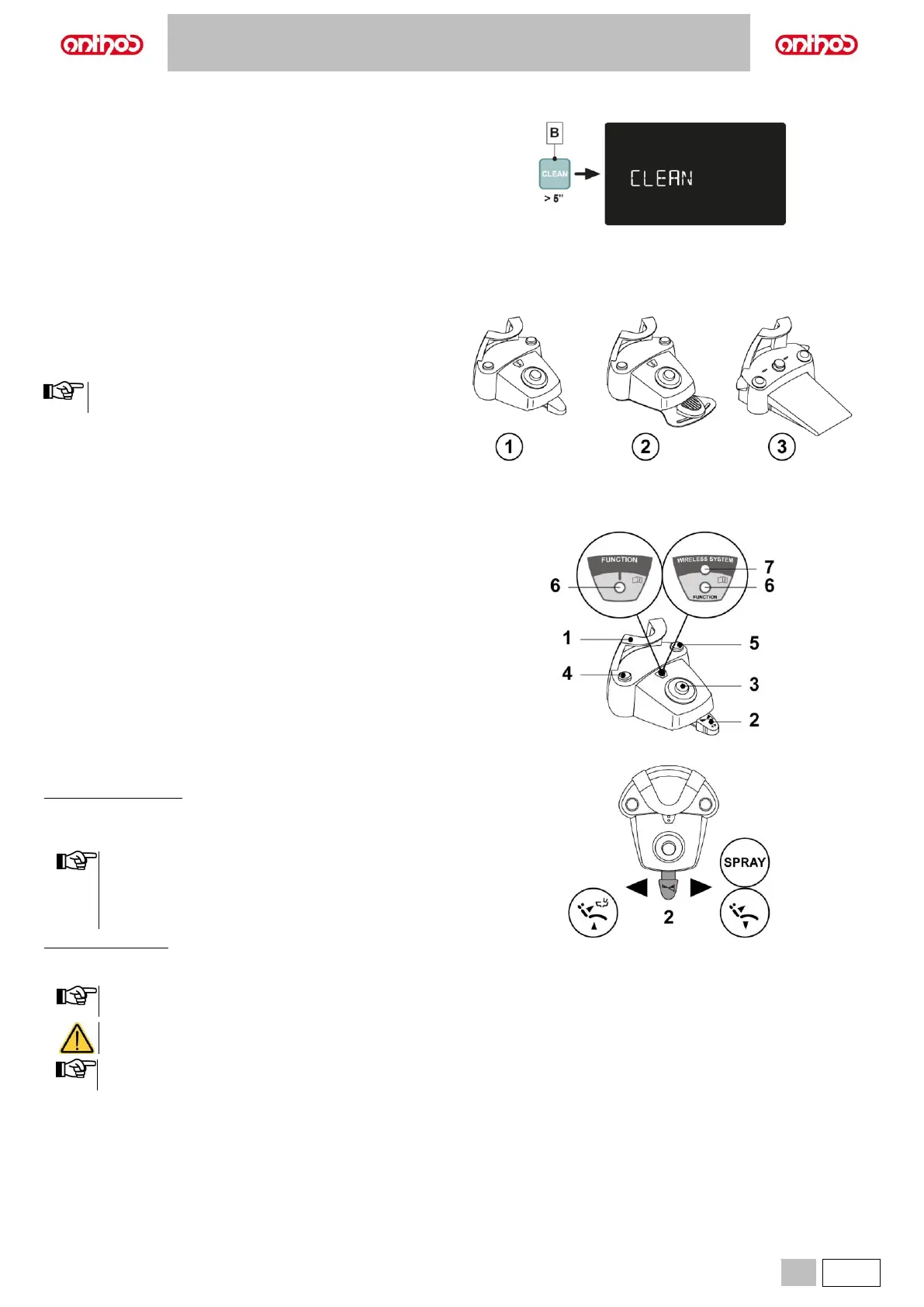
Press this button to enable/disable the control panel and the LCD Touch
DISPLAY (if any) in order to easily carry out console cleaning operations.
• Press button (B) for at least 5 seconds to disable the control panel and
the LCD Touch DISPLAY (if any).
• Press again button (B) for at least 5 seconds to re-enable the control
panel and the LCD Touch DISPLAY (if any).
Three types of foot controls are available:
1 Multifunction (see paragraph 5.2.1.).
2 Pressure-operated (see paragraph 5.2.2).
3 Power pedal (see paragraph 5.2.3).
The foot controls can also be supplied in WIRELESS version
(see paragraph 5.2.4.).
5.2.1. "MULTIFUNCTION” FOOT CONTROL
Description of the parts.
1 Handle.
2 Control lever.
3 Dental chair movement control.
4 Chip-air/Patient rinse position recall control.
5 Water Clean System/Automatic dental chair return control.
6 LED (not active).
7 Battery charge LED (wireless version only).
Control lever (2).
With instrument removed
• Shifting the pedal (2) adjusts speed/power of the instrument:
- rightward: activation with spray.
- leftward: activation with no spray.
• The control lever adjusts the speed/power of the instrument
from the minimum to the maximum value set from the
dentist's board.
• At the end of work, air is automatically blown to eliminate
any drops of liquid remaining in the spray ducts.
With instrument at rest
• End-of-travel to the right: dental chair reset position recall.
• End-of-travel to the left: rinse position recall.
If the lever is pushed again all the way to the left, the dental
chair goes back to the work position.
These dental chair functions are activated by keeping the
pedal at the end of the travel for at least 2 seconds.
When the foot control is pressed, all automatic dental chair
movements are automatically blocked.



 To Next Page