A3 PLUS - A5 - A6 PLUS - L6
SURGICAL SINGLE CART
Dental units of L6 model:
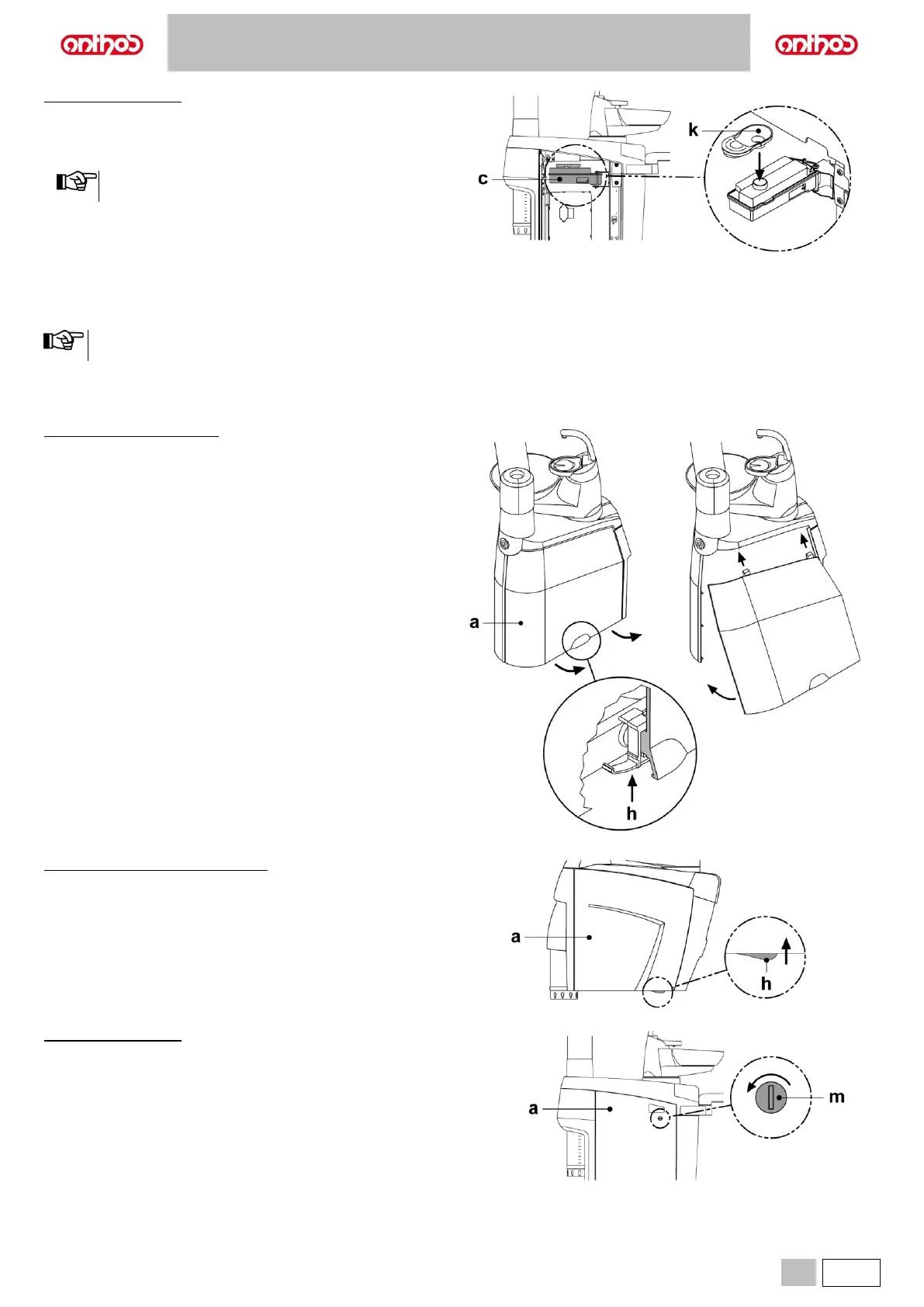
• Open the water side unit cover (see paragraph 7.7.).
• Rotate the tank (c).
• Remove plug (k) and pour disinfectant fluid inside tank until it is full.
Tank capacity: 800 cc approx.
The plug shape allows it to be used as a funnel to make filling
easier.
• Refit plug and tank.
• Close the water unit side cover.
Stopping the flushing cycle.
If system detects a malfunction, a warning message will be displayed
(see paragraph 10).
Once stop causes are removed, the flushing cycle will restart
automatically.
7.7. OPENING/CLOSING THE WATER UNIT SIDE COVER
Dental units of A3 PLUS model:
Opening the cover.
• Open the cover on the side of the water unit (a) after pushing up and
releasing the lock lever (h).
Closing the cover.
• Put on the cover making sure the two locks are inserted in the notches
in the water unit.
• Bring the bottom of the cover near the water unit frame to engage the
lock lever (h) again.
Dental units of A5 and A6 PLUS models:
Opening the cover.
• Disengage water unit side cover (a) by grasping handle (h) and pulling
it up.
• Open the cover by turning it outwards.
Closing the cover.
• Close the cover until you feel the mechanical locking of the handle (h).
Dental units of L6 model:
Opening the cover.
• Unlock the water unit side cover (a) by turning the lock (m) anti-
clockwise using a tool.
• Open the cover by turning it outwards.
Closing the cover.
• Close the water unit side cover and lock it by turning the lock (m)
clockwise.



 To Next Page