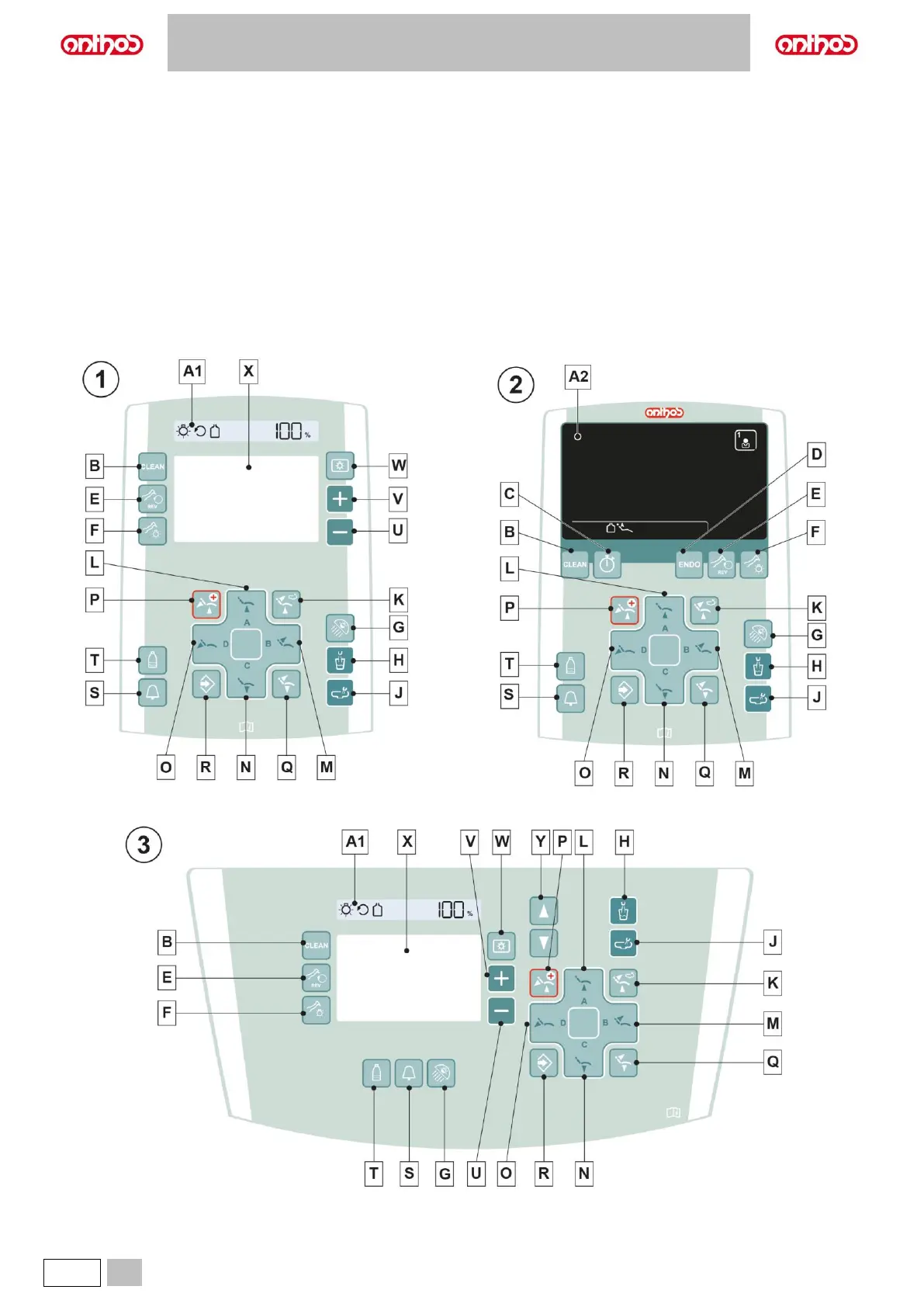
5.1. DENTIST’S CONTROL CONSOLE
The console consists of a control panel and a DISPLAY that, depending on the model, can be of LCD Touch (A2) or Digit (A1) type.
Upon turning on, the dental unit runs a short self-diagnosis cycle ending when the MAIN SCREEN
with the machine model, name of the last set operator and the active warning icons appears on the DISPLAY.
1 Console with Digit DISPLAY (dental units in CONTINENTAL versions).
It allows to display the power or speed of dynamic instruments and shows some warning icons.
2 Console with LCD Touch DISPLAY (dental units in CONTINENTAL versions).
It allows viewing the machine’s operating steps and setting some parameters using touch keys.
3 Console with Digit DISPLAY (dental units in INTERNATIONAL, CART, SIDE DELIVERY versions).
It allows to display the power or speed of dynamic instruments and shows some warning icons.
4 Console with LCD Touch DISPLAY (dental units in INTERNATIONAL, CART SIDE DELIVERY versions).
It allows viewing the machine’s operating steps and setting some parameters using touch keys.



 To Next Page