A3 PLUS - A5 - A6 PLUS - L6
SURGICAL SINGLE CART
5.8.1. C-U2 INTRAORAL CAMERA (DIGIT console)
Using the camera (DIGIT console).
• Place the instrument in its work position.
Now camera is activated and is in LIVE mode (monitor shows "moving"
images) or FREEZE mode (monitor shows a snapshot).
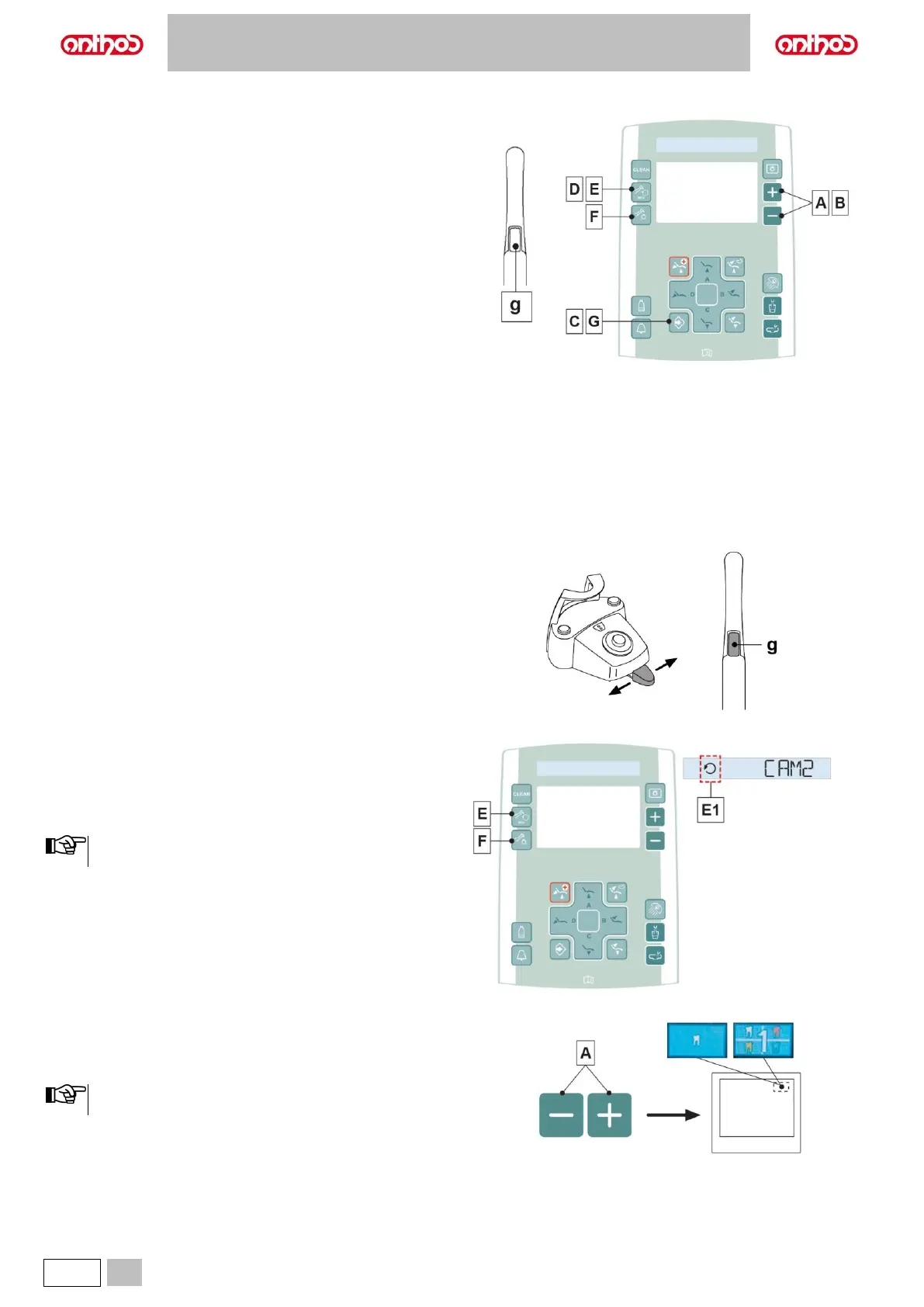
Buttons on the camera
g Image acquisition.
Console buttons:
A In LIVE mode: allows switching from single to multiple image
mode (and vice versa).
In FREEZE mode: allows scrolling through pages with frozen
images.
B In FREEZE mode: it allows selecting the frozen images.
C Function to EXIT the image management page.
(camera in FREEZE mode).
D Enables/disables zoom.
(camera in FREEZE mode)
E Enables/disables MIRROR function
(camera extracted and set to LIVE mode).
F Turns camera LEDs on/off
(camera extracted).
G Button pressed shortly: deletes selected image.
Button pressed and held: it deletes all images on current page.
(camera in FREEZE mode).
Image acquisition (FREEZE function).
• Shortly press the touch key (g) on camera handpiece or operate the
foot control to capture the image shown on the monitor.
To go back to "live" image, simply touch again the touch key (g) on
camera handpiece or operate the foot control.
• When the camera is set back to LIVE mode, the display shows the
MAIN PAGE; the image management page remains active in FREEZE
mode, press the button (C) to exit it.
Turning on camera lighting system.
• Press the button (F) to turn on/off camera lighting system
MIRROR function.
• With the camera set to LIVE mode, briefly press the button (E) on the
console to change from viewing real images to mirror images.
The activation of single image mode is signalled on the display
through icon (E1).
Setting operation in single image or multiple image mode
• With the camera set to LIVE mode, briefly press the button (A) to
change from viewing a single image to multiple images (and vice
versa).
An icon, found in the top right-hand corner of the monitor,
signals when single image mode is active.



 To Next Page